Google just moved agent mode from a side quest to the main storyline: Gemini 3.5 Flash now includes native Computer Use. Translation: the same fast, lower latency model many teams already use for production can now see your screen (via screenshots) and take UI actions like click, type, and scroll across web and app workflows, without requiring a separate computer use only model.
For creators and content ops teams, this is not about AI taking your job. It is about AI taking the tabs. The daily grind of bouncing between a CMS, Google Docs, Drive folders, ad managers, scheduling tools, and where did that asset go again becomes something you can orchestrate with one agent loop instead of brittle automation glue.
What actually shipped
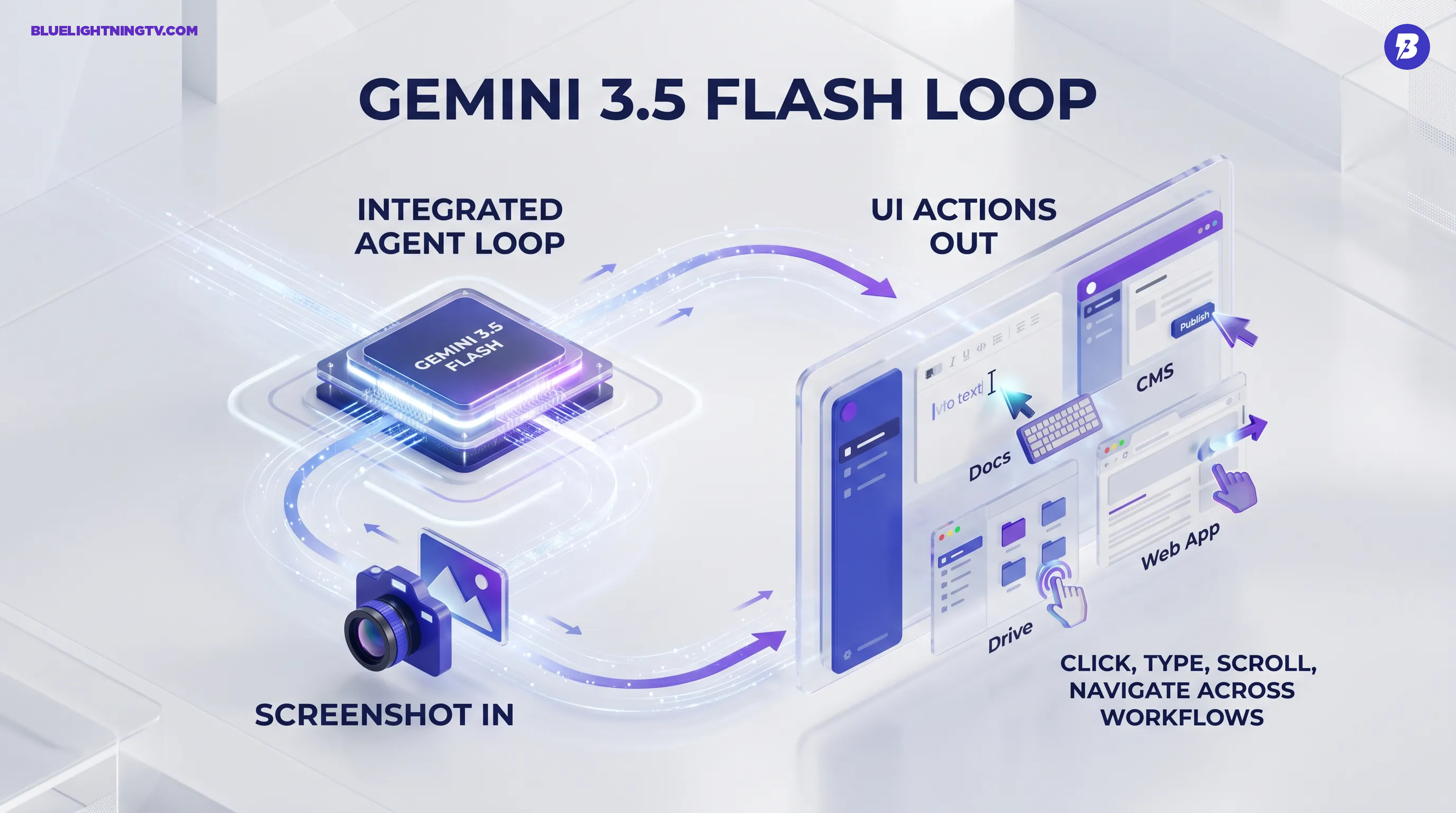
Gemini 3.5 Flash’s new capability is Computer Use as a built-in tool in the Gemini developer stack. The model can interpret a screenshot of the current UI state and respond with structured actions (tool or function calls) like clicking coordinates, typing text, scrolling, and navigation. Your app executes those actions, captures the next screenshot, and continues the loop until the task finishes.
Big shift: Computer Use is no longer a special side model you have to route to. It is integrated into Gemini 3.5 Flash, so you can combine UI control with the rest of the Gemini toolchain in one workflow.
Google’s framing is straightforward: this is about letting agents complete tasks in environments where APIs are missing, inconsistent, or locked behind UI flows. That is exactly where creators spend time doing repetitive, low creativity work.
How it works in practice
The mechanic is a loop: screenshot in, action out, screenshot back. In the Gemini API, Computer Use is exposed as a tool you enable, and the model responds with tool or function calls that represent UI actions. Google lays out the flow and core action set in the Gemini Computer Use docs.
Two details matter for real production use:
- It is stateful by design. The model needs the latest screenshot and recent action history to avoid goldfish agent behavior.
- You own execution. Gemini decides actions, but your implementation runs them, meaning you can gate risky steps, add retries, and enforce your own workflow rules.
| Piece | What Gemini provides | What you provide |
|---|---|---|
| Perception | Understands screenshots and page state | Fresh screenshots plus optional URL or metadata |
| Action planning | Tool or function calls (click, type, scroll, navigation) | Executor (browser, desktop, mobile runner) |
| Guardrails | Safety signals plus confirmation patterns | Approval UX, permissions, logging |
Why creators should care
Creators do not need another AI can do everything demo. They need an assistant that can survive the messy middle: posting flows, asset uploads, formatting quirks, version confusion, and the unglamorous reality that half your tools do not have clean APIs.
Computer Use is valuable because it targets the real bottleneck: manual UI labor. Not brainstorming. Not ideation. The clicking.
Content ops, not vibes
Where this gets practical fast:
- CMS publishing: moving a draft from Docs into a CMS, adding headings, embeds, tags, featured images, and checking preview without a human doing the same motions for the 400th time.
- Multi platform scheduling: adapting one campaign into platform specific posts, then uploading and scheduling across different dashboards that never quite behave the same.
- Research capture: gathering sources, grabbing quotes, and screenshotting references into a working doc when copy and paste breaks formatting or loses context.
It is also a big deal for small teams because it lowers the need a dev to automate this threshold. You still need a proper executor and guardrails, but you no longer need to hand script every UI path upfront.
What is genuinely different
UI automation has existed forever. The difference here is LLM level flexibility layered onto UI execution, so the agent can handle variation (different layouts, modals, popups, minor redesigns) better than brittle selectors. That does not make it perfect, but it changes how often automations break in the wild.
Google also positions this as a consolidation move: Computer Use can now sit alongside other Gemini tools inside the same flow, instead of forcing teams to stitch together multiple model calls. That matters when you are building a production content agent that needs to:
- read a brief (text)
- reference a style doc (text)
- check an image or thumbnail (vision)
- then publish and verify in a UI (computer use)
Net effect: fewer handoffs between systems, fewer model A writes model B clicks patterns, fewer fragile orchestration chains.
Safety and control
Any tool that can click around your logged in accounts needs adult supervision. Google’s guidance emphasizes permissioning, confirmations for high risk actions, and auditability, and it calls out prompt injection risk. It recommends stopping or requiring confirmation when something looks suspicious or irreversible.
Practically, teams adopting this should assume:
- Human in the loop is still the default for publishing to live channels, billing surfaces, and account settings.
- Scoped visibility will matter: give the agent only the apps and pages it needs for the job, not your entire digital life.
- Logging is not optional: when an agent misclicks, you will want receipts, not vibes.
Limits you will hit early
This is not a magical intern who never sleeps. It is a powerful new interface, but it still operates on screenshots and action loops, which come with real constraints:
- Latency adds up: each step requires a screenshot roundtrip. Fast model helps, but multi step tasks still have a tempo.
- UI ambiguity is real: cookie banners, A B tests, infinite spinners, and confirm you are human flows can derail autonomy.
- Determinism is not guaranteed: unlike strict scripts, agents are probabilistic. You will want retries, constraints, and stop conditions.
In other words, great for assisted automation and supervised runs today, still maturing for fully autonomous unsupervised publishing pipelines.
Availability and access
Google is making Computer Use available through Gemini’s developer stack, with Gemini 3.5 Flash supporting it as an integrated tool. If you are building, start with the Computer Use documentation to see the tool schema, action loop, and configuration options, then map it to your executor of choice (headless browser, device farm, or controlled desktop runner).
If you are integrating via the legacy GenerateContent surface, Google’s update notes for Gemini 3.5 Flash are worth checking for behavior and parameter changes: What is new in Gemini 3.5 Flash.
The immediate takeaway for creator teams: agents are getting less theoretical. When your model can both reason and operate the interfaces where work actually happens, automation stops meaning Zapier only workflows and starts meaning end to end runs that include the annoying UI steps you have been manually babysitting.
Gemini 3.5 Flash adding Computer Use is a strong signal that the agent era is not just for flagship models and lab demos anymore. It is landing in the faster tier where teams can realistically run it every day.