Google just gave the Gemini app a new superpower: it can generate interactive 3D models and interactive simulations directly inside chat. Not a static render you screenshot and forget. Actual spin it, zoom it, tweak a variable, watch it change output right where you are already prompting.
This matters because most generative tools are still stuck in a one-way format: you ask, they output, you redo. Gemini’s update pushes the interface toward something creators actually want: a conversation that produces manipulable artifacts. It is the difference between here’s an image of a pendulum and here’s a pendulum you can mess with.
What shipped
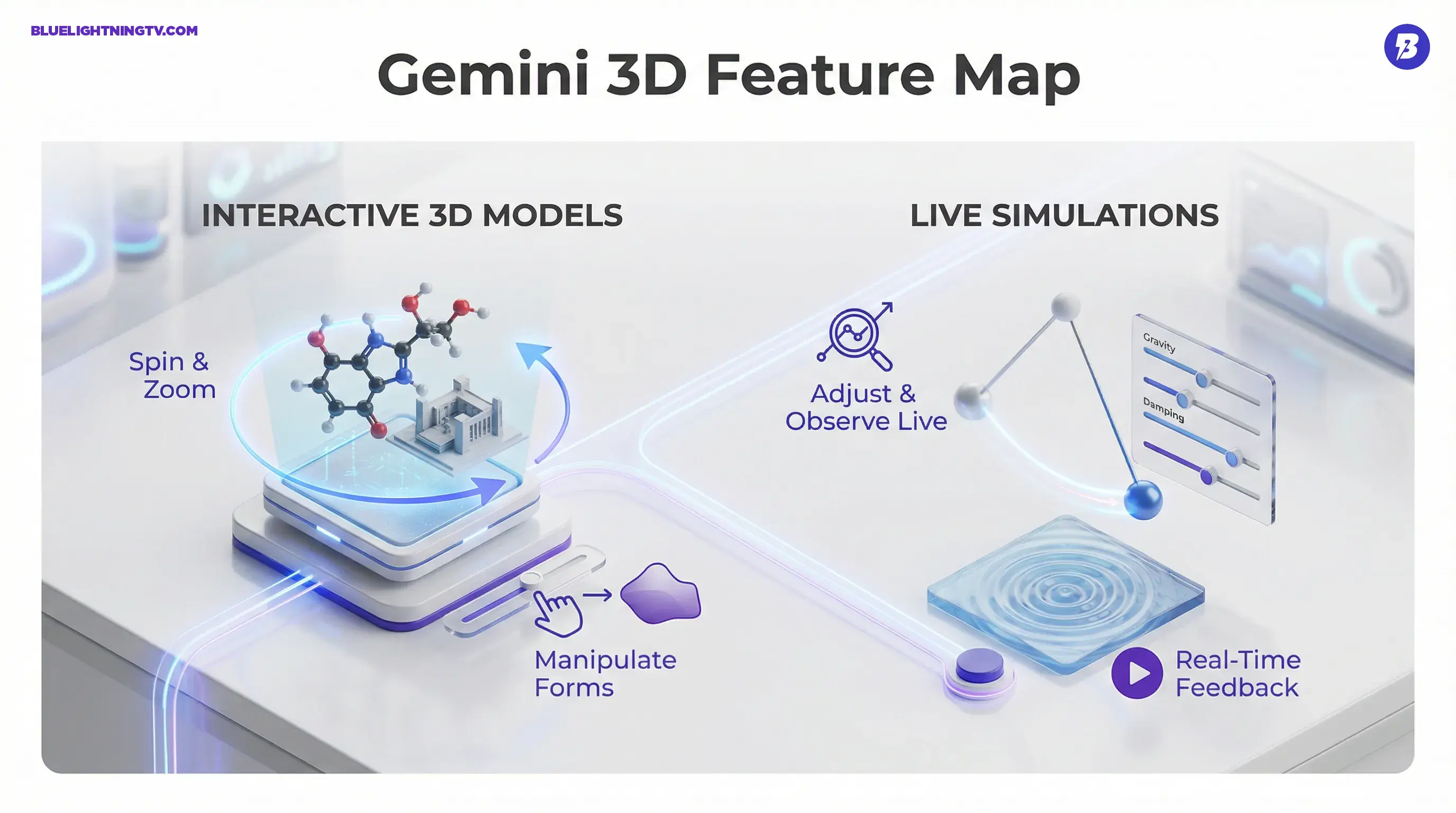
Gemini can now respond to certain prompts with interactive experiences, including:
- 3D models you can rotate and inspect (think molecules, anatomy, product forms)
- Interactive simulations where you can adjust parameters and see results update in real time (think physics, systems behavior, what if scenarios)
- Interactive charts in the same spirit (less relevant for visual creators, but huge for explainers and data storytelling)
Creator translation: Gemini is moving from generate me a visual to generate me something I can interact with while I am still thinking. That shortens the gap between idea and decision.
Google frames this as a way to help people understand complex concepts more intuitively, but the creative implication is broader: interactive outputs are a faster way to get alignment internally, with clients, or with an audience.
How it works
The interaction model is straightforward: you prompt normally, and Gemini surfaces an interactive visualization when the request fits the feature. Google suggests starting prompts with language like show me or help me visualize, which nudges Gemini into render something interactive mode rather than explain in text mode.
Prompt to model to control
When it triggers, you get:
- Viewport controls: rotate, zoom, pan (depending on the output type)
- Parameter controls: sliders or inputs for variables in simulations
- Immediate feedback: changes update on the spot, so iteration feels like play (the good kind)
This is a subtle interface shift with a big workflow effect: the output becomes a shared object, not just a response you scroll past.
Availability details
This rollout is tied to using the Pro model in the Gemini app. Per Google’s announcement, these interactive experiences are available when you select Pro in the model picker, and they are not currently available for Workspace or Education accounts.
If you are running Gemini personally, you are the target audience right now. If you are trying to deploy it across a company or school, you will be waiting.
| What you get | Where it shows up | Current constraint |
|---|---|---|
| Interactive 3D models | Gemini app (Pro model selected) | No Workspace or Education access yet |
| Interactive simulations | Gemini app (Pro model selected) | Triggers only for supported concepts |
| Interactive charts | Gemini app (Pro model selected) | More useful for explainers than art |
Why creators should care
Interactive 3D sounds like an education feature until you remember how creative work actually happens: fast drafts, fast feedback, fast revisions. Interactivity compresses all three.
It speeds up decisions
Static outputs are fragile in reviews. A stakeholder sees one angle, misunderstands the form, and suddenly you are in a 30-minute meeting about a thing that would have been obvious if they could rotate it. With interactive 3D, you can answer the question in the moment.
It makes explainers stronger
If you do content that depends on showing motion or relationships (science, finance, product mechanics, even sports breakdowns), interactive simulation is a native format upgrade. You are not just telling people what happens. You are letting them change the conditions and watch it happen.
It is a prototyping shortcut
For product and brand teams, 3D model on demand is not replacing CAD or Blender. It is replacing the dead zone before those tools: the we need something to react to phase. Early-stage mockups do not need perfect topology. They need clarity.
The real win: interactive outputs reduce the number of times you have to leave the chat, open another tool, rebuild a concept, then come back with a screenshot.
What it changes next
This update lands in the middle of a bigger trend: assistants competing on workflow gravity, not just answers. Google has been steadily moving Gemini toward do things with me instead of talk to me, and interactive visuals are a clean extension of that direction.
Two implications are worth watching:
Chat becomes a canvas
Once interactive outputs are normal, the chat thread stops being a transcript and starts being a workspace. That is a more durable model for creative production, especially for teams that want to move fast without juggling five apps.
Export pressure will rise
Right now, Google’s focus is clearly on in-app interactivity. But creators will immediately ask the inevitable question: can I export this into my pipeline? If Google adds clean export paths (common 3D formats, embeddable widgets, handoff to other Google tools), this goes from cool feature to default early-stage visualization layer.
Until then, treat it like an acceleration tool for ideation, explanation, and alignment, not a final asset generator.
Bottom line
Gemini generating interactive 3D models and interactive simulations is a practical upgrade masquerading as a flashy demo. It reduces the static output problem, shortens iteration loops, and gives creators a new way to communicate ideas with less back and forth.
The constraints are real (Pro model required, no Workspace or Education access yet), but the direction is clear: generative AI is becoming less about producing content and more about producing interactive objects you can think with.
If you want a related workflow read on where Gemini is heading for creators, see our post Gemini Drops: Ask Plan Act for Creators.