ByteDance just made a very CapCut move. It pulled generative video out of the side tab and dropped it closer to where creators actually live: the edit.
Seedance 2.0, ByteDance and Dreamina’s newer text to video engine, is now being surfaced as a practical creation step that feeds directly into a CapCut workflow. The cleanest official entry point is CapCut’s own Seedance page here.
This is not the kind of launch that needs fireworks. The significance is boring in the best way: less exporting, fewer tabs, fewer lost minutes, and a faster path from idea to postable cut.
The trend line is clear: gen video tools are not competing on wow. They are competing on whether you can actually edit the output without hating your life.
What Actually Shipped
CapCut is not just slapping a generate button onto the home screen. Seedance 2.0 is positioned as an in editor creation step, meaning you generate a clip, then immediately treat it like any other piece of footage: trim it, stack it, caption it, template it, and export.
Text to video, inside CapCut
Seedance 2.0’s headline is straightforward: type a prompt, get a short clip. What is different now is that the clip lands where the rest of your production already lives: fonts, brand colors, beat cuts, hooks, effects, the whole creator starter pack.
CapCut is also surfacing Seedance across its broader ecosystem, including Dreamina, its AI creative surface, where Seedance has been available as part of Dreamina’s AI video tools. Dreamina’s hub is here.
If you want a deeper look at how Seedance is positioned inside Dreamina and why editability is the real product, see our post Seedance 2.0 in Dreamina: More Editable AI Video.
Reference control is the real story
Seedance 2.0 is being framed less like text only roulette and more like prompt plus reference generation. In practice, that matters because creators are not trying to conjure a universe every time. They are trying to keep:
- a product looking like the product
- a character staying the same person
- a scene staying in the same visual world
That is the difference between cool clip and usable asset.
Motion and face quality got attention
The early chatter around Seedance 2.0 points to improvements creators actually feel in timelines: cleaner motion, less drift, and more stable faces. None of that guarantees perfection, but it raises the floor, which is what editors care about.
The Workflow Shift
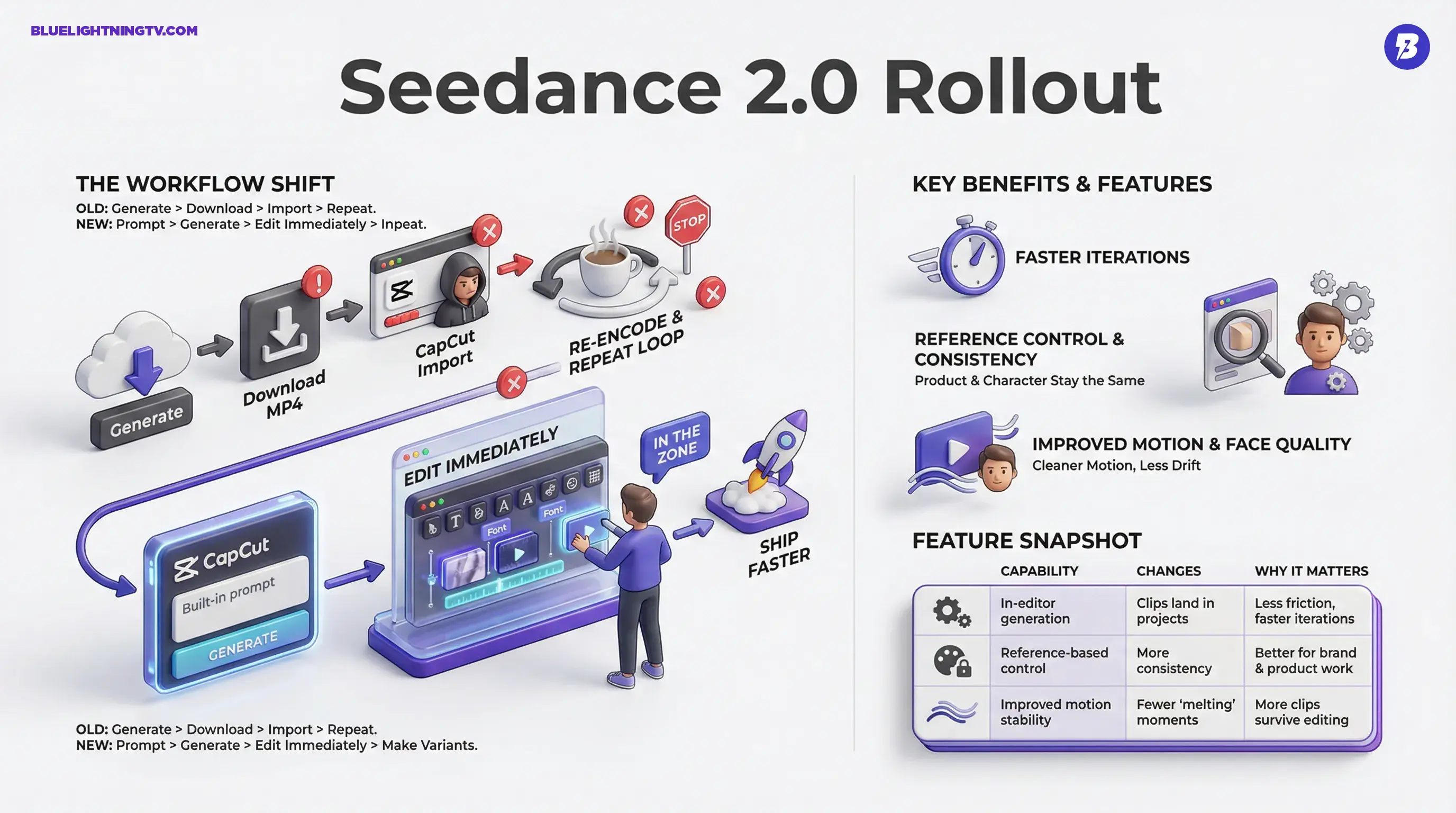
If you have used standalone generators, you know the pain: generate, download, import, re encode, then discover the clip needs to be 2 seconds longer or a camera move is weird, so you do the whole thing again. Seedance 2.0 inside CapCut is ByteDance trying to kill that loop.
Less tool hopping, more shipping
The old workflow looked like:
- Generate elsewhere
- Download an MP4
- Import to CapCut
- Edit
- Realize you need a variation
- Repeat until your coffee is cold
Now it is:
- prompt inside CapCut (or CapCut adjacent surfaces)
- generate
- edit immediately
- make variants while you are still in the zone
This is why in editor gen video is the bigger category move than any single quality bump. The future is not a better demo. It is a faster feedback loop.
Timeline native gen video changes expectations
Once gen video is a timeline block, the normal creator habit becomes: generate 5 options, pick the best 2 seconds from each, stitch, add captions, export, post. That is not cinematic filmmaking. That is modern short form production.
And yes, this also means your clients, or your own inner perfectionist, will start asking for more variations because they are suddenly cheap to create.
What You Can Do With It
Seedance 2.0 inside CapCut is most immediately useful in the places where speed beats polish:
- hook scenes for shorts (0 to 3 seconds that stop the scroll)
- product vibe shots for UGC style ads
- cutaway b roll when you do not have footage
- concept drafts that become pitchable within an hour
It is also naturally aligned with CapCut’s template culture: generate something good enough, then let templates, captions, and effects do the platform native finishing.
Feature snapshot table
| Capability | What it changes | Why it matters |
|---|---|---|
| In editor generation | Clips land directly in projects | Less friction, faster iterations |
| Reference based control | More consistency across outputs | Better for brand plus product work |
| Improved motion stability | Fewer why is it melting moments | More clips survive editing |
Rollout Reality
Access is still uneven. CapCut and ByteDance are rolling Seedance 2.0 out in waves and it can vary by region, account, and platform (mobile, desktop, web). Creator posts on X also suggest the familiar it showed up, then disappeared behavior that comes with staged, server side rollouts.
If you are not seeing it yet, that does not automatically mean you are doing something wrong. It often means you are simply not in the current rollout bucket, or you need the latest CapCut build.
How It Compares Right Now
A lot of gen video competition talk gets stuck on which model is best. For creators, the better question is: which workflow wins?
Standalone tools (Runway and other web first generators) can be powerful, but the handoff step still costs time. CapCut’s advantage is not just model quality. It is that the generator sits inside an editor that millions already know.
That changes adoption in a very non mystical way: fewer new UI concepts, fewer subscriptions to juggle, fewer steps between draft and export. The first tool that becomes default usually is not the most advanced. It is the one that is already open on your laptop.
Limitations To Expect
Seedance 2.0 is not a magic make my campaign for me button. The practical constraints creators are already bumping into across gen video still apply here.
Clip length stays short
Short form generation is the sweet spot. Public demos and user reports commonly show generations in the short range, often up to about 15 seconds per clip, which keeps drift and continuity problems more manageable.
Control varies by surface
Depending on where you are accessing Seedance (CapCut vs Dreamina vs other ByteDance surfaces), controls for references and camera behavior may not be identical. Staged rollouts can mean feature gaps that feel random.
Editable does not mean final
Even when the footage looks solid, you still need finishing work: pacing, text, sound, platform formatting, and the usual CapCut polish. The win is that more outputs start closer to rough cut, not interesting artifact.
Seedance 2.0 does not replace editors. It replaces the dead time between attempts.
What This Signals Next
ByteDance is betting on a very specific future: generative video becomes a normal timeline ingredient, not a special workflow you plan your day around. That is consistent with what the whole space is converging toward, tools that prioritize:
- iteration speed
- revision stability (change one thing without breaking everything)
- reference control (stop the brand look from drifting)
If Seedance 2.0 keeps improving while staying embedded in CapCut’s editing gravity, the competitive pressure on the rest of the gen video world gets sharper. It is not just about making a pretty clip. It is about making a clip you can ship.