
Adobe is chasing drafts
Adobe just dropped a new beta feature in its Firefly web video editor: Quick Cut, an AI-driven way to turn a pile of raw clips into a watchable first edit, fast. The official overview lives in Adobe’s docs here.
This isn’t Adobe trying to replace editing. It’s Adobe going after the most annoying part of editing: the empty timeline moment where you know what you want, but you still have to sift, trim, and assemble before you can even start making real creative decisions.
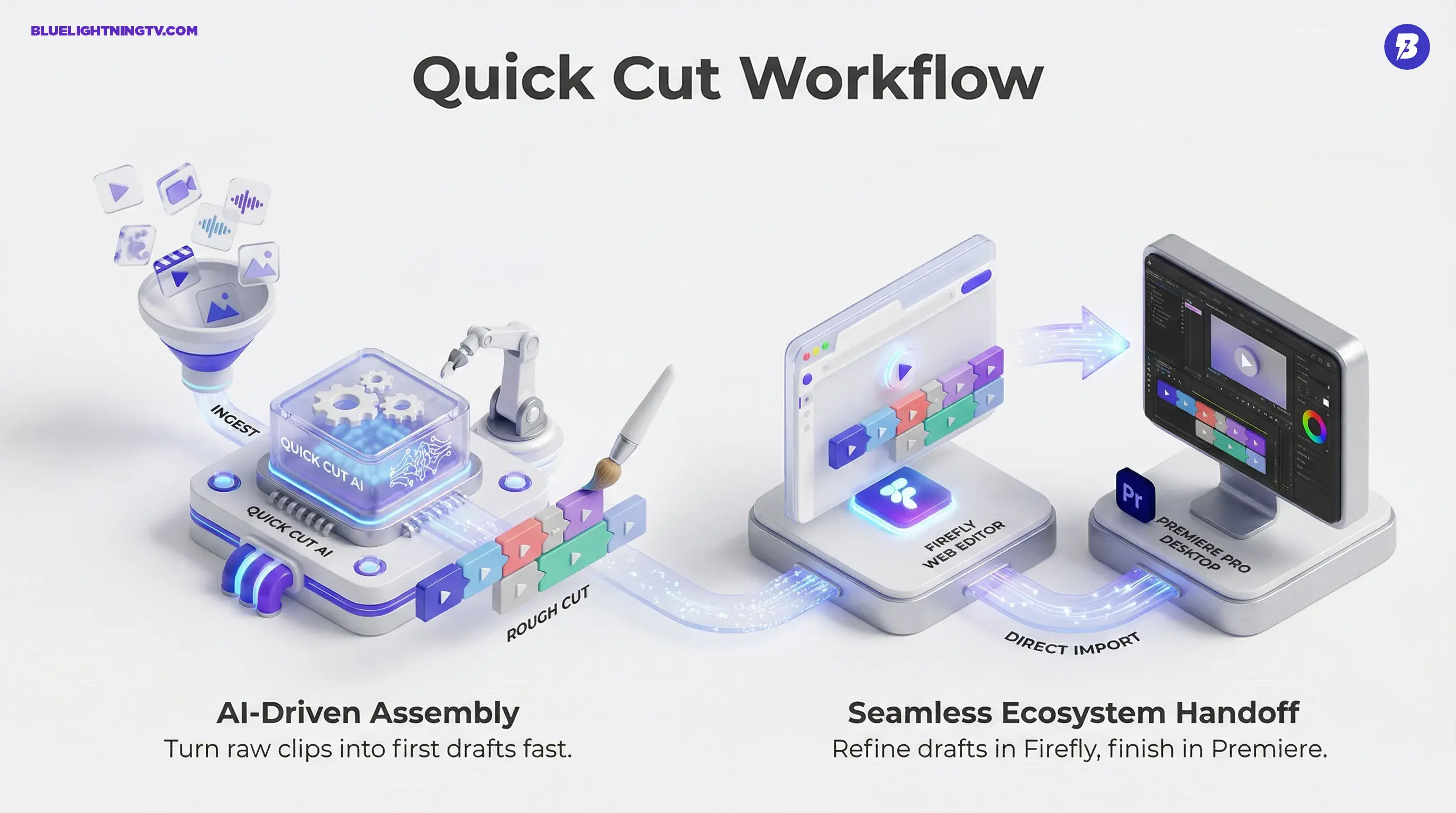
Quick Cut’s pitch is simple: upload footage, describe what you’re trying to make, and Firefly builds a rough cut you can refine. The implication is bigger than it sounds: Adobe is turning Firefly into a place where editing starts, not just where AI experiments happen.
Generative AI doesn’t win by making the coolest clip.
It wins by making the first draft show up faster than your procrastination.
What shipped in beta
Quick Cut lives inside the Firefly web video editor and focuses on first-pass assembly. Adobe positions it as a way to automatically build an initial sequence from your uploaded media, saving you from manually hunting for the good take, trimming dead air, and arranging the basic story spine.
In practice, Quick Cut is doing three useful things at once:
- Ingest + organize: your video clips, images, and audio can be pulled into one workspace.
- Assembly: Firefly generates a rough sequence based on your instructions, with controls like aspect ratio and target duration available in the Quick Cut panel.
- Editable output: you’re not locked into an auto-video. You can still cut, move, and refine in the editor timeline.
Adobe also published a companion doc on how to prompt it effectively here, which is a tell: Adobe expects Quick Cut to be used in real workflows, not just demo reels.
The workflow it replaces
If you’ve edited anything at scale podcast clips, brand socials, talking-head ads you know the pattern:
- Import footage
- Scrub endlessly
- Mark selects
- Build a rough structure
- Only then start shaping pacing, tone, and vibe
Quick Cut is aimed squarely at compressing steps 2 to 4. Not the taste part. The calendar part.
And yes, other tools have played in this space for a while. The difference is where Adobe is putting it: inside the same ecosystem where people actually finish.
Why that matters
A lot of AI video tools still create a workflow tax:
- Generate somewhere else
- Download files named output_final_7.mp4
- Re-import into your real editor
- Lose context, lose versions, lose will to live
Adobe is clearly trying to make Firefly the upstream staging area where drafts, selects, and early structure happen before the serious finishing moves downstream.
Transcript editing is central
Quick Cut’s most creator-friendly move is that it pairs well with transcript-driven editing in the Firefly web video editor: the idea that you should be able to navigate spoken video the way you navigate a Google Doc: search, highlight, delete, reorder.
This matters most for:
- Podcasts: turning 60 minutes into 6 clips without scrubbing a waveform for eternity
- Founder or exec video: removing rambles and stitching together a clean narrative
- UGC ads: quickly getting to the line that sells the product
The big win is speed, but the hidden win is confidence: when you can see the words, you can make structural decisions faster. You stop editing vibes and start editing meaning.
Text-based editing isn’t a gimmick anymore.
It’s what happens when video production collides with creator volume.
How it fits Adobe
Quick Cut doesn’t land in a vacuum. It lands in the middle of Adobe’s recent pattern: Firefly becomes more than generation, it becomes an interface layer for multiple creation steps.
We’ve already seen Firefly get more editor-shaped in the browser with things like multi-track timelines and transcript workflows (covered on COEY previously: Firefly Web Beta Levels Up With Real Editing Tools). Quick Cut is basically that trajectory, pointed at a specific production pain: first-pass assembly.
And if Adobe can make that first pass easy enough, it changes where editing begins. That’s the competitive game here.
Handoff to Premiere
Adobe is also tightening the Firefly to Premiere pipeline. Firefly-generated media can be sent into Premiere via Open in Premiere desktop, and it will show up in Premiere Pro’s Project panel in a Firefly Downloads bin. Adobe documents that workflow here.
That connection matters because it keeps Quick Cut honest: it’s not the final stop. It’s the fast start.
Quick Cut vs reality
Quick Cut is designed for drafts, and that’s a good thing. But it also comes with practical limits creators should keep in mind, especially if you’re cutting for brand, not just for fun.
What it’s good at
- Rough structure: getting you to a reviewable cut quickly
- Talking-head speed: transcript workflows shine with speech-heavy footage
- Repeat formats: weekly shows, recurring content series, product updates
Where you’ll still intervene
- Pacing: AI can assemble, but rhythm is still human
- Brand nuance: what you can include vs what you should include
- B-roll choices: relevance isn’t always obvious to a model
To keep this grounded: Quick Cut doesn’t remove the need for an editor. It removes the need for an editor to spend their best hours doing the least creative part of the job.
What changes for teams
Quick Cut is most interesting for teams that produce a lot because volume is where draft speed turns into a real competitive advantage.
| Workflow pressure | Old bottleneck | Quick Cut impact |
|---|---|---|
| Weekly content cadence | Manual culling + first assembly | Faster draft to review |
| Podcast clipping | Scrubbing for moments | Transcript-driven navigation |
| Brand social production | Too many variants to hand-build | Quicker first-pass versions |
The bigger implication: drafting becomes cheaper. And when drafting is cheaper, creative direction gets better because you can test more ideas without burning days on assembly.
The bigger signal
Quick Cut isn’t just Adobe added AI editing. It’s Adobe doubling down on a workflow philosophy:
- Firefly is becoming the place where you start content.
- Creative Cloud is where you finish content.
- The differentiator is the handoff, keeping projects, versions, and assets from turning into file chaos.
If you’re a creator, this is the kind of AI feature that actually matters: not because it’s flashy, but because it moves the bottleneck. And in 2026, the bottleneck is rarely can we make a clip. It’s can we ship a version that’s good enough to approve before the deadline eats us alive.
Quick Cut is Adobe trying to make that first approval-ready draft show up sooner, and that’s a genuinely useful target.