
OpenAI has officially released ChatGPT Atlas, a standalone web browser with ChatGPT integrated at its core, launching first on macOS. The company positions Atlas as a daily-use browser that brings AI assistance directly into page context for research, drafting, and multi-step actions. Full details are in OpenAI’s announcement: Introducing ChatGPT Atlas.
What ChatGPT Atlas Is
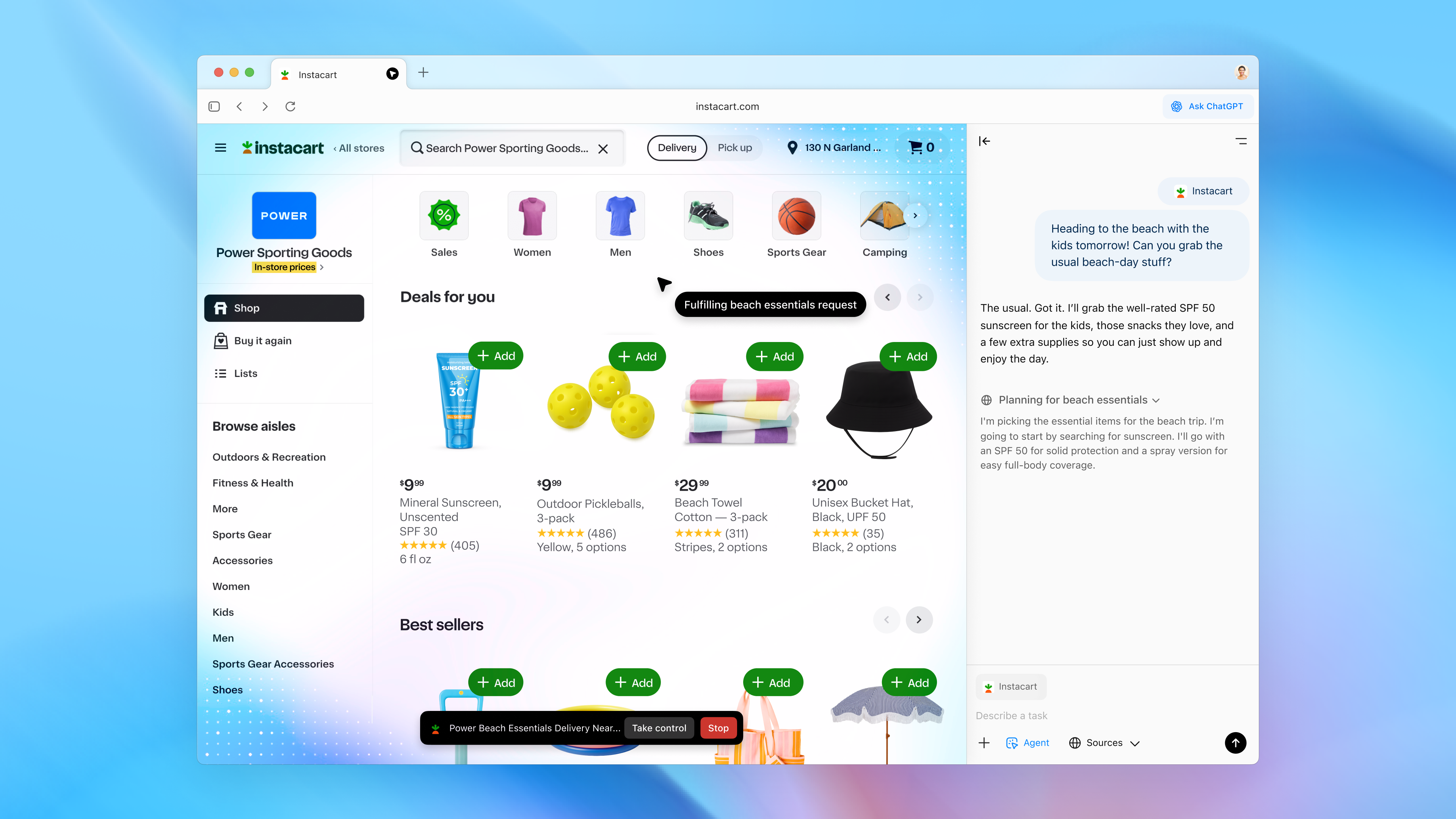
Atlas is a full desktop web browser built with ChatGPT as a first-class feature, not an add-on. As you navigate sites, a context-aware ChatGPT panel can summarize pages, extract key points, answer questions, and help draft or refine language without leaving the current tab. For creators, brand teams, and founders who live in the browser, the promise is fewer app hops and faster movement from reading to action.
a web browser with ChatGPT integrated at its core. OpenAI
Key Capabilities: What’s New
- Ask ChatGPT Sidebar: A persistent, page-aware panel that can explain, summarize, extract details, and draft text in the context of what’s on screen. OpenAI’s help article covers how the sidebar works and where it appears on pages: OpenAI Help: Ask ChatGPT sidebar.
- Agent Mode (Preview): For supported plans, Atlas can perform multi-step tasks like navigating sites, filling forms, and assembling results under user supervision. OpenAI describes this as a preview feature with explicit permission prompts and controls for each action. Details are in the release notes: OpenAI Help: Atlas release notes.
- Browser Memories (Optional): A user-controlled setting that lets ChatGPT remember relevant browsing context to personalize help across sessions. Users can view, archive, or delete these memories.
- Privacy and Controls: Visibility settings, history clearing, and incognito-style browsing are built in. By default, browsing content is not used to train models unless users opt in.
- Family and Admin Settings: OpenAI notes added controls for families and businesses to manage browser memories, Agent Mode, and other advanced features across users.
Agent mode is available in preview for Plus, Pro, and Business users and Windows, iOS, and Android coming soon. OpenAI
Target Users: Creators, Founders, and Brand Teams
OpenAI’s positioning spans individual creators and knowledge workers to team-based business use. For creative professionals, the pitch is an AI-native browser that can collapse research, drafting, review, and follow-up actions into a single surface. For startup founders and marketing teams, Atlas emphasizes structured extraction from web sources, safeguarded automation via Agent Mode, and admin-grade controls to deploy AI assistance at team scale. The design goal is to keep users in flow: read, ask, decide, act.
Availability and How to Access
At launch, Atlas is available for macOS, with Windows, iOS, and Android “coming soon,” according to OpenAI. Users can obtain the app directly from OpenAI’s product page and sign in with an existing account: chatgpt.com/atlas.
OpenAI says the macOS release is broadly accessible across core ChatGPT plans, with Business available in beta. The company highlights import support to ease switching from other browsers, along with optional controls for setting Atlas as the default browser.
Plan, Feature, and Access Snapshot
| Plan Tier | Atlas App Access | Ask ChatGPT Sidebar | Agent Mode (Preview) | Admin / Family Controls |
|---|---|---|---|---|
| Free / Go | Yes (macOS at launch) | Included | Not included | Basic personal controls |
| Plus | Yes (macOS at launch) | Included | Included (preview) | User-level permissioning |
| Pro | Yes (macOS at launch) | Included | Included (preview) | Advanced user controls |
| Business (beta) | Yes (macOS at launch) | Included | Included (preview) | Team admin and policy settings |
Notes: OpenAI documents specific inclusions and preview limitations in its Atlas release notes and related Help Center guidance.
Pricing and Rollout
OpenAI states there is no separate fee for the Atlas browser; access is included with current ChatGPT plans where available. Agent Mode is in preview and limited to Plus, Pro, and Business tiers. Atlas is shipping first on macOS, with OpenAI indicating broader platform support is in development.
What Sets Atlas Apart
Deep Integration vs. Extensions
Atlas differentiates itself from extension-based approaches by embedding ChatGPT directly into the browser’s core UI and permissions model. The page-aware sidebar, user-granted actions for Agent Mode, and first-party visibility controls are intended to reduce friction and prevent context loss common with copy-paste or tab switching.
Action Inside the Web
With Agent Mode, OpenAI is moving beyond passive summarization toward supervised task execution: navigating sites, completing forms, and assembling outputs inside real pages. The company emphasizes user consent and the ability to pause, approve, or override each action.
Privacy, Memory, and Control
Browser memories are off by default and managed at the user’s discretion. OpenAI underscores opt-in policies for data use and visibility toggles on a per-site and per-session basis. For families and organizations, Atlas adds settings to restrict or disable memory and agent features.
Why This Matters to Creative Work
For creators including designers, writers, photographers, and video teams, the notable change is speed in context. The browser becomes the workspace where references, outlines, mood boards, captions, briefs, and approvals are assembled more quickly with fewer jumps into separate tools. In marketing and brand-building, supervised automation can take on repetitive web tasks that slow campaign cycles. The early emphasis on privacy and controls is also aimed at teams working with sensitive assets, drafts, and client materials.
Use-Centric Outcomes for Non-Technical Teams
| Outcome | What Atlas Changes | Relevance to Creators & Brands |
|---|---|---|
| Faster reading-to-draft loop | Summarize and draft beside the page | Quicker briefs, captions, treatments, and pitch copy |
| Supervised web tasks | Agent Mode navigates and fills forms with approval | Structured research and routine actions with guardrails |
| Continuity across sessions | Optional browser memories | Consistent context for campaigns and serialized projects |
| Team deployment | Admin/family controls | Policy-aligned use across groups and clients |
Context: OpenAI’s Broader Product Direction
Atlas lands amid a wider period of product consolidation around agents, on-page assistance, and multimodal creative tools. Earlier this month we covered OpenAI’s broader roadmap for creators, spanning apps, agents, and media generation, signaling a push toward fewer, deeper, AI-native experiences inside everyday workflows. For context on that trajectory, see our recent coverage: OpenAI DevDay 2025: upgrades for creators.
Notable Lines From OpenAI
- “a web browser with ChatGPT integrated at its core.”
- “Agent mode is available in preview for Plus, Pro, and Business users”
- “Windows, iOS, and Android coming soon.”
Bottom Line
ChatGPT Atlas marks OpenAI’s entry into AI-native browsing, bringing page-aware assistance and supervised agents inside a first-party macOS browser. The early focus is on context fidelity, permissioned actions, and user or admin controls, guardrails aimed squarely at creators and teams that need speed without losing oversight. With Windows, iOS, and Android on the horizon and Agent Mode in preview for paid tiers, Atlas is positioned as a practical, privacy-conscious step toward AI that not only summarizes the web but also helps complete work within it.