Meta is rolling out Muse Image, a new generative image system from Meta Superintelligence Labs that’s less “type prompt, get picture” and more “let’s actually finish the creative task.” Alongside it, Meta is baking in an invisible provenance mark called Content Seal, plus a public checker so anyone can test whether an image carries that watermark.
This isn’t a moonshot announcement. It’s a very specific bet: creators and marketers don’t just need better generations they need fewer steps between idea, revision, and posting across Meta’s own surfaces.
What shipped
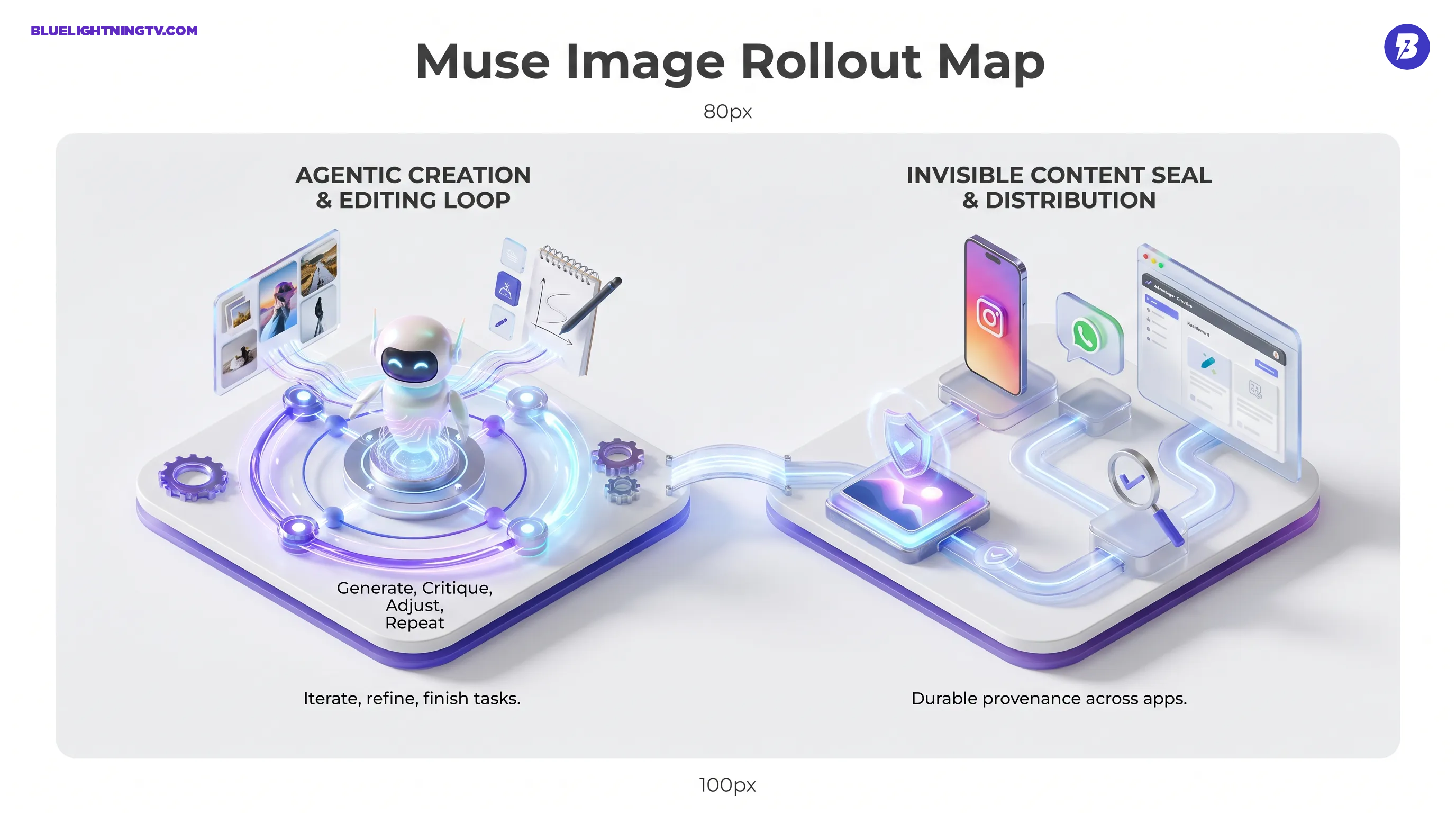
Muse Image lands with three distinct pieces that matter for day-to-day content production: agentic editing behavior, workflow distribution inside Meta’s apps, and automatic watermarking.
At a high level, Meta is positioning Muse Image as a model that can generate, edit, and iterate in a more structured way than typical “one prompt = one output” tools. It’s available through Meta’s AI surfaces (Meta AI app and meta.ai on the web), and Meta says it will expand into more posting and messaging products over time. Meta’s consumer-facing launch write-up is here: Introducing Muse Image.
The core idea: agentic images
Meta’s framing is that Muse Image is built to behave like a creative assistant that can take actions, not just produce a single render. In practice, that means the product pitch leans on the same concept we’re seeing everywhere right now: tools that can plan, iterate, and revise inside one session, instead of forcing you into a generate, download, edit, reupload loop.
If your current workflow is “make 20 drafts, pick 2, tweak 1, ship,” Muse Image is trying to compress that whole ladder into one place.
How it works
Meta is emphasizing control knobs that map to real production needs: references, iteration, and edits that don’t require starting over.
Multi-reference inputs
Muse Image supports multiple reference inputs, including combining elements from more than one input image. For creators and brand teams, references are how you get repeatability: the same face, the same product, the same vibe, the same campaign look, without re-litigating your prompt every time.
This is the shift from “prompt craft” to “art direction.” Not perfect art direction, but closer.
Iteration without chaos
Muse Image is built around iterative workflows: generating options, making edits, branching explorations, and returning to previous variations. That’s not exciting in a demo, but it’s exactly what separates “toy generator” from “tool people open daily.”
Edits inside the flow
Meta also highlights interactive edits, like sketching or annotating and requesting changes, so the editing loop can stay inside the same session. The practical implication: fewer exports to external editors for early-stage changes, especially for social assets where speed beats perfection.
Content Seal basics
Muse Image outputs carry Content Seal, Meta’s invisible watermark system intended to persist through common handling: cropping, resizing, compression, and Meta also claims it remains detectable through screenshots in many cases. Meta has also pointed to a public-facing detection experience tied to the seal. External coverage has focused on the watermarking plus detection combo as Meta’s attempt to make provenance more than a label sticker that disappears the second someone reposts an image. Engadget’s overview is a solid plain-language rundown of the “what and why” here: Meta built an AI detection tool to ID images and video created with its new models.
Why this matters in practice
For working creators, provenance features are only useful if they’re:
- automatic (no one remembers to toggle a checkbox)
- durable (survive normal platform compression)
- checkable (a tool exists to validate it)
Content Seal is Meta pushing on all three.
Quick snapshot
| Feature | What Meta’s shipping | What it changes |
|---|---|---|
| Provenance | Invisible watermark on outputs | Origin can survive common repost handling |
| Verification | Public detection tool | Brands and partners can check assets fast |
| Workflow fit | Applied by default in Muse Image outputs | No extra step for creators |
Where it shows up
The distribution strategy is the most Meta part of this: Muse Image isn’t trying to win by becoming your new standalone app. It’s trying to win by being where you already post.
Meta says Muse Image is live through Meta AI (app and web), and is also rolling out inside Instagram Stories in the US and WhatsApp in select countries, with broader expansion to additional Meta products over time. The key point for creators: this is not a model you adopt this is a model Meta turns on inside your existing workflow.
Advantage+ Creative is the power move
Meta also says Muse Image will integrate with Advantage+ Creative, its ad creative and optimization pipeline. If you’re an advertiser, that’s the difference between “AI helps me brainstorm” and “AI sits inside the machine that actually ships variants.”
The Advantage+ Creative surface is here: Meta Advantage+ Creative.
This is where “agentic editing” becomes less of a buzzword. Ads are iteration factories. If Muse Image can generate and version creatives quickly inside the system that tests and routes them, that’s direct time saved plus fewer asset handoffs.
What’s different versus typical image generators
Muse Image isn’t just competing on output. It’s competing on workflow architecture.
It’s built for do the task
Most image generators still treat creation as a single moment: prompt to render. Muse Image is framed as an agentic loop: generate, critique, adjust, repeat, with edits happening in the same environment.
It’s built for on-platform delivery
Meta’s real advantage is distribution. If Muse Image becomes the default image creation and edit layer inside Meta’s ecosystem, creators won’t need to switch tools to try it. They’ll bump into it while doing normal work.
The quiet competitive edge is not quality. It’s reduced friction.
It’s provenance-first
Content Seal being default is a meaningful difference from tools that treat watermarking or provenance as optional, inconsistent, or purely policy-driven. For brands, especially, the ability to validate origin without starting a Slack archaeology expedition is a real operational win.
Muse Video: preview only
Meta also previewed Muse Video alongside Muse Image, positioning it as a companion video generator that will inherit similar concepts: references, editability, and workflow integration. It’s in preview rather than broadly released, and Meta has also indicated Content Seal is planned to expand beyond images over time.
Meta’s technical announcement pairs Muse Image and Muse Video in one post here: Introducing Muse Image and Muse Video.
Implications for creators and teams
Muse Image is most relevant for people who live in high-output reality: daily posting, weekly campaigns, constant variant testing, and brand consistency battles.
Faster content loops
If Muse Image’s agentic editing holds up in real use, it reduces the boring parts: resizing, re-framing, “make five versions,” “try a different palette,” “now make it feel more premium,” etc. That’s not replacing taste. That’s deleting repetitive labor.
Consistency becomes less fragile
Multi-reference workflows are a direct attack on the “every generation is a new universe” problem. It won’t fully solve identity drift or brand drift (no one has), but it’s the right direction: anchor the model to your real assets, not just your adjectives.
Provenance becomes operational
Content Seal plus detection tooling turns provenance into something that can actually travel with an asset across reposts and edits. That matters for creators working with brands who increasingly want clarity on what’s synthetic, what’s edited, and what came from where, without adding extra workflow tax.
Bottom line
Muse Image is Meta packaging three creator-relevant moves into one launch: agentic creation and editing, built-in distribution across Meta surfaces, and automatic invisible watermarking with verification. The bet isn’t that Muse Image will be the single best generator on the internet. The bet is that it’ll be the most convenient generator in the places creators already work, and that convenience compounds into adoption.
If Muse Video follows the same pattern, directable, reference-friendly, and wired into ad and social workflows, Meta’s “generative media inside the platform” strategy gets a lot harder to ignore.