Adobe’s Firefly lineup just got a new “go faster” button. Gemini Omni Flash is now available as a partner model inside Adobe Firefly, showing up in the model selector for Firefly Boards. The move matters less as a headline and more as a workflow signal: Adobe wants Firefly to be the place where you try ideas quickly, compare engines side by side, and keep everything inside the same project space you will eventually ship from.
If you have been watching Firefly’s evolution, this fits the pattern. Adobe is not betting everything on one in-house model. It is turning Firefly into a multi-model studio where the best engine for the job is a dropdown, not a new tab and an export ritual.
What actually shipped
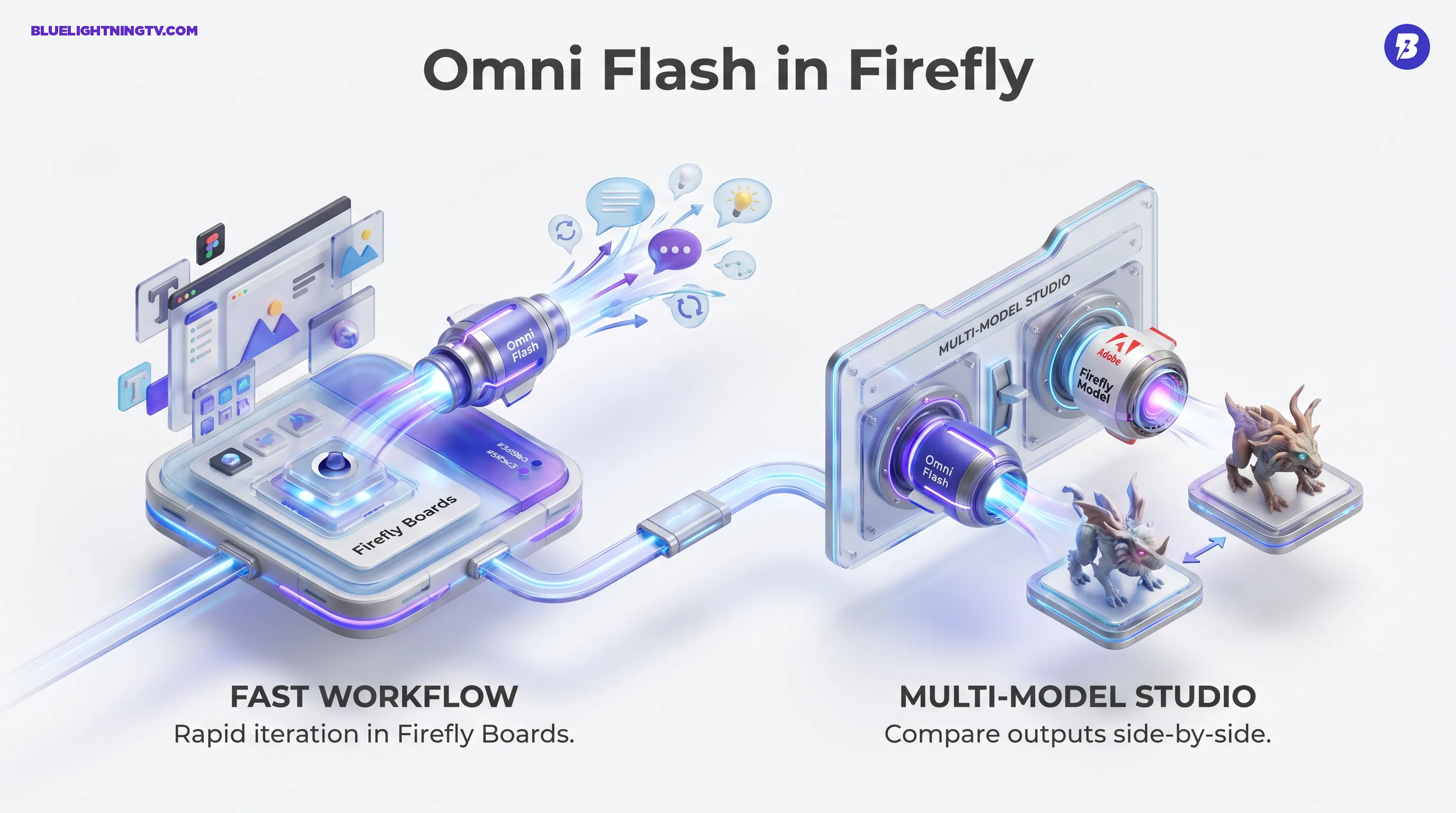
The practical change is straightforward: in Firefly Boards, creators can select Gemini Omni Flash as the generation engine. That makes Omni Flash part of the same ideation environment where teams already build moodboards, explore concepts, and iterate quickly.
It is worth calling out what this is not: Adobe has not positioned this as “Omni Flash replaces Firefly.” It is an additional engine option, one designed for speed and iterative edits, and one showing up first in the part of Firefly built for rapid exploration.
Big picture: Firefly is increasingly acting like an interface layer for multiple models, not a single-model destination.
Why Omni Flash matters
Google’s Gemini Omni Flash is built around a creator-friendly premise: fast generation with iterative, conversational-style refinement. In practice, that tends to translate to two things creators feel immediately:
- Shorter time to first draft: faster generations change how much you are willing to explore.
- More usable iteration loops: instead of rewriting a prompt from scratch, you steer and refine.
Firefly already has its own strengths, especially when you are trying to keep assets compatible with Adobe workflows and downstream finishing. Omni Flash adds a different kind of advantage: speed-first generation that is comfortable with back and forth direction.
Where you will see it
Right now, the notable detail is placement: Omni Flash is appearing in Firefly Boards via the model selector, rather than being framed as the default in every Firefly surface.
That placement is intentional. Boards is where creators behave like creators: collect references, throw ideas at the wall, test variations, and get stakeholders aligned before anyone commits to a final anything.
And yes, that is where model choice matters most, because creative direction benefits from comparison. If you can generate the same concept with multiple engines in the same workspace, the conversation shifts from “Is AI good?” to “Which output matches the brief?”
Multi-model becomes normal
Adobe’s bigger strategy is hard to miss at this point: Firefly is becoming a model switchboard. We have already seen this trend with other partner-model integrations and workflow expansions across Creative Cloud. Omni Flash is another step in the same direction.
The creator upside is simple:
- Less context switching: fewer generate elsewhere, download, re-import loops.
- Faster A/B decisions: compare outputs while your team’s attention is still in the room.
- Cleaner asset gravity: projects stay in Adobe’s orbit, where finishing happens.
If you want the recent Firefly as hub context, this Blue Lightning post tracks the arc clearly: Adobe Firefly Unlimited: New Multi-Model Creative Hub.
Speed changes behavior
When a model is optimized for fast output, creators do not just save time. They work differently:
- More iterations per session which usually means better final picks
- More willingness to explore weird directions because the cost of failure drops
- Better stakeholder alignment because you can show options, not just describe them
This is why flash models keep showing up across the ecosystem. Not because creators are impatient, but because creative decision making needs volume. The best idea is rarely the first prompt. It is the best prompt after eight variants and one surprisingly good accident.
| Workflow moment | Old friction | What improves now |
|---|---|---|
| Early concept search | Slow gen equals fewer options | Faster variants while momentum is high |
| Creative direction reviews | Hard to compare vibes | More comparable outputs in one workspace |
| High-volume campaigns | Iteration cost adds up fast | More shots at on brief before polishing |
What will not be magic
Even with a fast model in the mix, there are still practical limits that matter for real production:
- Brand precision still needs humans. Logos, regulated claims, exact typography, product truth. AI can help, but it is not your QA department.
- Consistency across a set is still work. One great output is easy. Ten matching outputs across placements is where pipelines either shine or collapse.
- Model choice becomes a skill. Multi-model freedom is powerful, but it also means teams need lightweight rules for which model to use when.
This is the grounded way to view Omni Flash in Firefly: it is not a replace your stack announcement. It is a new option inside the stack, positioned where rapid ideation lives.
What creators do next
If you are already using Firefly Boards for concepting, Omni Flash adds a new lane for fast iteration without leaving the workspace. The most practical expectation to set is this: you will likely get to something usable faster, which means you can spend more time on the part that actually differentiates your work: taste, selection, and finishing.
And as Adobe keeps adding partner models, the long-term shift gets clearer. The competitive advantage is not just who has the best model this month. It is who builds the best place to work with models all year.