
Google has introduced a new wave of generative AI capabilities to Google Vids inside Workspace, building on its core promise: turn everyday team ideas into finished videos without leaving the apps people already use. In addition to AI storyboarding and voiceovers, Google is adding image-to-video generation, AI-driven presenters, and smarter transcript cleanup. Full product details and plan availability are outlined on the official Google Vids page here.
What Is Google Vids?
Google Vids is Google’s browser-based, collaborative video creator for Workspace. It sits alongside Docs, Sheets, and Slides and follows the same co-creation model: draft together, review together, publish together. Teams can storyboard, script, record themselves or their screens, edit, and export without sending files to separate editing software. Vids combines a Gemini-assisted storyboard generator, a built-in recording studio with a teleprompter, stock media, and AI voiceovers, then wraps it in the familiar commenting and sharing controls Workspace users already know. Google’s launch framing positions Vids as bringing AI-powered video creation to the same place people already write, present, and share work.
Vids aims to make video-first communication as routine as writing a doc, so teams can draft, iterate, and approve visual stories in the same place they collaborate every day.
What’s New: GenAI Features Built for Team Velocity
Google’s latest additions focus on automating the steps that typically slow down production schedules: creating b-roll, getting a consistent on-camera presenter, and tightening rough audio.
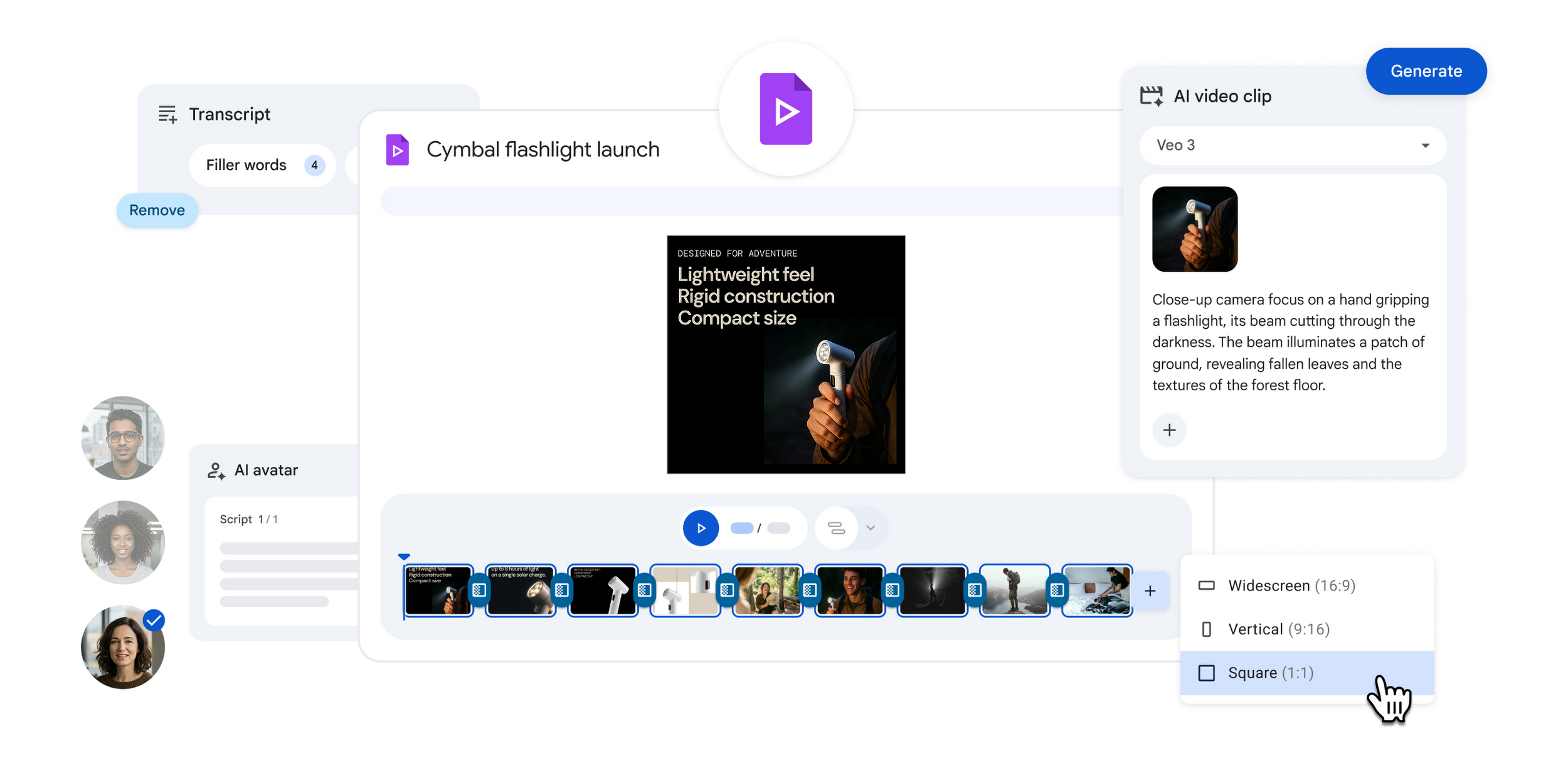
- Image-to-Video Generation: Vids taps Google’s Veo 3 model to turn prompts and static visuals into short, dynamic clips that slot into a scene. This is aimed at filling gaps where teams would otherwise hunt for b-roll or spin up manual motion graphics. Learn about Veo 3 in Vids.
- AI Avatars for Consistent Delivery: For teams that need an on-screen presenter but cannot schedule talent or studios, Vids adds AI avatars that deliver scripted lines in a consistent, brand-appropriate style. This is designed for repeatable workflows like onboarding segments, product explainers, and recurring internal updates. Coverage of the avatar rollout explains how this reduces the who can record today bottleneck.
- Automatic Transcript Cleanup: Vids can detect and remove filler words, stutters, and awkward pauses directly from transcripts, with edits reflecting in the timeline. That means less time scrubbing audio and more time aligning the story to the message.
Workspace-Native Collaboration, Now With AI in the Loop
Because Vids is native to Workspace, it uses the same collaboration stack: Drive file storage, shareable links with permissions, and real-time comments for review and approvals. That matters for marketing, comms, HR, and product teams who already route documents and slides through stakeholders. With AI now helping at key points like seeding storyboards, generating filler footage, and polishing transcripts, the time between draft and done shrinks while the review process stays visible and secure.
Google’s product introduction emphasizes that Vids is built to feel like the rest of Workspace: fast starts, simple edits, and easy sharing. For background on the Vids launch and core capabilities, see Google’s announcement overview on the Workspace Blog.
At-a-Glance: Features and Availability
| Feature | What it does | Where it lives in Vids | Availability notes |
|---|---|---|---|
| Gemini-assisted storyboards | Generates a draft script, scene list, and media suggestions from a prompt or assets | Project start and storyboard view | Available in Vids and aligned with Gemini in Workspace |
| Veo 3 image-to-video | Creates short motion clips from static images and text prompts | Media generation panel inside editor | Intended for quick b-roll and cutaways |
| AI avatars | Delivers your script on-camera with a consistent presenter | Presenter or voice section of the scene editor | Rolling out for repeatable training, explainers, and updates |
| Automatic transcript cleanup | Removes filler words, stutters, and long pauses with timeline sync | Transcript pane tied to audio and video tracks | Speeds last-mile polish before review and publish |
| Recording studio + teleprompter | Record camera, screen, or audio with a read-along script | Record tab within projects | Core feature that supports remote-friendly workflows |
| Stock media and AI voiceovers | Add licensed footage, images, music, and generate pro voice narrations | Media and audio panels | Included in Vids based on plan entitlements |
Why It Matters for Creators, Marketers, and Founders
For teams building brands, pitching products, teaching workflows, or telling stories, the constraint has rarely been ideas. It has been time and production overhead. Vids’ new gen AI stack addresses two slow moments in most internal video timelines:
- Getting to a first cut: Gemini and Veo 3 reduce the blank-canvas problem by proposing a structure and generating motion assets when you do not have footage. That is a head start for pitch decks turned into explainers, product shots turned into quick reels, or onboarding slides turned into short lessons.
- Polishing under pressure: Transcript cleanup trims the dead air and hesitations typical of unscripted segments, bringing a rough read closer to publish-ready without sending files to a specialist editor.
Because everything lives in Workspace, creators can keep reviewing and approvals where the rest of their content lives. Comment threads stay attached to scenes, brand assets stay in Drive, and version history is easier to manage without exporting to third-party tools.
For non-technical teams, the shift is practical: fewer tools to juggle, fewer handoffs, and more on-brand videos shipped on deadline.
Availability and Plan Details
Google Vids is available to Google Workspace Business and Enterprise customers, with AI capabilities tied to plan entitlements. Google has also highlighted generative creation options powered by Veo 3 directly in Vids, expanding what teams can produce without leaving the editor.
Integration Notes
As a Workspace app, Vids inherits the sharing model and collaboration patterns of Docs and Slides: link sharing with edit, comment, or view roles, comment threads for async review, and Drive-native asset management. Teams can move from prompt to storyboard to record-and-edit without switching tabs, with the option to pull in stock media or Drive assets at any time.
The Bottom Line
Google Vids positions generative AI as a practical production assistant, not a novelty. By combining Gemini-assisted structure, Veo 3 motion generation, AI presenters, and transcript-aware edits, the tool targets the moments that slow down creative teams. For marketers, founders, and educators balancing speed with brand consistency, the upshot is simple: fewer tools and fewer handoffs mean more videos that hit the mark and more time back for the creative work that moves the story forward.