Google’s Gemini is rolling out an “Import AI chats” feature that lets you pull exported conversation archives from competitors, including ChatGPT and Claude, into Gemini as a searchable library. A clear overview of the rollout is in this report from TechCrunch (you can now transfer your chats and personal information from other chatbots directly into Gemini), and it’s exactly the kind of unsexy, high-impact update creators actually feel: less rebuilding, fewer tabs, more continuity.
This isn’t a “Gemini became magic overnight” moment. It’s a workflow move. Google is trying to make Gemini a home base by removing the switching tax: years of prompt experiments, drafts, and decision threads stuck inside someone else’s chat sidebar like a digital junk drawer you’re emotionally attached to.
What actually shipped
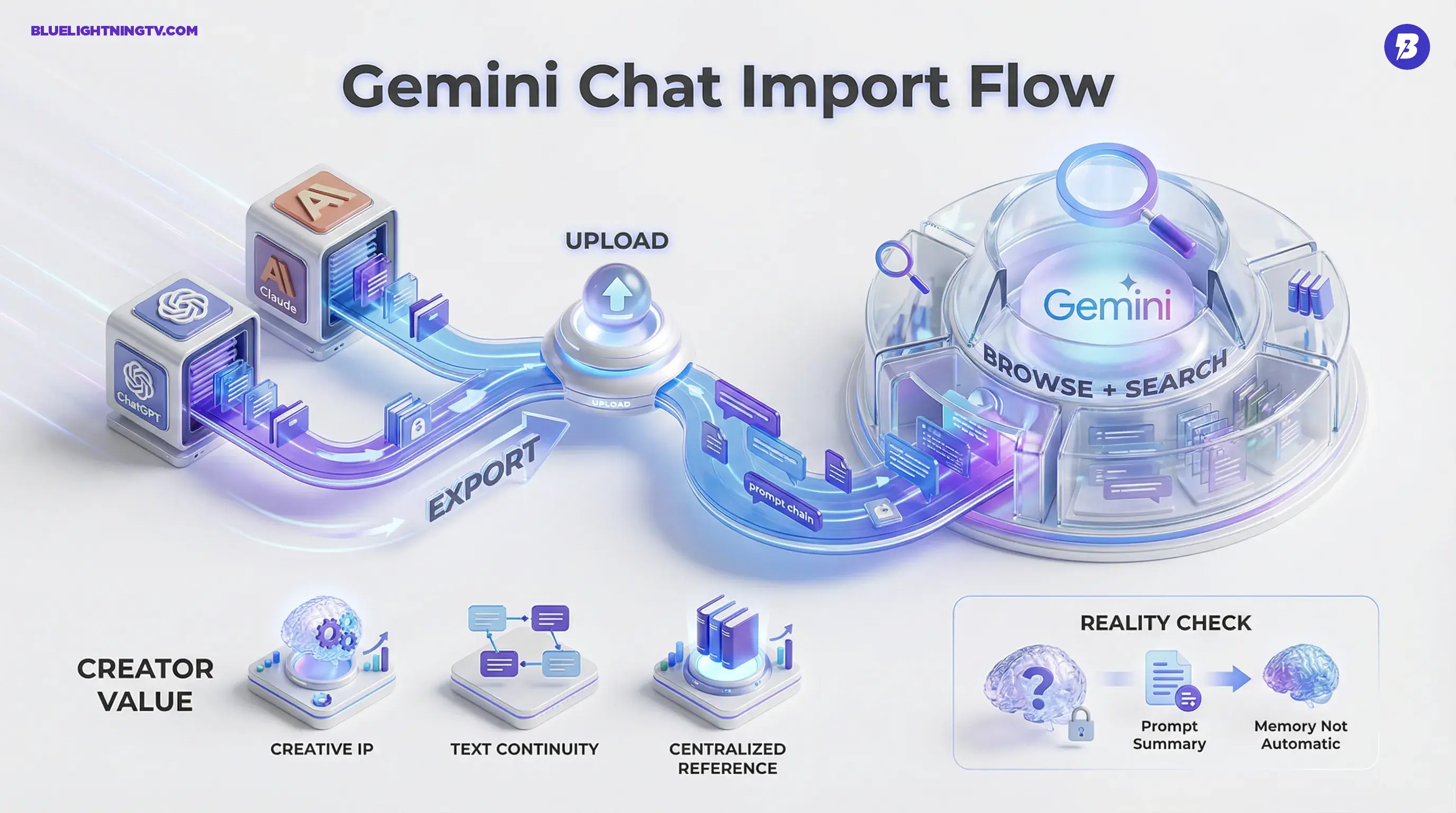
Gemini’s import capability is built around a simple, realistic flow:
- Export your history from ChatGPT or Claude
- Upload that export into Gemini
- Browse + search imported threads inside Gemini
Key detail: this is not an account-to-account live sync. It’s a migration lane. You’re bringing an archive over, not connecting two brains together in real time.
Practical translation: Gemini is reducing switching friction. It is not promising that your imported history becomes “always-on memory” that automatically changes Gemini’s behavior in every new chat.
Multiple hands-on reports describe two related “switching” tools: importing full chat history (via uploaded exports) and importing “memory” via a prompt-based summary flow. Android Authority breaks down the memory import angle and where it appears in settings (Gemini launches memory import feature for easier switching).
If you want the COEY take on why this matters for content ops, we covered the bigger implications here: Gemini Chat Import Makes AI Work Portable.
Why creators should care
Most creators don’t just “use an assistant.” Over time, they build a working system inside chat logs:
- prompt chains that reliably hit a specific voice
- campaign iterations (and the reasoning behind what won)
- client-specific constraints, disclaimers, and formatting rules
- research trails and content calendars shaped through conversation
That accumulated history is creative IP, not always pretty, often messy, but valuable. Before this, moving it across tools meant copy/paste purgatory, screenshots, or exporting archives that just sat in a folder like “I’ll organize this someday” lies.
Gemini importing chats is Google saying: you shouldn’t have to start from zero just because you’re trying a different model.
How the import works
The import flow is intentionally old-school: you export data from the source platform, then upload it to Gemini. That design choice matters because it keeps control and consent pretty explicit, no surprise data plumbing between vendors.
ChatGPT exports are delivered as a downloadable archive via OpenAI’s export flow (typically a ZIP). For ChatGPT’s own export process, OpenAI’s help page is the canonical reference (How do I export my ChatGPT history and data?).
Once inside Gemini, imported chats show up as their own set of threads you can navigate and search. The point is continuity: you can look up that “perfect” prompt scaffold you built months ago, or revisit a campaign exploration without bouncing between products.
What imports keep
Early coverage suggests the strongest, most consistent win is text continuity: prompts and responses, preserved enough to be useful.
| Imported item | What you get | Why it matters |
|---|---|---|
| Prompt + response text | Typically high fidelity | Preserves your “working” chains and drafts |
| Thread structure | Can be mixed | Impacts how reusable a long chain feels |
| Searchability in Gemini | Core value | Turns old chats into reference, not clutter |
That last row is the sleeper feature. Search is what turns chat history from “digital archaeology” into “usable library.”
What imports don’t solve
Importing is not the same as portability in the full creative sense. A few limitations show up fast:
Memory is not automatic
Even if Gemini can ingest your chats, that doesn’t mean it will behave like it has lived your last 18 months of brand voice work. Gemini’s memory import, as described in coverage, is a separate prompt-based flow (you generate a summary in the other assistant and paste it into Gemini) rather than a guaranteed “everything I said is now active preferences” switch. Imported chats are best treated as retrievable reference unless you explicitly add relevant details to Gemini’s memory and confirm how it behaves in your workflow.
Attachments are fragile
Text moves cleanly. Images, uploaded files, and other attachments do not reliably transfer through these archive-based imports, depending on what the source export includes and what Gemini currently supports ingesting from that export format.
Prompts won’t act identical
A prompt chain that slaps in ChatGPT might land differently in Gemini. Import protects your content and logic, but it doesn’t guarantee the same tone, pacing, or formatting compliance across models.
Creator reality: import reduces rebuilding, but you may still need a “translation pass” to get your best chains performing optimally in Gemini.
Who benefits first
This update is especially useful for people doing repeatable production, not one-off prompting.
Agencies and brand teams
If your “institutional knowledge” is scattered across multiple assistants and accounts, import gives you a path to centralize reference inside Gemini, particularly appealing if you’re already deep in Google Workspace and want fewer tool hops.
Series-driven creators
If you run a repeatable format (weekly video essays, newsletter drops, recurring brand reels), your consistency often lives inside one or two “golden” threads where you refined the structure. Import means those threads can follow you.
Teams onboarding collaborators
Imported chats are messy documentation, but they’re still documentation. For new teammates, being able to see “how we work” in real prompt chains is often more useful than a tidy SOP nobody reads.
What it signals
Zooming out: assistants are competing on workflow gravity now, not just model IQ. The easiest way to build gravity is to make switching painless, and “bring your history” is a direct attack on lock-in.
It also fits Google’s broader direction for Gemini: more operational, more embedded, more like a creator work hub than a chat toy. If you’ve been tracking that arc, Gemini’s import feature pairs cleanly with other recent workflow-oriented moves.
Bottom line: Gemini’s ChatGPT and Claude import is a practical upgrade that protects creator momentum. It won’t magically reorganize your past or make every imported thread instantly useful, but it does make your AI work more portable, which is exactly the kind of boring feature that changes what tools teams are willing to commit to.