Google’s Veo 3.1 is here, and the update is refreshingly practical. The headline is native vertical video generation (9:16), plus a set of quality and workflow upgrades that make Veo feel less like a flashy demo machine and more like something you can actually ship with. The official rollout details live in Google’s developer announcement here.
If you’re a creator living in Shorts, Reels, TikTok land (so: most of the internet), vertical support is not a nice to have. It is the canvas. And generating in the right canvas at the start means fewer ugly compromises later.
Vertical is the new default
For years, AI video has treated 9:16 like an afterthought: generate widescreen, then crop, then pray the subject did not wander out of frame like it is avoiding your rent.
Veo 3.1 flips that.
Native 9:16, finally
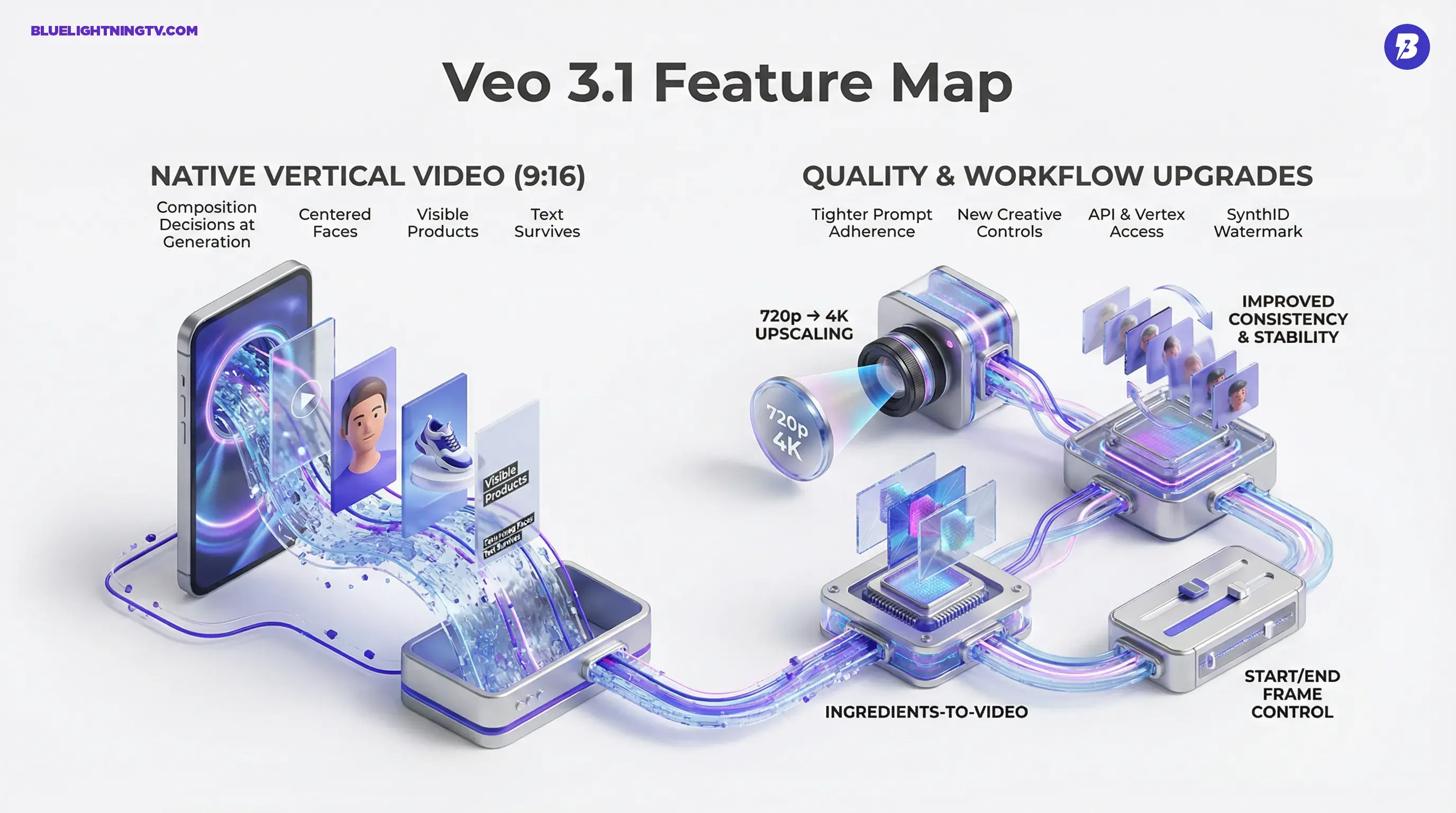
With true 9:16 generation, composition decisions happen at generation time, not during damage control in post. That matters because reframing is not just a resize. It changes the story:
- Faces stay centered instead of drifting into the UI chrome.
- Text overlays survive without being chopped off by a crop.
- Products remain visible (which is kind of the point if you’re making ads).
The quiet win here: when you generate vertical natively, you are not just saving time. You are protecting intent.
Why cropping fails at scale
If you only make one clip at a time, manual reframing is annoying. If you run a pipeline, batch variants, multi hook testing, multiple placements, it becomes a tax on everything.
Native vertical output means one less conversion step in your production chain, which is where most “AI saved time” promises go to die.
Quality upgrades that matter
Veo 3.1 is not positioning these as cinematic moonshots. The upgrades are aimed at what creators actually notice: stability, consistency, and fewer “why is his hand doing that” moments.
Resolution and finishing options
Google says Veo 3.1 can generate video at 720p and then use upscaling to reach 1080p or 4K, depending on the product or workflow you’re using. The point is not bragging rights. It is making clips more usable in real edits, where you might crop, stabilize, add text, and still need the image to hold up.
Better temporal consistency
AI video’s most common failure mode is simple: the model “forgets” what it already drew. Veo 3.1 is positioned as improving consistency across frames and scenes, especially when you guide it with reference images.
That translates into:
- fewer unusable takes
- cleaner cuts between shots
- more reliable character identity when you are building a series
Prompt adherence gets tighter
Creators do not want to write a novel length prompt just to get “blue hoodie” to remain a blue hoodie.
Veo 3.1 is marketed as improving instruction following and controllability, particularly when you are doing brand work (logos, product colors, recognizable wardrobe, repeatable visual language).
New creative controls
Alongside format and quality, Google is adding controls that push Veo toward something editors can actually plan around.
Ingredients to Video expands
Google is continuing to build on its “Ingredients to Video” approach, using up to three reference images to guide generation and better preserve identity and scene elements. Google’s overview of the feature set is here.
The bigger implication: Veo is not just trying to be “text to video.” It is trying to be art direction to video, where you bring more of the look with you, and the model behaves more like a collaborator than a slot machine.
End frame control enters
One of the most underrated problems in AI video is not how a shot starts. It is how it ends. If your clip resolves into visual mush, it is hard to cut.
Veo 3.1 adds first and last frame control (you provide a starting image and an ending image, and the model generates the transition). That is useful for:
- hitting a product hold
- sticking a logo moment
- ending on a character pose that matches the next shot
In short: it helps AI video behave more like footage.
Where you can use it
Google is distributing Veo 3.1 across both creator friendly and developer facing surfaces, which is where this starts to look like a real platform move instead of a model flex.
Gemini API and Vertex AI
Veo 3.1 is available via the Gemini API (and integrated into Vertex AI for teams building production workflows). Google’s Veo 3.1 developer post covering API access is here, and the Vertex AI model documentation for Veo 3.1 Fast Generate (preview) is here.
This matters because:
- creators get a UI path
- teams get automation and batching
- studios get repeatable generation inside pipelines
Creator tooling momentum
Veo is also showing up across Google’s broader creation stack (Gemini surfaces, Google AI Studio, and other integrated tools). The direction is clear: Google wants Veo outputs to be something you generate where you already work, not in a separate “AI playground” you visit for fun and abandon when deadlines hit.
Watermarks and provenance
Google continues embedding SynthID watermarking for AI generated video, aiming to keep provenance attached even when content travels. Google references SynthID (including a built in verification flow in the Gemini app) as part of Veo 3.1’s output story in its product write up here.
For creators and teams, this lands in the “annoying but inevitable” category, like captions and safe margins. It is increasingly part of platform reality, especially when distributing branded work.
What creators should watch
Veo 3.1’s vertical support is the obvious win. The more interesting signal is what it implies about where generative video is headed.
Vertical first pipelines emerge
A lot of teams still treat vertical as a cutdown of “real video.” But platform gravity is undefeated. With Veo 3.1 generating native 9:16, it gets easier to build vertical first creative systems where:
- you originate in 9:16
- adapt outward to 1:1 and 16:9
- keep composition intentional, not “best effort”
Reliability beats wow factor
The market does not need more “look what AI can do” clips. It needs outputs that hold up through:
- approvals
- revisions
- multi variant testing
- real editing timelines
Veo 3.1’s improvements, vertical generation, reference image ingredients, first and last frame control, and upscaling options, are all in service of that boring (and valuable) word: predictability.
API access raises expectations
Once teams can generate video programmatically, the bar shifts. It is no longer “can the model do it,” it is:
- can it do it consistently
- can it do it at scale
- can it do it without breaking brand rules
Veo 3.1 is moving in that direction, but it also raises the pressure: creators will notice fast when a model is strong at one off clips but fragile in series production.
Veo 3.1 at a glance
| Update | What changed | Why creators care |
|---|---|---|
| Native 9:16 output | Vertical video generation built in | Less reframing, better composition |
| 1080p plus 4K upscaling | Upscale from 720p to 1080p or 4K in supported workflows | More usable footage for real edits |
| Consistency upgrades | Better stability, especially with reference images | Fewer wasted takes, cleaner sequences |
| First and last frame control | Guide how shots start and end using images | Easier cutting, better timing |
| API plus Vertex access | Available for dev workflows | Automation, batching, pipelines |
| SynthID watermark | Provenance watermarking embedded | Clearer origin signals for distribution |
Bottom line
Veo 3.1’s biggest improvement is also its least flashy: it finally respects the format creators actually publish in. Native vertical generation removes a real workflow bottleneck, and the added control features (reference image ingredients, first and last frame guidance, and upscaling options) push Veo further into “usable tool” territory.
It is not a hype release. It is the kind of release that quietly makes your production week easier, which for creators is the highest compliment.