
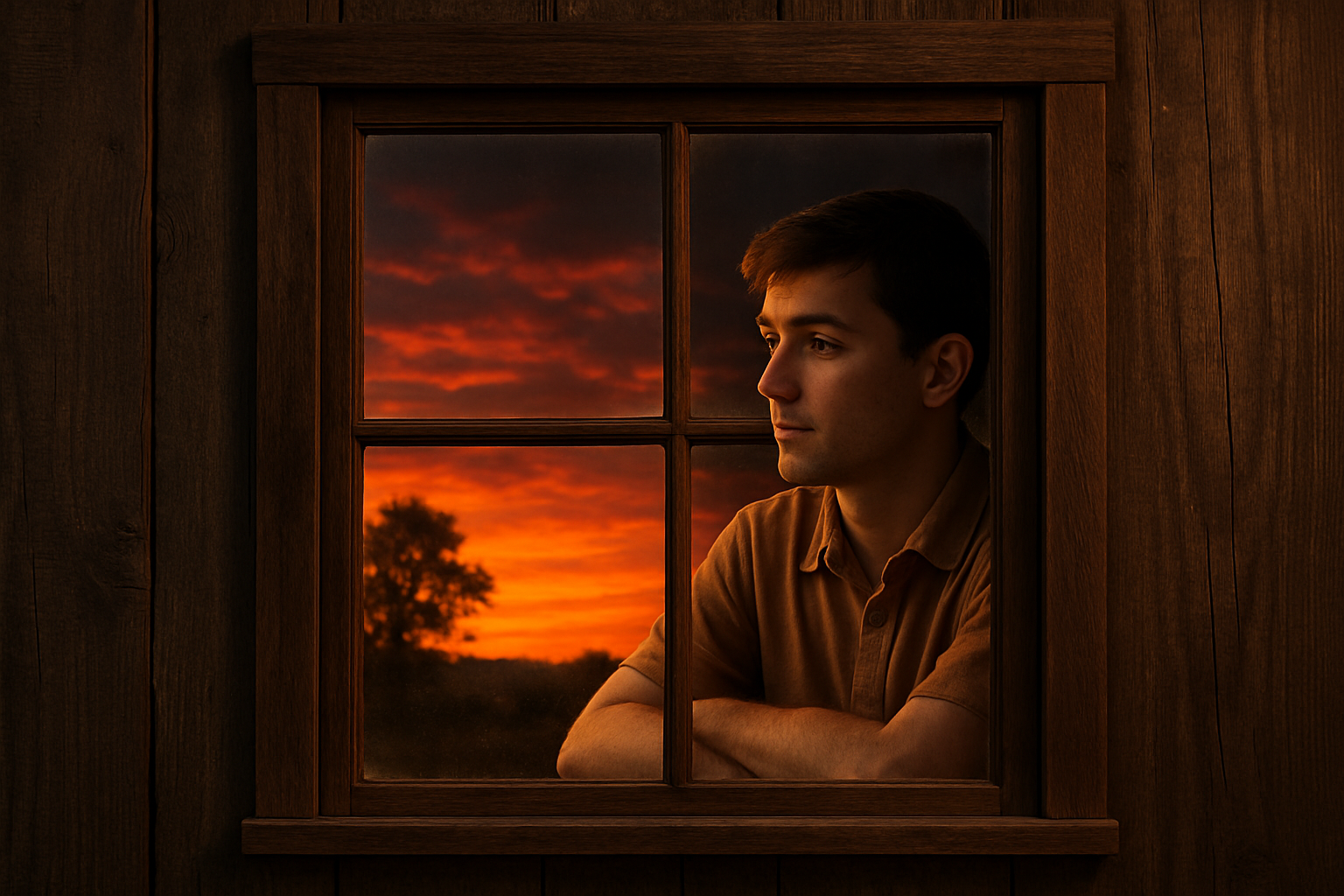
Create Stunning Visual Depth with Window Reflection Effects
Have you ever looked at a photograph and marveled at how the photographer captured not just what was behind the glass window, but also the reflection of the outside world on it? That’s not voodoo magic; it’s clever editing, and today we’re diving into the realm of Photoshop to learn exactly how to master this captivating effect. Whether you’re seasoned in the art of digital editing or a budding Photoshop enthusiast, this tutorial is bound to open up new creative avenues.
The Allure of Window Reflections
Sure, capturing real reflections is satisfying, but not always feasible. Each time light hits glass, wonders unfold—yet they are fickle and unpredictable. Enter Photoshop: the magician’s hat in the hands of digital artists. With the techniques you’ll learn here, you can control every aspect of reflections, presenting a seamless interaction between interior and exterior spaces. Imagine, at will, serenely blending a booming cityscape with an intimate portrait set indoors. Not to mention, this skill set is bound to notch up your editing game, making you the talk of creative circles.
Step-by-Step: Reflecting Reality in a Digital World
Let’s break down this mind-bending operation into actionable steps:
- Prep Your Canvas:
– Start by downloading a window frame and a sunset image, or use your own reflection-worthy image.
– With Photoshop, open your window frame image. Here, you’ll zoom in on each pane and harness the Pen Tool to meticulously select each glass area. Precision is your friend here—because a missed corner can break the illusion. - Mark Your Territory:
– Path selections allow for precise edits. To ensure no pixel gets left behind, expand the selection by one pixel, feather it similarly, and cut away the framework—leaving behind cutouts where the magic happens. - Cast Your Reflection:
– Time for that sunset (or whichever scene is set to reflect). Convert it into a Smart Object. This move ensures non-destructive editing, leaving room for endless tinkering without permanent consequence.
– Distort as needed. Windows are optical tricksters by nature, so play around with transformations—pull those corners as though you’re commanding a puppet show. A little skew here, a squish there. - Blurred Lines, Blurred Vision:
– Distorted reflections are expectedly blurry. The Gaussian Blur filter is your ally, allowing you to recreate the softer focus that adds realism to window reflections. For a lovely compliment to this effect, consider applying a subtle 3-pixel blur. - Mystic Layering:
– Take your reflection copy and focus on its shadows—literally. By selecting shadow areas, you can effectively use them to add depth to a second layer, emphasizing areas meant to overlay your future model or subject.
Bringing the Inside Out: Seamlessly Integrating a Subject
With a picture-perfect reflection in place, let’s introduce a subject peeking through:
- Craft Your Subject:
– Choose a person to be placed inside. As with furniture placement in a new home, getting ’em right requires consideration. Convert to a Smart Object and use tools like Quick Selection to snip them free from their native backgrounds. - Seamlessly Clip and Blend:
– Adjustment Layers (brightness, contrast) are your secret agents for smoothing the transition between the reflection and your subject. Clip them strategically to ensure meticulous effect application. - Final Touch: The Drama is in the Details:
– Introduce a color cast that makes the subject a part of the new world you’re building. Borrow hues from the reflection, using a subtle photo filter effect.
– Brushes sweep away unwanted wax-on, wax-off, regions that should blend, letting some parts of your subject blur into the glass.
The Grand Reveal
Finally, arrange the layers, ensuring everything flows together naturally. Adjust opacities where needed—this balancing act can drastically affect your final image. Continue to modulate focus areas, letting your edges fade subtly and your centers shine crisp.
Whether you’re crafting a heartwarming scene or a mesmerizing illusion, this window reflection effect allows you to present outdoor wonders encased in glass, peeping into indoor mysteries. Embrace experimentation, for within Photoshop’s limitless canvas, you hold the brush to life’s imaginative reflections.
This might seem like complex sorcery at first, but trust us, it’s about as difficult as brewing a good cup of coffee—once you’ve got the proportions right, there’s nothing stopping you from creating a masterpiece with every bean… or in this case, pixel.
Stay curious and keep creating!





