ByteDance is now rolling out Seedance 2.0 inside CapCut, turning generative video into something you can use like any other clip: generate, drop it in the timeline, trim, caption, ship. It’s a big move because it doesn’t ask creators to adopt a new “AI video app.” It makes AI video feel like a normal editing step in the app a lot of creators already treat as their home base.
The short version: Seedance 2.0 is CapCut getting serious about multimodal generation, including text and image references plus broader reference control, with output designed to survive actual editing, not just look good in a demo window.
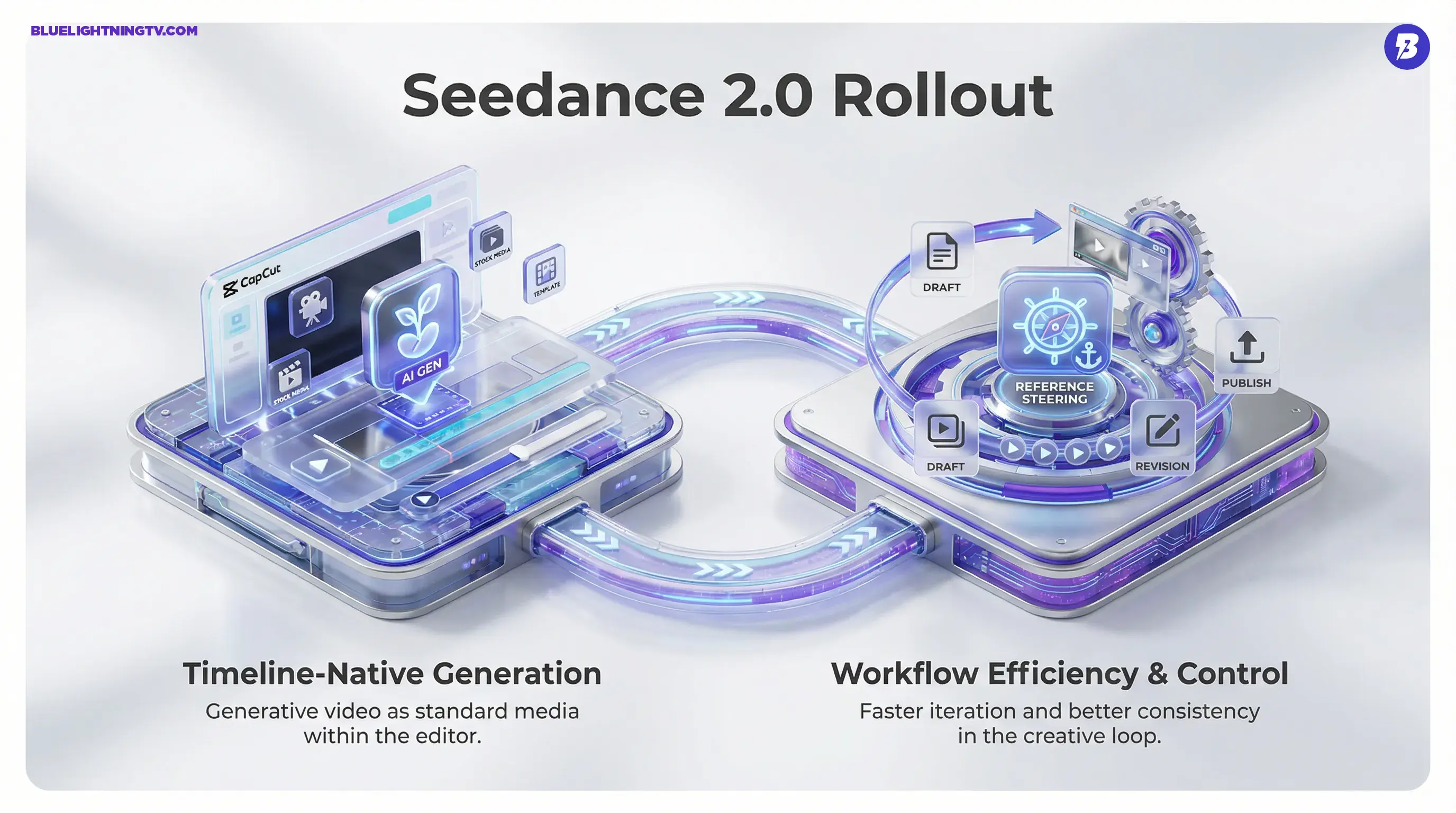
The shift isn’t “AI video is here.” The shift is that gen video is being productized as timeline media, with the same expectation as stock footage or B-roll: usable, editable, and fast to iterate.
What actually shipped
This rollout is being surfaced through CapCut’s editing surfaces, including mobile, desktop, and web, and it’s tied into ByteDance’s broader Dreamina stack. The most practical detail is the most boring one: fewer exports. You’re not bouncing between a generator, downloads folder chaos, and an editor anymore. You generate and keep moving.
Text and image inputs
Seedance 2.0 supports text-to-video and image-to-video workflows in CapCut. For creators, image-to-video is the “make this look like my thing” path: use a still to anchor character, product silhouette, or vibe, then generate motion around it.
Reference is the lever
ByteDance is pushing what it frames as “omni-reference” control, steering generation with reference media so results stay closer to your intent across multiple attempts. If you’ve ever gotten a gorgeous 3-second clip and then spent 45 minutes trying to regenerate a matching follow-up shot, that’s the pain point this is aimed at.
ByteDance’s own Seed team has positioned Seedance 2.0 as a reference-driven system, not just prompt roulette, with a focus on better coherence and controllability in practical creation flows. Source: ByteDance Seed: “Official launch of Seedance 2.0”.
Short clips, fast iterations
Public reporting around CapCut’s integration points to clips capped at up to 15 seconds per generation, with output designed for common social aspect ratios. Source: TechCrunch.
Where it’s available
Access is rolling out in waves and has been uneven by region and account type. In the initial rollout, TechCrunch reports availability for paid CapCut users in countries including Brazil, Mexico, Indonesia, Malaysia, the Philippines, Thailand, and Vietnam, with staged expansion. Source: TechCrunch.
If you’re not seeing the tool, the most likely explanation is simply that you’re not in the current rollout bucket yet, or the feature set is being staged by platform surface. That’s been standard operating procedure for CapCut: features arrive quietly, then suddenly everyone’s posting screenshots like it “just dropped.”
What it changes
Seedance 2.0’s biggest impact isn’t a single button. It’s what happens when generation and editing collapse into one loop. The moment gen video is one step inside your editor, creator behavior changes:
- More drafts per idea because iteration cost drops
- More variant testing because swapping the hook shot is suddenly cheap
- More hybrid edits mixing real footage, templates, captions, and synthetic cutaways without leaving the project
This is also why integrated gen video is a different competitive threat than a standalone model demo. CapCut doesn’t need Seedance 2.0 to be the best model on Earth. It needs it to be good enough and frictionless enough that creators stop leaving the app.
Distribution beats novelty
CapCut has the kind of distribution most gen video startups would trade a kidney for. When a generator is embedded into a workflow tool millions already use, adoption happens for a very non-mystical reason: creators don’t have to learn a new product to get value.
That’s the play here. Seedance 2.0 isn’t trying to win on vibes. It’s trying to become default.
Features creators feel
ByteDance is emphasizing improvements that show up in the cut: motion stability, better coherence, and more control via references. Even if you never touch advanced settings, the goal is that more generations are keepable.
| Change | What you’ll notice | Why it matters |
|---|---|---|
| Timeline-native generation | Clips can be generated and then used as project media | Less tool-hopping, faster revisions |
| Reference steering | More consistent look across attempts | Better for brands, series, recurring characters |
| Short, social-ready clips | Iterations stay quick and focused | Matches the way creators actually ship |
| Output built for editing | More clips survive captions, crops, speed ramps | Usable beats impressive in real workflows |
Limits to watch
Even with better controls, Seedance 2.0 doesn’t magically remove the usual gen-video constraints. It just pushes them into a workflow where you can work around them faster.
15 seconds is a ceiling
Short clips are where this shines. Longer continuity-heavy sequences still tend to amplify drift and weirdness, even with references. Expect creators to chain scenes, cut aggressively, and use Seedance for hooks, transitions, cutaways, and style shots rather than full narrative sequences.
Controls vary by surface
CapCut, Dreamina, and related ByteDance surfaces don’t always expose identical controls at the same time. If one creator is showing a setting you can’t find, it may not be user error. It may be staged UI rollout.
Credits and gating
CapCut’s AI features increasingly run on credits and plan tiers, and TechCrunch’s reporting around the Seedance 2.0 integration ties availability at launch to paid CapCut users in the initial markets listed above. Exact credit allotments and per-generation costs appear to vary by region and promotion, so teams forecasting cost per asset should confirm the current in-app credit pricing in their market before standardizing a “generate 30 variants, pick 2” workflow.
Why this matters now
For years, AI video meant a separate workflow: generate somewhere else, then import into your real editing tool. Seedance 2.0 inside CapCut is the opposite. It treats AI generation as a normal media source, like stock, templates, or your camera roll.
That’s a category-level change because it shifts competition away from whose model looks best in a cherry-picked demo, and toward who owns the loop creators live in every day: draft, revise, publish.
And if you want the broader CapCut context, we’ve already covered how ByteDance is positioning Seedance as editable-first gen video across its ecosystem in CapCut Adds Seedance 2.0 Text-to-Video Inside Timeline.
What happens next
Expect the next wave of upgrades in this lane to look less like “new cinematic mode” and more like the stuff that actually saves production time:
- Stronger consistency across multi-scene projects, same subject, same world, fewer re-rolls
- More controllable revisions, change one thing without nuking everything
- Deeper editor handoff, generation behaving like editable footage, not a precious artifact
Creators aren’t asking for AI that’s magical. They’re asking for AI that’s reliable enough to use on a deadline, inside the tools they already opened today.
Seedance 2.0 in CapCut is ByteDance betting that the winning gen video product isn’t a standalone AI studio. It’s an editor where AI is just another clip source: fast, remixable, and built for the grind of shipping content at speed.