Transform Your Photos into Cinematic Masterpieces
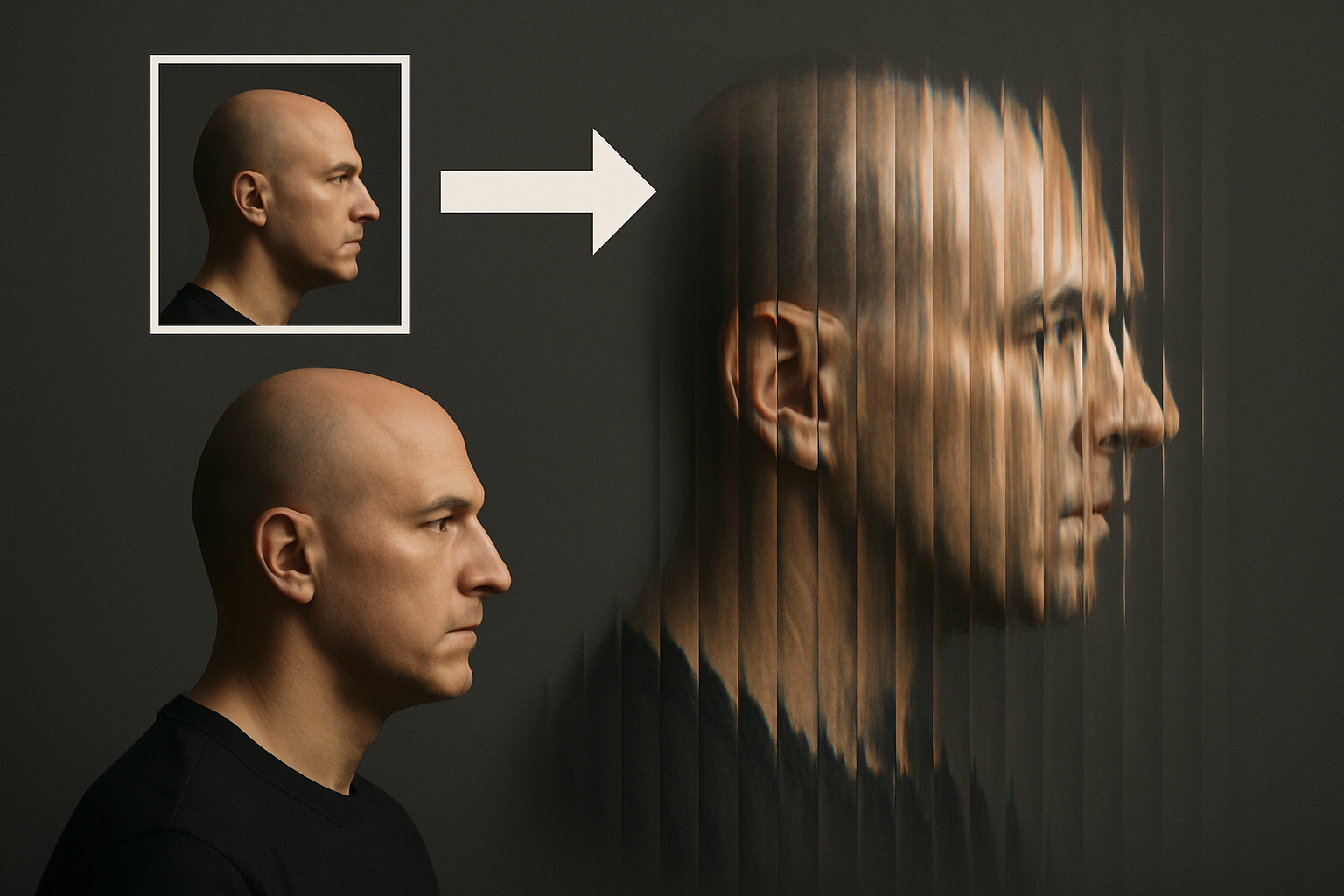
Creating photographic effects inspired by cinematic masterpieces is a riveting endeavor for any Photoshop enthusiast. Today, we delve into the captivating world of Netflix’s Ripley by recreating the iconic glass prism effect seen in its posters. This eye-catching effect not only gives your photos an introspective depth but also a polished, professional edge that is sure to leave a lasting impression.
Getting Started with the Basics
First things first, let’s talk tools and setup. Mentioning the intricacy of shaping layers and manipulating gradients might put off the average photo hobbyist, but don’t worry—the process is straightforward, and dare I say, quite therapeutic.
Choose an image—a portrait, a skyline, or perhaps something abstract—and open it in Photoshop. As an initial step, create a new layer and fill it with white, ensuring your foreground and background colors are correctly set to black and white, respectively.
Crafting Your Prism with Precision
This is where the magic begins. Craft the foundational shapes that will conjure your prism effect. Using the Rectangular Marquee Tool, draw a thin rectangle and apply a gradient adjustment. Photoshop is surprisingly intuitive here, facilitating precise transformations with its gradient editor.
- First Step: Ensure your gradients flow from black to white.
- Rotation: Dabble with angles—counterclockwise to be exact—until you reach a satisfying -180 degrees.
- Gradient Dynamics: Alter the stops along your gradient path for enhanced color transitions.
Continue layering and shifting these gradient elements until they form a complete pattern across your canvas. Remember, while this might seem like pixel pushing, the vivacity of the final effect will justify each meticulous motion.
Save and Repeat, It’s Not Redundant
With gradients on lock, save your progress—not just as an ordinary save, but as a Photoshop PSD file. This playful precursor not only secures your work but doubles as a cheat code for future creativity. By deleting the layer stack and anchoring these gradients as filters, you unlock the capacity to resurrect them later as bold textures.
Invoking the Distorted Drama
Now, with the basic structure in place, it’s time to channel the prism’s palpable drama. Enter the Filter Gallery, your one-stop-shop for distortion. Within the gallery, the Glass filter is your best tool to communicate the prism’s idiosyncratic refractions.
- Effect Enhancement: Adjust the Distortion level to around 16, spicing up the intensity.
- Control the Smoothness: Whether sharp or blurred, tweak the edges for desired realism.
- Determine the Size: At a setting of 100%, the prism’s scale governs its magnitude across your canvas.
With a masterful application of the glass filter, your image will morph into a veritable prism of colors and light. It’s almost like summoning a tangible Hollywood touch to any humble file on your desktop.
Taking it Further with Tech
Photoshop’s AI features swoop in when needed—like a helpful chatbot in a pinch. Should any distortions ruffle your image, the Rectangular Marquee Tool and Generative Fill functions offer seamless corrections adorned with AI wizardry. This is the future of photo editing where artificial intelligence redefines image integrity, one pixel at a time.
A Monochrome Makeover
To conclude, a classic black-and-white transformation is at your disposal via adjustment layers. This stripped-back look magnifies the prism effect, ensuring no essence is lost in translation.
The glass prism effect emanates drama and a sense of surreal aesthetic elegance. Crafting such visual allure might seem daunting initially but witnessing an ordinary photo that’s been transformed into an exceptional piece of art is profoundly satisfying.
The creative tomfoolery of seamlessly merging the nostalgia of classic cinema with contemporary editing techniques is not to be missed. Now, the only question is, what image will you transform next with this technique?
Feel inspired? Capture the prism effect’s potential. Perhaps you’ll even create a poster worthy of its own show. Dive in, be daring, and edit with unbridled gusto!