
Create an Awe-Inspiring Interstellar Scene with Blue Lightning TV
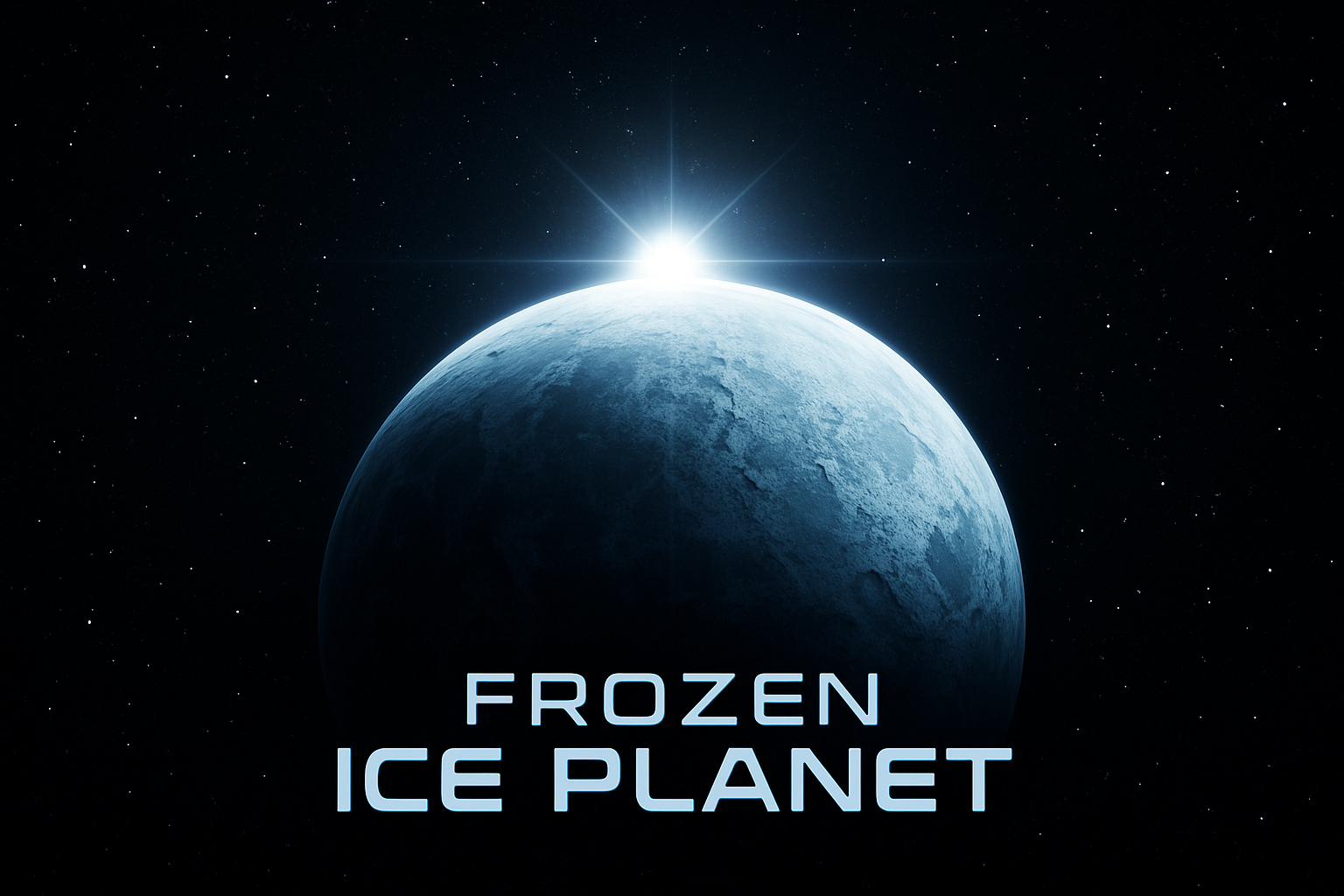
There’s something about the vastness of space that captures the imagination like nothing else. Packed with mysteries and unexplored realms, space has been the backdrop for countless sci-fi epics and artistic masterpieces. Today, we’re tapping into that interstellar charisma by learning how to craft a cinematic rendering of a massive frozen ice planet set against the enchanting canvas of deep space, using Photoshop’s powerful toolkit. Why settle for mundane, when you can create your own otherworldly masterpiece?
Cinematic Space Art: Enter the Creative Cosmos
Creating a frozen ice planet scene isn’t just an exercise in using Photoshop tools; it’s about conjuring an ethereal realm, reminiscent of the greats like Interstellar and Star Wars. This tutorial combines artistic finesse with technical proficiency, resulting in a visually captivating masterpiece. Plus, since this is an update from an earlier tutorial, we’ve refined the process with newer, more efficient techniques, perfect for crafting a nuanced space odyssey.
Setting the Scene: Your Creative Launchpad
To commence our cosmic adventure, create a new document. Hit Ctrl or Cmd + N, or navigate through File > New.
1. Enter dimensions of 1920 by 1080 pixels with a resolution set to 150 ppi.
2. For our starry scene, an RGB Color Mode at 8 bits per channel is essential.
3. Should your initial backdrop not be black, simply adjust it to embrace the infinite darkness of space.
The magic begins by converting this layer into a Smart Object—our gateway to adjusting the stars’ abundance and illumination at any time, enabling creative control over the cosmos.
Twinkle, Twinkle, Little Stars
Via Filter > Noise > Add Noise,
1. Select 80%, ensuring the settings are both Gaussian and Monochromatic.
2. Follow up with a subtle sprinkle of blur (0.3 pixels via Gaussian Blur) to give our universe the hazy depth of field it deserves.
3. By employing Levels (Ctrl or Cmd + L), fine-tuning the Input Black Level to 200 and the Input White Level to 220 allows for stellar adjustments to align with your vision.
Transforming Terrains: Our Frozen Frontiers
Bringing in the ice texture,
1. Transcend ordinary flatness by converting it into a Smart Object.
2. Under Filter > Distort > Spherize, an Amount of 100% creates the spherical illusion of a planet, a trick repeated to perfection by pressing Ctrl + Alt + F/Cmd + Ctrl + F.
3. Add stratospheric boost with Filter > Sharpen > Smart Sharpen, where 400% Amount and a 2-pixel Radius sharpen the edges with precision.
Crafting the Planet: Layer by Layer
With the Elliptical Marquee Tool,
1. Conjure up a perfect circle.
2. Apply Select > Modify > Contract by 4 pixels.
3. Then Select > Modify > Feather by 2 pixels.
4. Blend seamlessly to shape your planet amidst the astral wonders.
5. Layer masks and positioning via the Move Tool ensure proper placement.
Inner and Outer Glows add luminous highlights:
– Outer Glow: Screen Blend Mode, 60% Opacity, 0 Noise, Softer Technique, 35-pixel Size.
– Inner Glow: 100% Opacity, 0 Noise, Softer Technique, 75-pixel Size.
Perfecting the Celestial Balance: Shadow and Highlight Techniques
A deftly filled new layer casts shadow:
1. Feather and transform (50 pixels and resizing to 160%) to lend darkness.
2. Impactful brushwork using an 800-pixel soft round brush blends the terrestrial with the eternal.
3. Achieve a seamless balance of light and shade.
Achieving Atmospheric Drama: The Lens Flare
Lens flare encapsulates the planet:
1. Create a composite snapshot (Ctrl + Alt + Shift + E/Cmd + Option + Shift + E).
2. Go to Filter > Render > Lens Flare, position as desired.
3. Delete the snapshot once satisfied.
4. Add an extra layer, fill with black and set Blend Mode to Screen, repeat filter for a professional finish.
Find Your Creative Cosmos
With each layer, adjustment, and brush stroke, we’ve voyaged together from simple pixels to interstellar artistry. Every shadow painted, every glow nurtured, embodies curiosity and drive pushing the boundaries between reality and imagination. Why stop at a frozen planet? Devise alien landscapes, craft galaxies, and embrace creative freedom without limits.
Let us know how your voyage into space artistry goes—it’s only the start of an adventure without end, where even the sky isn’t the limit! Enjoy transforming the ordinary into something extraordinary while mastering the cosmos one pixel at a time.





