Transform Your Image Library into a 3D Masterpiece
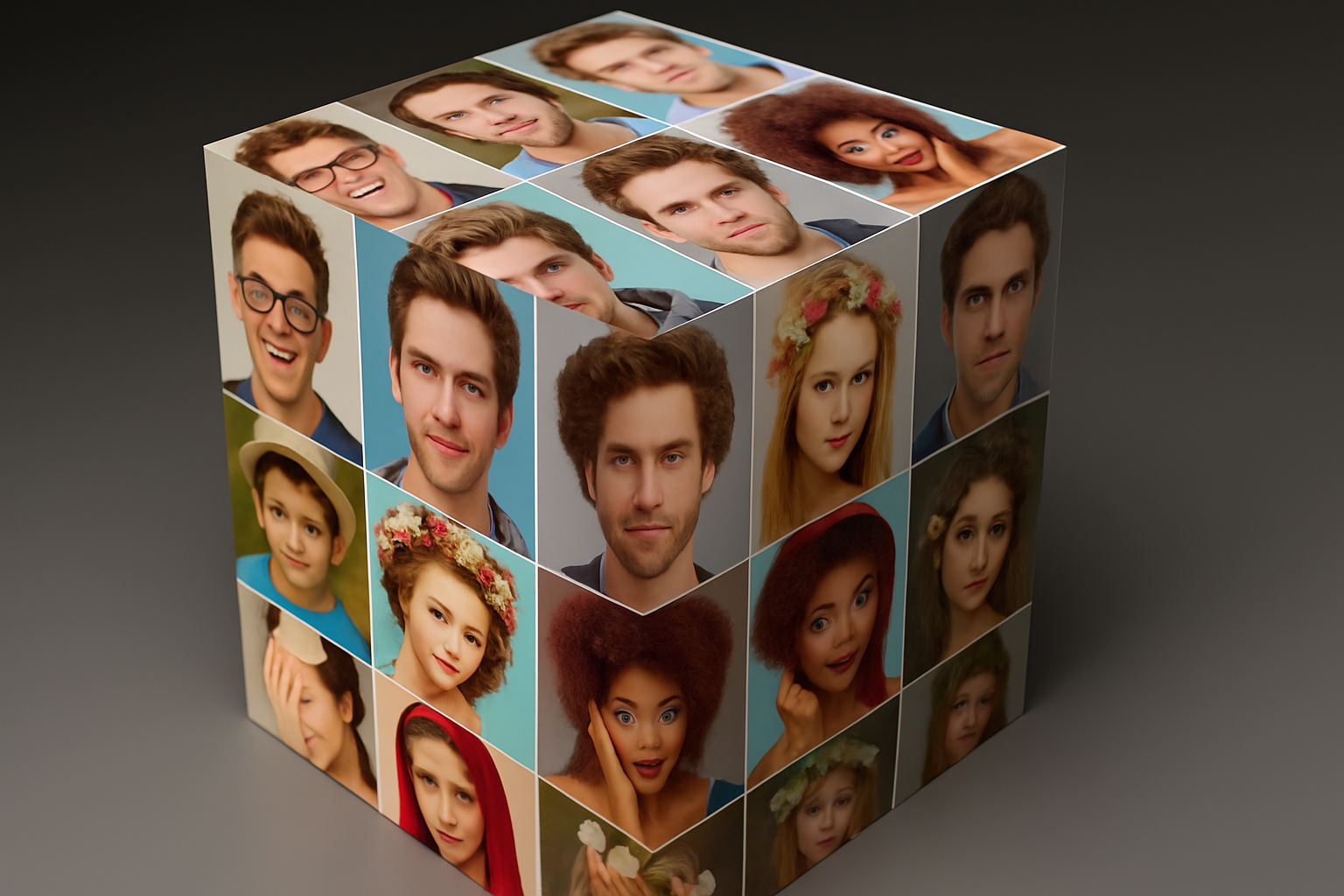
If you’ve ever dreamed of encapsulating your memories, idea board, or best photographs into a 3D piece of art, this project for creating a photo mosaic cube using Photoshop is your next challenge. This isn’t just about envisioning; it’s about manifesting conceptual creativity into a visual marvel. Whether you’re a graphic designer, photography enthusiast, or hobbyist intrigued by Photoshop’s endless possibilities, this step-by-step guide is your portal into a blend of art and technology.
Prepare Your Photo Collection
Before diving into the mesmerizing world of Photoshop, start by collecting your selection of photos. For balanced aesthetics, the quantity of your chosen photos should perfectly divide into identical dimensions. So, whether you’re eyeing a neat 3×3 nesting or a picture-flooded 4×4 array, grab those 9 or 16 favorite snapshots. A practical tip? Keep it at a maximum of 16 to avoid minuscule and indistinct images.
Get those pictures organized in a folder and reserve anticipation for a magnificent mosaic. Navigate through Photoshop’s ‘File’ → ‘Automate’ → ‘Contact Sheet II’ trickery to breathe life into our mosaic. Select your photo-filled folder, stick to the provided units and ensure not to flatten your layers for further adjustments.
Building Blocks of Your Mosaic
Crowded screens may be daunting, but multitudes of layers? A digital playground! Each photo inhabits its own layer with a snug mask perfecting its fit. Achieving precision beauty in a single portrait on your screen? Simply unlink the layer mask and photo, activating quick edits. Resize and reposition until perfection grins back.
Convert this beauty into a Smart Object. Smart Objects are Photoshop’s answer to “What if I want to change this detail later?”. They’re non-destructive marvels that let you backtrack or swap images without restarts.
Crafting the Cubic Illusion
With your mosaic ready, plunge into the phantasmagorical land of Vanishing Point to bend realities—a tile showcase fit to stun. Plot grids for each cube face independently for tighter control and supreme results. The vertical alignment, scaling, and repositioning are precision tasks demanding just the right eye for detail. Lock each photo set onto a side of the cube.
Shades and Lights—Bring Reality to Life
For that true-to-life cube, each face deserves individuality. Adjust brightness through ‘Levels’ adjustments, clipping these valuable edits to single layers. Brightness orchestrates depth—illusion controlled pixel by pixel!
The Artistic Dark Background
What stage is worthy of your artistic creation? A sophisticated, darkened gradient background that dances with the cube. Paint your backdrop with the ever-classic black and then let Photoshop add depth with a “Gradient Overlay” by tweaking angles and scaling to optimum charm.
Shadows and Reflections—The Unseen Performers
Shadows, true wielders of magic. Strategically path-lined shadows cling naturally to your cube, and Gaussian Blur elevates them to mystery status—soft yet empowering.
And let’s reflect on reflections—a subtle hint at reality often overseen yet noticeably missed. Create this mirror image, blur the narrative with Gaussian and Motion Blurs—shadows soften and expand the illusion further.
Bringing the Cube to Life
Raise your pixel saturation. Increase your color vibrancy using ‘Vibrance’ adjustments to uncover the photos’ potential, their hues casting a lively reflection onto the cube.
Zoom into craft mode, ensuring each adjustment blesses the overall scene, bringing it alive. The final silhouette? A cube that’s poised, popping vibrant nostalgia into the digital ether.
Close this singular masterpiece by sealing the top layer activity with a Smart Object translation. Layer in that Gaussian-conjured ‘Depth of Field.’ Blur in spaces where your digital revives dream.
Revel in Eternal Moments
Here we are—the sum of creative exploding into visual existence! Each photo wasn’t merely contained but given stature in a cube that boasts both art and inspired geometry. An ode to timeless craftsman’s mastery—holding static images in dynamic form.
Ever crave more pixel-playground projects or looking for your next mosaic feat? The YouTube video, deftly orchestrated, holds all these steps and more.
While mosaic cubes evoke awe and elation, don’t hesitate to let your creativity leap beyond borders. Keep experimenting, aligning, and layering; Photoshop’s palette holds infinite stories yet untold—yours to unfold.