
Adobe has opened the public beta of Firefly AI Assistant, a conversational creative agent designed to execute multi-step creative work across Adobe’s ecosystem. The shift here isn’t another text-to-image button. It’s Adobe trying to make production itself promptable: take an outcome request, plan the steps, run the tools, and keep you in control.
If that sounds like chat, but with real hands, that’s the point. Adobe’s been stacking workflow pieces across Firefly’s editing surfaces and newer conversational assistants, plus tighter Firefly-to-Creative Cloud handoffs. Firefly AI Assistant is the umbrella that tries to make those pieces behave like one system instead of a pile of features.
The story isn’t that Adobe added a chatbot.
It’s that Adobe is trying to turn repetitive creative operations, edits, variants, exports, handoffs, into a single, directed workflow you can run and revise.
What Adobe shipped
Firefly AI Assistant lives in the Firefly web experience and is positioned as an agentic layer: you describe the goal, and it orchestrates the work. That initial vision is outlined in Adobe’s intro post: Introducing Firefly AI Assistant.
In the public beta announcement, Adobe emphasizes three practical ideas:
- Natural language to multi-step execution (not just single edits)
- Workflow transparency (you can review and refine)
- Deep Creative Cloud relevance (because this only matters if it fits production)
Assistant, not a shortcut
This is the important distinction: Adobe isn’t pitching this as generate an image. They’re pitching it as run a workflow.
Think less: make a banner.
More: take this product photo, clean it, generate a few background options, prep a social pack, export the files, keep it editable.
That’s the gap between a cool demo and something your team might actually use on a Tuesday.
What it can do
Adobe’s public framing is broad (it’s a beta), but the core capability is consistent: Firefly AI Assistant can interpret a request and sequence multiple creative actions rather than forcing creators to execute each step manually.
Adobe also frames this as a combination of guided, reusable workflows and tool orchestration. In the beta, that includes Adobe-provided Creative Skills (pre-built task flows) and access to dozens of underlying creative actions inside the Firefly experience.
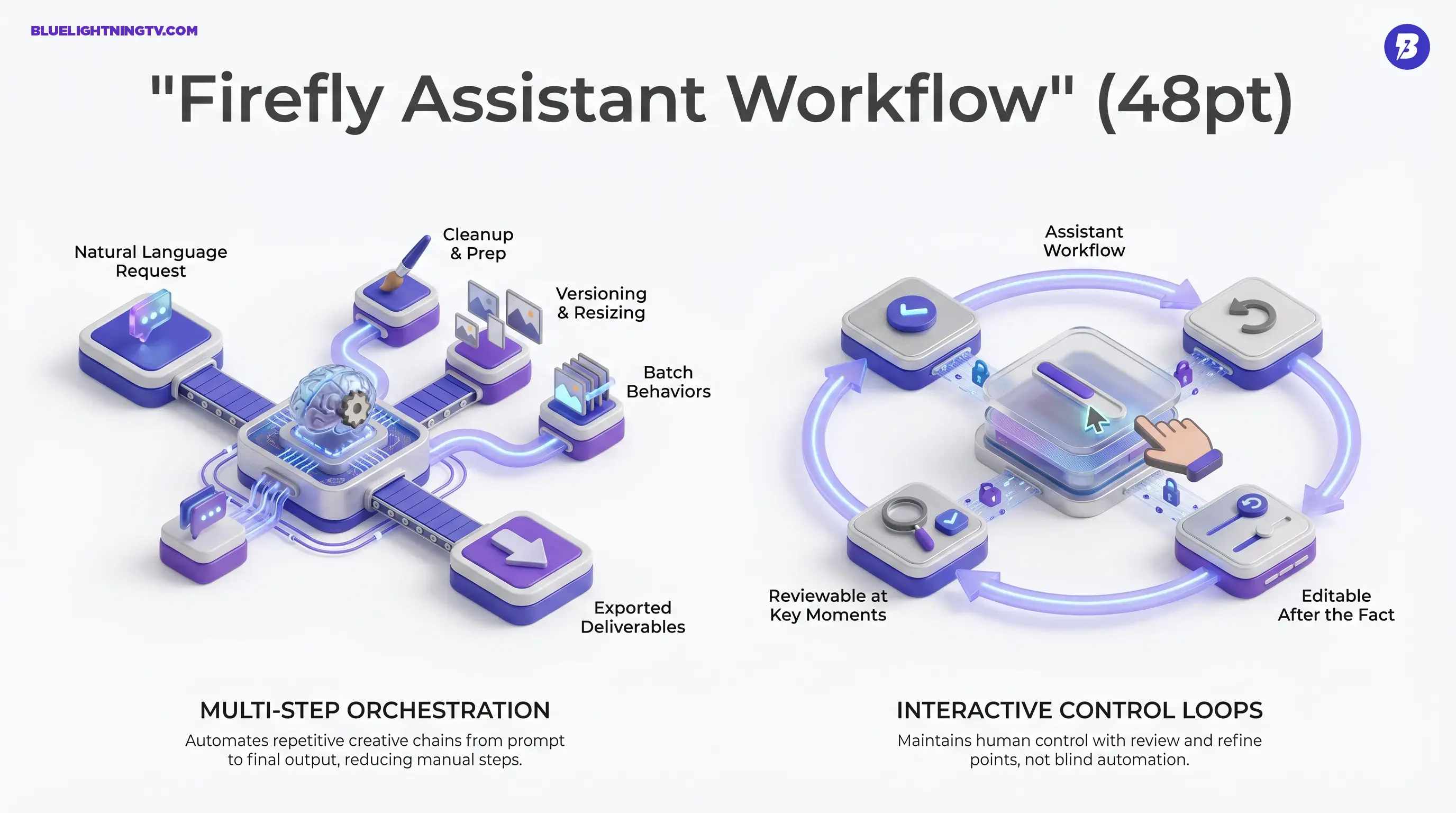
Multi-step orchestration
For high-volume creators, the pain is rarely I can’t do this. It’s I can’t do this 40 times without my brain leaking out my ears.
Firefly AI Assistant targets the repeatable sequences that pile up fast:
- Cleanup and prep (remove distractions, adjust look, refine)
- Versioning and resizing (turn one asset into many deliverables)
- Batch-style behaviors (when you’re doing the same intent across a set)
Interactive control loops
Adobe keeps saying you’re in control because that’s the adoption line in pro workflows. Creators will try automation; they won’t ship blind automation.
So the assistant is positioned as:
- step-by-step visible
- reviewable at key moments
- editable after the fact (not a locked AI output blob)
This matters because the fastest way for AI tools to get banned from a team workflow is: it changed a bunch of stuff I didn’t ask it to change.
Why Adobe’s timing makes sense
The last year of generative launches taught the market a blunt lesson: generation quality is only half the product. The other half is everything around it, revision loops, approvals, exports, consistency, and collaboration.
Adobe’s advantage is that it already owns the finishing layer for a huge chunk of the creator economy. Firefly AI Assistant is basically Adobe trying to make sure the start layer (drafting, generating, prepping) snaps into that same ecosystem cleanly.
A big tell: Adobe’s recent Firefly updates have been obsessed with control surfaces and revision survival, not just look at this cool output. Two examples that connect directly:
- AI Markup + Precision Flow inside Firefly’s image editing experience, built to reduce prompt roulette and collateral edits: New image editing features in Adobe Firefly
- Photoshop’s AI Assistant beta, which brings conversational intent into Photoshop on web and mobile (not the desktop app yet): Image editing just got smarter with AI in Photoshop and Firefly
On COEY, we previously dug into how Firefly AI Assistant is positioned to orchestrate Creative Cloud work end to end: Firefly AI Assistant Aims to Run Creative Cloud.
Firefly AI Assistant is the connective tissue play: make these experiences feel like one workflow brain.
Who benefits first
Adobe’s messaging is everyone, but the real winners are more specific: teams who ship lots of variations and live inside feedback loops.
Social and performance teams
If you’re producing a constant stream of hooks, crops, aspect ratios, and A/B variants, the assistant’s value is simple: fewer manual steps between approved direction and exported deliverables.
E-commerce and product content
Product pipelines are repetitive by design: clean, background, consistency, formatting, export. The assistant’s sweet spot is the assembly line part, especially if the workflow stays reviewable so humans can catch the almost moments.
Agencies in revision land
Agency work isn’t hard because tools are missing. It’s hard because feedback never ends.
If Firefly AI Assistant can reliably accelerate the make the change, generate options, prep versions cycle without wrecking files, it becomes a throughput tool, not a novelty.
A quick reality check
Agentic creative tooling is real, but so are the limits. A few grounded expectations creators should keep in mind as this rolls out:
| Workflow area | What improves | What still bites |
|---|---|---|
| Repetitive operations | Faster execution via chaining | You still need taste and QA |
| Targeted changes | Better intent capture plus review steps | Complex edges can still glitch |
| High-volume output | Easier variant creation | Consistency across sets is still work |
Brand accuracy doesn’t become automatic
If your workflow involves logos, packaging accuracy, regulated product visuals, or exact typography, you’re still doing human review. The assistant can reduce time-to-draft, but draft isn’t the same thing as ship.
Reliability is the whole game
The assistant’s success won’t be measured by a single impressive run. It’ll be measured by whether:
- the same request behaves consistently
- edits remain reversible and understandable
- outputs survive handoffs to other humans
If it nails those, it becomes infrastructure. If it doesn’t, it becomes a cool beta we tried once tab.
What to watch next
The public beta is the start, but the direction is clear: Adobe is trying to redefine Creative Cloud skill from knowing every tool to directing outcomes clearly.
One practical note on access: Adobe says the Firefly AI Assistant public beta is rolling out globally in Firefly, but it is limited to eligible paid plans (Creative Cloud Pro and paid Firefly plans). Adobe also includes complimentary daily generative credits for the assistant during the beta.
As Firefly AI Assistant matures, the most meaningful expansions won’t be more wow features. They’ll be:
- more reliable task chains
- deeper cross-app execution
- stronger controls for revisions and consistency
That’s the pragmatic bet: creators don’t need more magic tricks. They need fewer steps, tighter steering, and workflows that can handle the messiest part of creative work, the part where someone says, Love it, now change just one thing.