Adobe is rolling out a new conversational layer for its ecosystem: Firefly AI Assistant, a “creative agent” designed to take multi-step requests and orchestrate the right tools across Creative Cloud. Adobe’s announcement frames it as outcome-driven creation: tell it what you want, and it figures out the steps. The official overview is here: Introducing Firefly AI Assistant.
This isn’t Adobe chasing chatbot vibes for the sake of it. It’s an attempt to solve the most expensive part of creative work in 2026: the busywork between “idea” and “shippable.” And Adobe is bundling that push with two control upgrades in Firefly’s image editor, AI Markup and Precision Flow (beta), that target the exact moment most generative tools fall apart: revisions. Adobe’s post on those editing controls is here: New image editing features in Adobe Firefly.
The real story isn’t “Adobe added AI.”
It’s “Adobe is trying to make generative work survive real production loops: feedback, tweaks, approvals, exports, and handoffs.”
What Adobe shipped
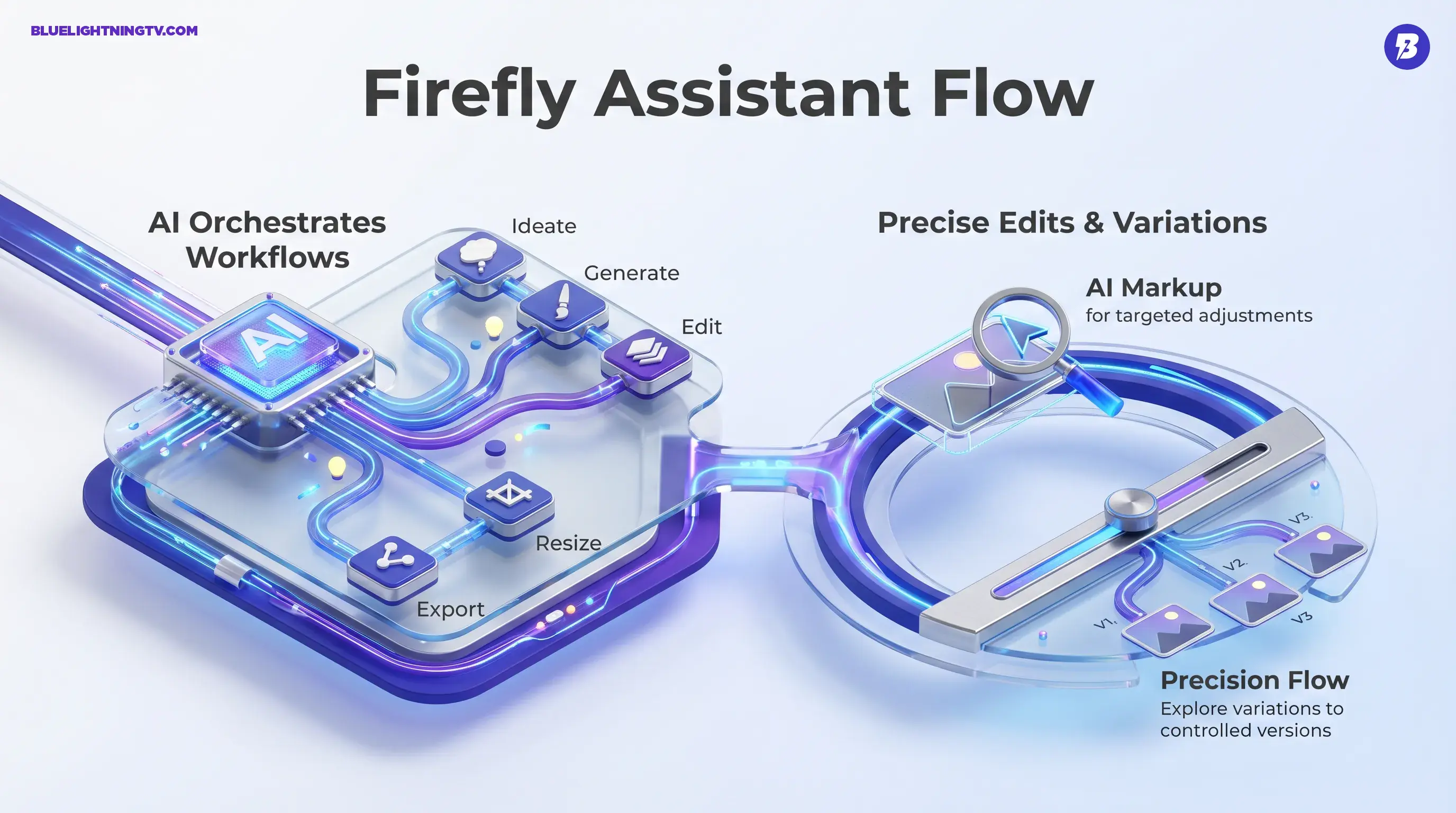
At a high level, Adobe is shipping three related ideas that reinforce each other:
- Firefly AI Assistant: a conversational agent that can plan and execute multi-step creative work, pulling capabilities from Firefly and Creative Cloud apps.
- AI Markup: “point first, prompt second” image editing: annotate regions, then instruct changes.
- Precision Flow (beta): a slider-based way to explore controlled variations from a single edit direction, aiming to reduce prompt roulette.
Firefly AI Assistant is expected to arrive as a public beta in the Firefly app on a rolling timeline. Adobe describes timing as “in the coming weeks.” Adobe’s newsroom announcement is here: Adobe’s Firefly creative agent announcement.
Assistant, not generator
A lot of generative tools start and end at “make me an image.” Adobe’s angle is different: make me a workflow.
Firefly AI Assistant is positioned as a conversational interface that can:
- Understand an outcome request (ex: “build a social pack for this campaign”)
- Ask clarifying questions when needed
- Execute multiple steps across tools (generate, edit, resize, export, version)
- Keep outputs editable in Adobe-native formats (Adobe emphasizes editability as a core principle)
If you’re a creator, this is basically Adobe saying: you shouldn’t need to memorize which panel does what when your brain is already juggling brand rules, deadlines, and feedback like “can we make it pop but also less pop.”
Why this is different
The difference isn’t that it can chat. The difference is that Adobe wants the assistant to behave like a producer:
- It sequences tasks (instead of you doing click choreography)
- It manages repetition (batch resizing, formatting, exporting)
- It tries to stay aware of the project context (so follow-ups aren’t treated like brand-new requests)
That’s the bet: less tool driving, more direction giving.
Control surfaces arrive
If Firefly AI Assistant is the “talk to your tools” layer, AI Markup and Precision Flow are the “don’t mess up my file” layer.
Generative workflows fail most often during edits, not generation. Everyone can get something cool once. The question is whether you can change one thing without the model “helpfully” changing five other things.
AI Markup: point and instruct
AI Markup lets you annotate regions directly (with markup tools) and attach instructions to those regions. The intent is to reduce ambiguity:
- “Change this background, keep the subject”
- “Brighten this area only”
- “Swap this object, not the whole scene”
This is Adobe taking a very normal human behavior, pointing at the thing you mean, and turning it into a usable signal for AI editing.
Precision Flow: explore variations
Precision Flow (beta) is built around a slider that explores a controlled range of variations for an edit direction. Instead of rewriting prompts repeatedly, you adjust the intensity of an edit (more subtle or more dramatic) while staying closer to the original.
This targets a real pain point: the “I liked it, but…” zone.
- I liked it, but warmer
- I liked it, but less intense
- I liked it, but keep the shadows
- I liked it, but stop changing the entire vibe
Where teams feel it
Adobe’s framing is broad (designers, marketers, creators), but the practical winners are pretty specific: anyone shipping lots of variations under feedback pressure.
That includes:
- social teams building multi-format asset packs
- performance marketers producing constant variants
- agencies doing approvals across multiple stakeholders
- in-house brand teams trying to keep output consistent across a campaign
This is less interesting if you make one hero image a week. It’s more interesting if your job is basically “make 80 deliverables and keep them coherent.”
Workflow reality check
Here’s the shift Adobe is aiming for, less time in the “work about the work” loop.
| Workflow moment | Old friction | What Adobe’s pushing |
|---|---|---|
| Multi-step requests | Manual tool hopping | Assistant orchestrates steps |
| Targeted revisions | Prompt ambiguity + masking time | AI Markup narrows the target |
| Iteration loops | Rewrite prompts, regenerate batches | Precision Flow explores a range |
What won’t vanish
This is where we keep it honest. Even if Firefly AI Assistant is genuinely useful, a few realities stay true.
Brand accuracy still needs QA
If your work involves logos, packaging, product details, regulated claims, or exact typography, you’re still reviewing with human eyes. Assistants can speed up production, but they don’t magically inherit your brand’s tolerance for “almost.”
Complex edges stay tricky
Hair, reflections, translucency, motion blur, these are the classic trouble spots in generative editing across the board. AI Markup should reduce collateral damage, but it’s not a guarantee of perfection.
Consistency is a bigger system
Assistant-driven workflows can help create and adapt assets, but true cross-campaign consistency still depends on:
- shared brand kits and templates
- disciplined review and approvals
- (often) style anchoring via tools like custom models
If you want related context on Adobe’s push to reduce drift, COEY covered Firefly’s Custom Models direction here: Adobe Firefly Custom Models Beta Tackles Brand Drift.
What to watch next
The beta label matters less than the adoption behavior Adobe is chasing. If Firefly AI Assistant works reliably, it changes what “being good at Adobe” means.
Instead of “I know every menu,” the advantage becomes:
- I can direct outcomes clearly
- I can iterate fast without breaking files
- I can keep approvals moving without drowning in exports
And that points to a bigger trend across generative tools: the model is only half the product. The workflow layer, what happens before and after generation, is where tools become daily drivers or get demoted to “cool demo, never used again.”
For now, Firefly AI Assistant plus AI Markup plus Precision Flow look like Adobe making a very specific bet: creators don’t need more magic tricks. They need fewer steps, tighter control, and edits that survive feedback.