PixVerse has dropped PixVerse V6, a generative video model aimed squarely at the we need three ad concepts by lunch crowd and it is live now on the PixVerse platform. The headline upgrades match what PixVerse is publicly claiming: native 1080p, multi-shot sequences from one prompt, and native audio generation that includes lip-sync for spoken dialogue. PixVerse’s own launch coverage via PR Newswire frames V6 as a step forward for creative and agentic workflows: PixVerse Launches V6.
If you’ve been watching gen-video evolve over the past year, V6 isn’t a random grab bag of features. It’s a very specific bet: creators don’t just want prettier frames, they want fewer steps between idea and publishable draft. Audio plus shot changes plus higher-res output is the combo that makes that happen.
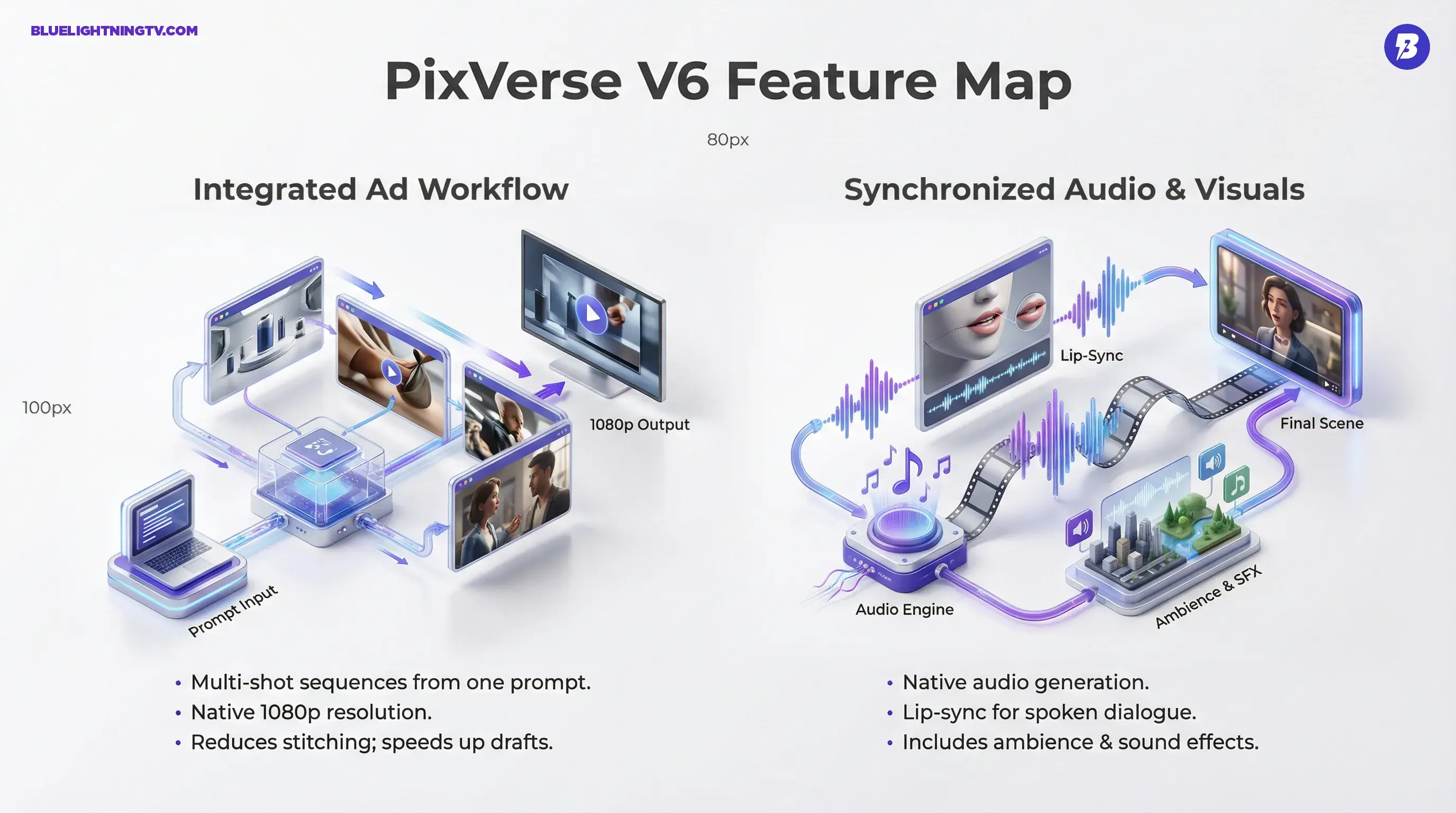
What shipped in V6
PixVerse V6 is positioned as a model upgrade, but the practical story is workflow compression. Instead of stitching together multiple generations and multiple tools, V6 tries to deliver a sequence with sound that can actually survive a review.
Here’s the feature set as PixVerse and early demos describe it:
1080p by default
PixVerse is marketing V6 as capable of 1080p output, and demos around launch show V6 generating short audiovisual clips at that resolution. In practice, available duration and credit cost can vary by mode, but the core claim here, native 1080p, is consistent with PixVerse’s public messaging.
Multi-shot from one prompt
V6 can generate multi-shot sequences inside a single output from one prompt, including fast cut style transitions like wide to close-up, scene A to scene B. This multi-shot positioning is explicitly part of PixVerse’s V6 launch messaging and is widely reflected in early user demos.
Native audio plus lip-sync
PixVerse is joining the biggest trend in AI video right now: audio isn’t optional anymore. PixVerse describes V6 as generating native synced audio alongside the video, including ambience and sound effects, and it is marketed as supporting lip-sync when you prompt spoken lines.
That said, treat lip-sync like a capability with a spectrum: it is real and demonstrable, but results vary with shot type, angle, and how close the camera is.
The real shift isn’t AI can make video.
It’s AI can make something that plays like a scene, not a silent demo.
Cinematic controls (more directable)
PixVerse is also leaning into director knobs, including camera and lens style control in prompting. Third-party documentation and integrations describe V6 as offering more explicit camera movement and lens controls than prior versions, aligning with PixVerse’s more steerable direction.
Why this release matters
Generative video has hit an awkward phase: visuals have gotten dramatically better, but the production reality is still messy. Most teams still do some version of:
- generate silent clips
- pick the least broken one
- rebuild audio elsewhere
- fake continuity with edits
- pray the client doesn’t ask for one small change
PixVerse V6 is trying to reduce that pain in three key places.
It reduces stitch tax
Multi-shot generation means you’re spending less time playing timeline surgeon, cutting together separate clips that don’t quite match. For short-form ads especially, the stitch tax isn’t creative work, it’s repair work.
It makes drafts feel complete
A clip with sound gets taken more seriously. Not because sound is magic, but because humans evaluate media emotionally and audio carries half the emotion.
This is the same reason native audio has become the arms race feature across gen-video. If you want related context from our own coverage of how audio is reshaping the space, here’s our earlier post on the broader shift: Kling 3.0 Native Audio Could Change AI Video.
It’s built for iteration, not perfection
PixVerse is clearly optimized for rapid variation: regenerate, tweak a line, try a new hook, adjust tone. That’s not a filmmaker fantasy workflow, it’s how modern ad creative actually gets made, especially in performance marketing.
Who benefits (and why)
PixVerse V6 is not trying to be every kind of video tool. It’s aiming at the creators and teams who live in fast cycles and high volume.
Performance marketers
If your job is to test hooks and angles, V6’s value is simple: more shots on goal in less time, with outputs that are closer to client-reviewable because they already include audio and edits.
Social-first creative teams
Multi-shot plus audio maps directly to how social content is structured: quick scene changes, punchy pacing, and sound doing the heavy lifting.
Freelancers and micro-agencies
When you’re small, switching tools is expensive, not just in cost, but in time and focus. A platform that can generate video that already plays is a leverage multiplier, even if you still finish in an editor.
Prototype-heavy creatives
If you’re pitching concepts, V6 is the type of tool that can produce animatic-level ads that feel closer to a real spot than a storyboard.
Feature snapshot
| What V6 adds | Why it’s useful | What to watch |
|---|---|---|
| Native 1080p | Holds up better after captions, crops, compression | Fine detail can still vary shot-to-shot |
| Multi-shot output | Sequences, not isolated clips | Continuity can drift on complex transitions |
| Audio plus lip-sync | Draft feels finished faster | Voice quality and editability still matter |
| Camera and lens controls | More directable, more repeatable look | Advanced controls can be prompt-sensitive |
The pragmatic caveats
PixVerse V6 is a meaningful step, but it doesn’t remove the laws of physics or the laws of client feedback.
Audio is powerful and messy
Native audio is a workflow win, but it introduces a real question: how editable is the sound after export? Many tools still output a single baked track, which is perfect for speed and annoying for precision.
If you need clean stems, dialogue, music, SFX separated, you may still end up rebuilding audio in post. V6’s value is that your first draft arrives with a sound world, not that it replaces finishing.
Lip-sync is good enough until it isn’t
Basic lip-sync can be totally fine for UGC style delivery and quick character beats. But if you’re doing close-up dialogue, the bar rises fast. The make or break isn’t does it move the mouth, it’s whether it matches timing, emotion, and camera angle without falling into uncanny valley.
Multi-shot coherence is the real test
Multi-shot generation is easy to demo and hard to ship reliably. The question isn’t whether it can cut from scene A to scene B, it’s whether it can do it repeatably, while keeping:
- character identity stable
- wardrobe consistent
- props and product shapes correct
- lighting logic intact
That’s where creators will either adopt V6 as a daily driver or treat it as a concept machine.
Related COEY coverage
If you want another PixVerse workflow signal from earlier this year, see: PixVerse R1 Turns AI Video Into Live Worlds.
The bigger category signal
PixVerse V6 is another strong data point that gen-video is moving away from clip generators and toward compressed production tools. The competitive edge is no longer just realism. It’s whether the output behaves like something you can actually use:
- sequence structure (multi-shot)
- scene completeness (audio)
- publishable baseline (1080p)
And importantly: V6 is aimed at the exact place gen-video gets adopted first, ads and social, where speed, iteration, and good enough to test beats perfection.
PixVerse’s own platform entry point is here: app.pixverse.ai. For teams already living in rapid creative cycles, V6 looks like a serious attempt to turn AI video from asset roulette into draft generation and that’s the kind of progress that actually changes output, not just headlines.