Google just shipped two updates that land squarely in the stop rebuilding the same thing over and over category: Stitch, a Gemini powered UI generator that can move designs into editable Figma layers, and NotebookLM Video Overviews, which turns your sources into narrated, slide style video summaries.
Google’s Stitch announcement is here: From idea to app: Introducing Stitch, a new way to design UIs.
These are different products, but the vibe is consistent: reduce the distance between idea and something your team can react to. Not in a one prompt replaces your job way. In a can we please skip the busywork phase way.
What shipped (quickly)
Before we get into implications, here’s what’s actually new:
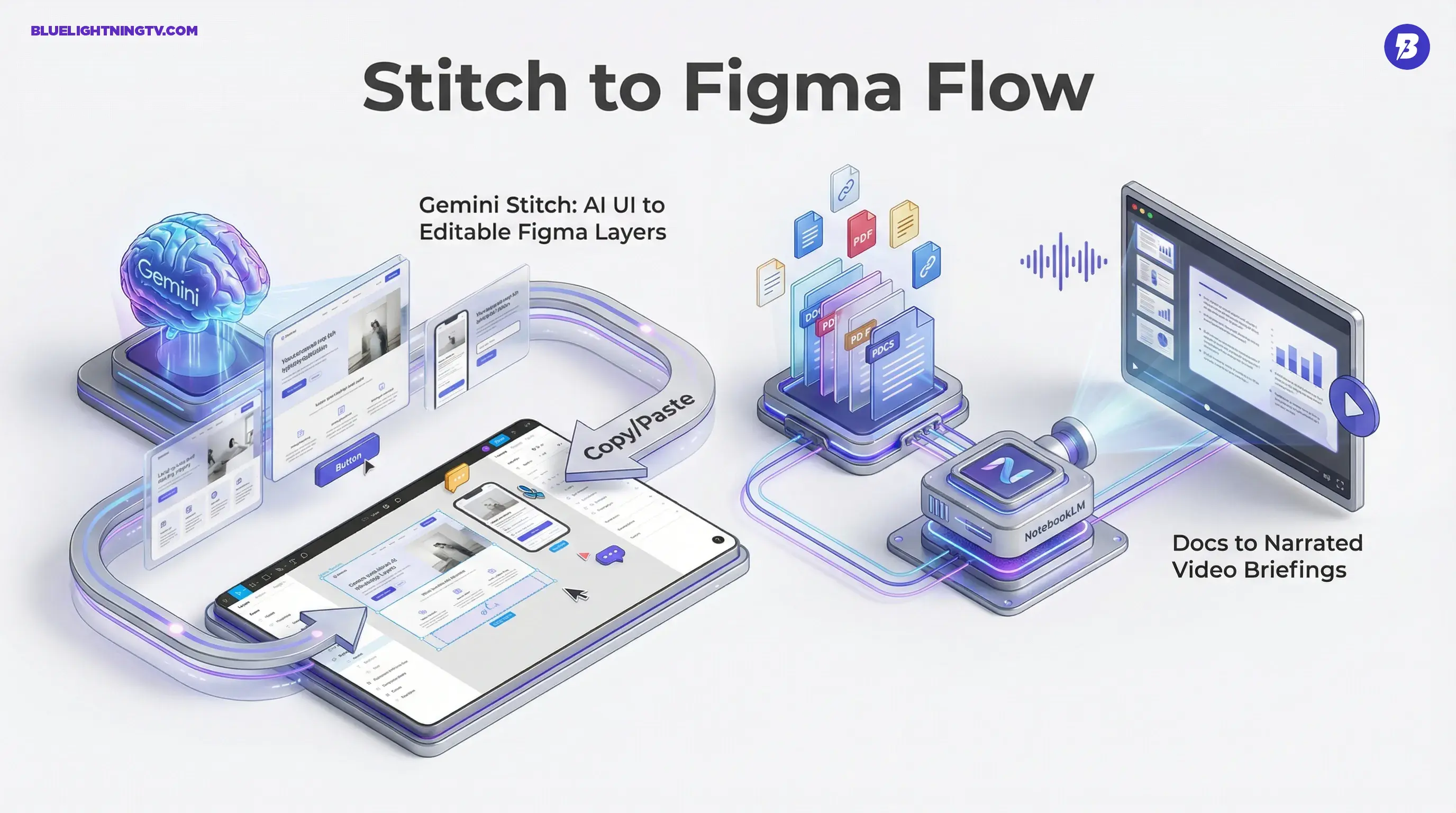
- Stitch: prompt (or reference image) to UI design to paste or copy into Figma as editable layers (and or generate frontend code)
- NotebookLM Video Overviews: sources (docs, PDFs, notes, links, etc.) to AI narrated slide style video overview with visuals
They’re not flashy for the sake of it. They’re workflow tools that target two bottlenecks creators hit constantly: UI iteration and knowledge packaging.
Stitch, in plain terms
Stitch is Google’s play for the earliest stage of product and design work: the part where someone says we need a landing page, app flow, or settings screen, and everyone loses half a day just getting to a first draft.
According to Google’s write up, Stitch generates UI from natural language descriptions or image inputs, and it supports moving the result into tools like Figma for refinement. It’s built on Gemini models, positioned as a bridge from concept to something shippable enough to review.
The key detail is that Stitch is not just outputting a pretty screenshot. It’s aimed at producing a design artifact you can keep working on.
Why Figma export is the real headline
A lot of AI UI tools can generate layouts. The failure mode has been predictable: you get an image that looks decent, and then you rebuild it anyway in your real design tool.
Stitch’s Figma workflow matters because it’s trying to cut out the rebuild tax. In Stitch’s Standard (Rapid) mode, you can copy and paste into Figma and get a structure you can continue editing there.
- layers are editable
- elements can be moved, restyled, or replaced
- teams can comment, branch, and iterate using normal Figma workflows
That’s the difference between AI for inspiration and AI in the pipeline.
What Stitch seems best at (right now)
Based on how Google frames it, Stitch is built for:
- landing pages and marketing pages (structured sections, CTAs, common layouts)
- app screens and flows (nav plus content blocks plus forms)
- fast variant generation (A and B layout directions, not pixel perfect polish)
If you’re expecting deeply brand specific systems work like design tokens, component libraries, or accessibility rules baked in, you’ll likely still do that in Figma. Stitch is more like: get me to a credible starting point, fast.
What Stitch changes for teams
This is where things get interesting. Stitch is not design automation. It is handoff compression.
Fewer steps between roles
Historically, early UI work involves a chain:
- founder or PM writes a doc
- designer interprets it into wireframes
- designer makes comps
- someone asks for changes
- designer makes another version
- dev asks questions
- designer clarifies again
Stitch will not eliminate that, but it can reduce how many of those cycles are spent just producing the first thing people can point at.
More drafts, earlier feedback
The practical upside is volume: you can generate multiple directions quickly, which changes the conversation from:
- Is this the design?
to
Which direction is right, and why?
That is a healthier creative loop, especially for small teams.
The pragmatic caveat
AI generated UIs can also create a new kind of mess: false completeness.
A design can look done while still being unclear on:
- edge cases
- content strategy
- real data constraints
- accessibility
- interaction details
So Stitch helps most when teams treat it as draft acceleration, not as a final UI spec.
NotebookLM’s Video Overviews
NotebookLM’s Video Overviews feature tackles a different pain: turning dense info into something people will actually consume.
Google’s overview of the update is here: NotebookLM updates: Video Overviews, Studio upgrades.
The idea is simple: you already have sources, and NotebookLM can generate an AI narrated, visual explainer that summarizes the key points.
What video means here
This is not AI b roll cinematic montage. It is closer to:
- a narrated slide deck
- a motion briefing
- an explainer format with text and visual emphasis
The win is that it takes something that’s usually shared as a doc and ignored and turns it into something that feels like a quick internal update.
Why this matters now
Creators and teams are drowning in documentation:
- strategy docs
- campaign plans
- onboarding notes
- meeting recaps
- research dumps
Most of that does not need to become a polished YouTube video. It needs to become a watchable briefing that aligns a team quickly. Video Overviews is a direct shot at that use case.
If the last decade was everything becomes a doc, this is the start of docs becoming media objects.
The shared signal
Stitch and Video Overviews look unrelated on the surface, but they point to the same product strategy.
1) AI is moving into first draft roles
Not the final deliverable. The first usable artifact:
- first mock
- first summary
- first layout
- first briefing
That’s where AI saves time without demanding perfection.
2) Exports and interoperability matter more than magic
Stitch gets more valuable because it lands in Figma.
NotebookLM gets more valuable because it turns sources into shareable formats.
In 2026, the best AI features are not the ones that generate. They are the ones that connect.
3) Workflows are the competitive arena
Model quality is important, but creators feel:
- how fast they can iterate
- how cleanly work moves between tools
- how much rework gets eliminated
Google is clearly trying to own more of that middle layer: the messy space between idea and production.
At a glance comparison
| Update | What it outputs | Why creators care |
|---|---|---|
| Gemini Stitch | UI mockups plus Figma editable design layers (via copy and paste) and optional frontend code | Faster prototype cycles, less rebuild time |
| NotebookLM Video Overviews | AI narrated slide style video summaries grounded in your sources | Docs become watchable briefings, faster alignment |
What to watch next
A few practical questions will decide whether these features become daily drivers or cool demo used twice tools.
For Stitch
- How clean is the Figma handoff? Layer structure and editability are everything.
- Can it respect brand systems? The moment it can follow tokens and components, adoption spikes.
- Does it generate useful code? Code output is only valuable if it’s maintainable, not just it runs.
For Video Overviews
- How controllable is the narrative? NotebookLM supports customization prompts, but creators will still want tighter pacing and emphasis controls.
- How well does it cite sources? Trust increases when viewers can trace claims back to inputs.
- Does it fit team sharing habits? If it’s easy to share where teams already work, it sticks.
Bottom line
Stitch is a meaningful step toward AI generated UI that does not collapse into a screenshot dead end, especially because its Standard (Rapid) mode is designed to copy and paste into Figma as editable layers and continue the workflow. NotebookLM Video Overviews takes the endless river of docs and turns it into a format people will actually watch, which is a surprisingly big deal for teams trying to stay aligned without scheduling yet another meeting.
Neither tool replaces craft. But both push in the direction creators actually want: less grunt work, faster iteration, and fewer can you turn this into something visual moments clogging the week.