Runway’s new Gen-4.5 is here, and the headline isn’t “AI video is cool now.” The headline is image-to-video is getting dependable enough to support real storytelling without falling apart mid-shot.
Runway’s overview and access point for Gen-4.5 is on their docs page here, and this release is also tied to a bigger distribution move: Gen-4.5 is available inside Adobe Firefly as part of Adobe and Runway’s partnership here.
That combination matters. Runway is improving the model where creators feel the pain most (consistency plus motion coherence), while Adobe is making sure the model lands where production actually happens (inside the ecosystem teams already use to ship).
What shipped, exactly
Gen-4.5 is a Runway video model built for Text-to-Video and Image-to-Video workflows, with a clear focus on usable motion, better prompt adherence, and fewer continuity glitches across frames.
Runway’s own guidance for prompting Image-to-Video makes the intent clear: start from a single still, then steer motion, camera behavior, and progression with text prompts, without losing the original image’s identity anchors here.
If you’ve used earlier image-to-video tools, you already know the core failure modes:
- characters subtly “face swap” themselves every second
- logos drift into unreadable hieroglyphs
- sleeves and hands do the elastic worm
- backgrounds crawl like they’re alive
Gen-4.5 doesn’t magically delete those problems (this is still generative video), but it’s clearly engineered to reduce the most common dealbreakers.
Consistency is the feature
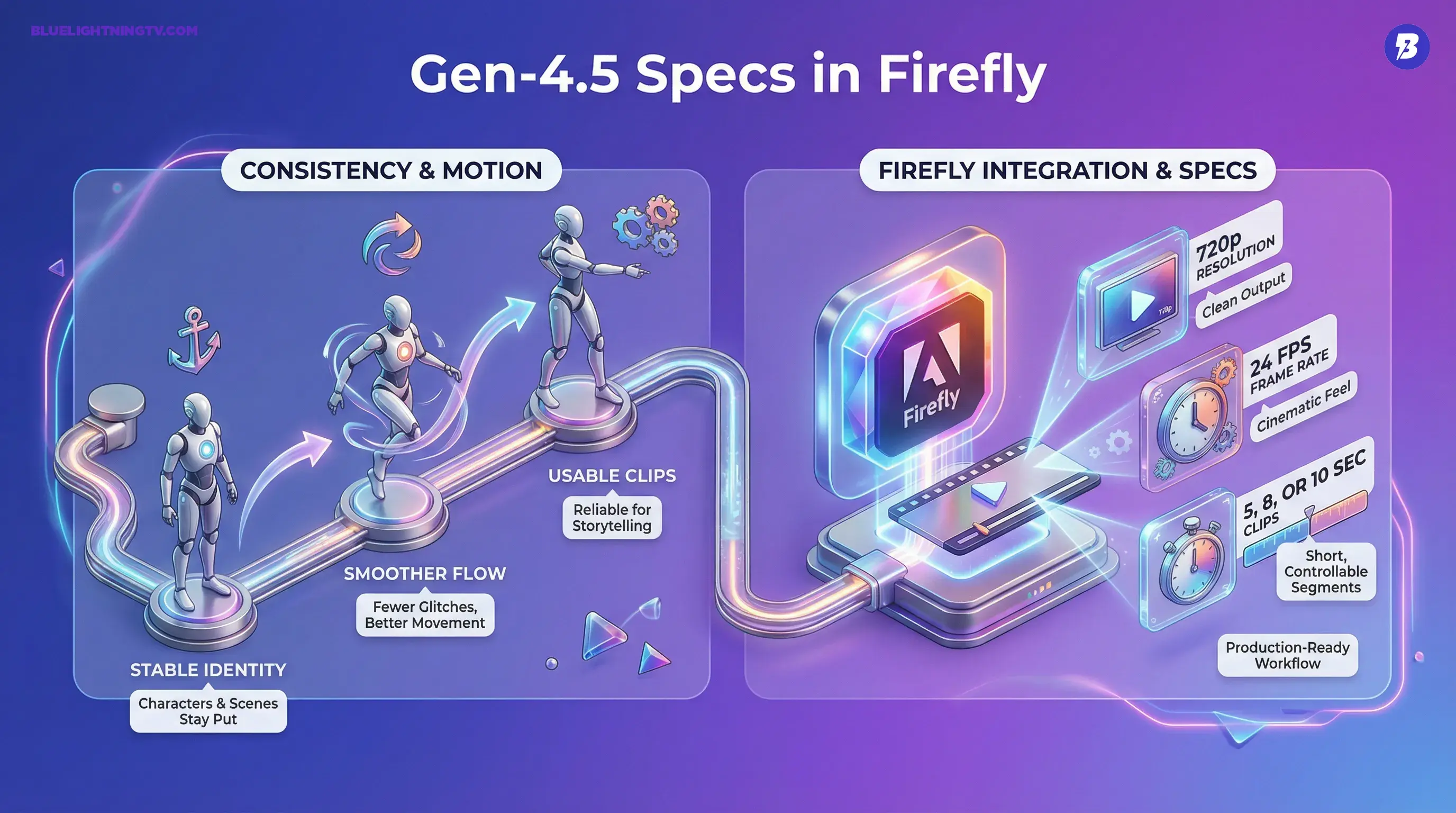
The most important improvement isn’t some new cinematic buzzword, it’s identity staying put.
For creators, “consistency” means:
- the same character looks like the same character
- the wardrobe doesn’t mutate
- the environment doesn’t re-roll itself every few frames
- objects keep their rough shape and placement as motion happens
That sounds basic until you remember how many AI video clips still look like a dream you can’t quite explain the morning after.
In 2026, the bar is shifting from “looks cool” to “holds up across revisions.”
Gen-4.5 is a step in that direction.
Motion control, without math
Gen-4.5 is also about steering motion with less wrestling. This is where image-to-video lives or dies: if the model can’t transition between frames cleanly, you don’t get “video,” you get a slideshow with confidence issues.
Runway positions Gen-4.5 around stronger motion quality and temporal behavior in both Text-to-Video and Image-to-Video. Practically, that shows up as:
- fewer jittery micro-jumps
- smoother camera movement
- more believable subject motion (especially when the prompt asks for a clear action)
This doesn’t replace keyframing, but it does reduce the number of takes you burn just trying to get something that’s not visibly broken.
Quick reality check
Even with better coherence, creators should still expect weak spots in:
- fast motion plus occlusion (hands crossing faces, hair whipping, crowds)
- highly specific branded geometry (exact product silhouettes)
- complex reflections (mirrors, shiny packaging, eyewear)
The difference is you’re more likely to get a good enough to cut clip faster, especially when you’re generating short segments meant to be assembled, not one perfect continuous shot.
Firefly distribution matters
Runway improving Gen-4.5 is one story. Adobe putting it inside Firefly is the other.
Adobe’s product page frames the partnership model approach clearly: bring Runway into Firefly so creators can generate video concepts in a familiar workspace, then move into the Creative Cloud finishing pipeline (Premiere Pro, After Effects, etc.) without the constant export and import shuffle here.
If you want the COEY take on what this integration changes in real workflows, see our earlier coverage here.
This isn’t about one app to rule them all. It’s about reducing the friction that kills adoption:
- tool-hopping
- asset sprawl
- version confusion
- broken handoffs between “AI clip” and “real edit”
The model is important. The workflow is what makes it usable.
Specs: production-shaped limits
Inside Firefly, Adobe’s documentation for Runway video models shows constraints that are very telling: Gen-4.5 is positioned for short, controllable clips you can assemble into edits, not infinite-length scenes. In Firefly’s Runway documentation, outputs are 720p at 24 fps in a 16:9 widescreen format, with 5, 8, or 10 second duration options here.
That’s not a drawback, it’s an honest reflection of where AI video is strongest right now: shot building, not entire films.
What Gen-4.5 is good for
This release is most relevant for teams who need repeatable output, not just occasional viral weirdness.
Campaign variant engines
If you’re generating multiple cutdowns, angles, or hooks from the same base image, Gen-4.5’s consistency work directly targets your biggest risk: Version B doesn’t match Version A and now the campaign looks stitched together.
Motion storyboards that actually move
Static boards are fine. But motion boards get stakeholder buy-in faster because people can feel pacing, energy, and framing. Image-to-video is becoming a legit middle layer between deck and shoot.
Short-form content pipelines
If your output is TikTok Reels Shorts pacing (fast, punchy, lots of micro-moments), you don’t need 60-second generations. You need a handful of 5 to 10 second clips that cut cleanly.
Runway vs. Firefly: a practical view
Here’s the real decision most teams will make: do you generate in Runway directly, or in Firefly?
| Need | Runway direct | Runway via Firefly |
|---|---|---|
| Fast model access | Native Runway workflow, built for video generation | Access depends on Firefly plan and org rollout |
| Creative Cloud handoff | Manual export and import, file management on you | Smoother path into Adobe’s ecosystem |
| Team workflow | Great for individuals or video-first teams | Great for Adobe-centered teams and approvals |
What to watch next
Two things determine whether Gen-4.5 is a nice update or a real production shift.
1) Can it survive iteration?
The first generation is rarely the one you ship. The win is when the model stays stable enough that you can request tweaks without detonating continuity.
2) Can Adobe deepen the pipeline?
Gen-4.5 in Firefly is step one. The bigger story is whether this becomes a true pro workflow: tighter versioning, project continuity, and controls that feel closer to editing than regeneration.
Because creators don’t just need better generations. They need less chaos between generations.
Bottom line
Runway Gen-4.5 is a meaningful move toward image-to-video you can rely on for consistent characters, stable scenes, and cleaner motion, and the Adobe Firefly integration turns it from a video nerd tool into something that can actually show up in mainstream creative production.
Not magic. Not hype. Just a practical step forward in the direction creators keep asking for: less drift, more control, faster shipping.