Adobe just tightened the loop between “I need one more shot” and “fine, we’re shipping” by pushing more Firefly-powered features directly into Premiere Pro and After Effects. The headline is workflow: fewer app hops, fewer exports, and fewer “we’ll fix it later” promises that turn into late-night rotoscoping. Adobe’s official announcement is here.
Instead of positioning AI as a separate playground, Adobe is doing the unglamorous thing that actually matters: putting AI inside the timeline where editors already live. If you’ve ever watched an edit stall because of missing b-roll, a tracking fail, or a “can you just remove that thing?” note, this update is aimed directly at that pain.
What actually shipped
This rollout clusters into three creator-relevant upgrades:
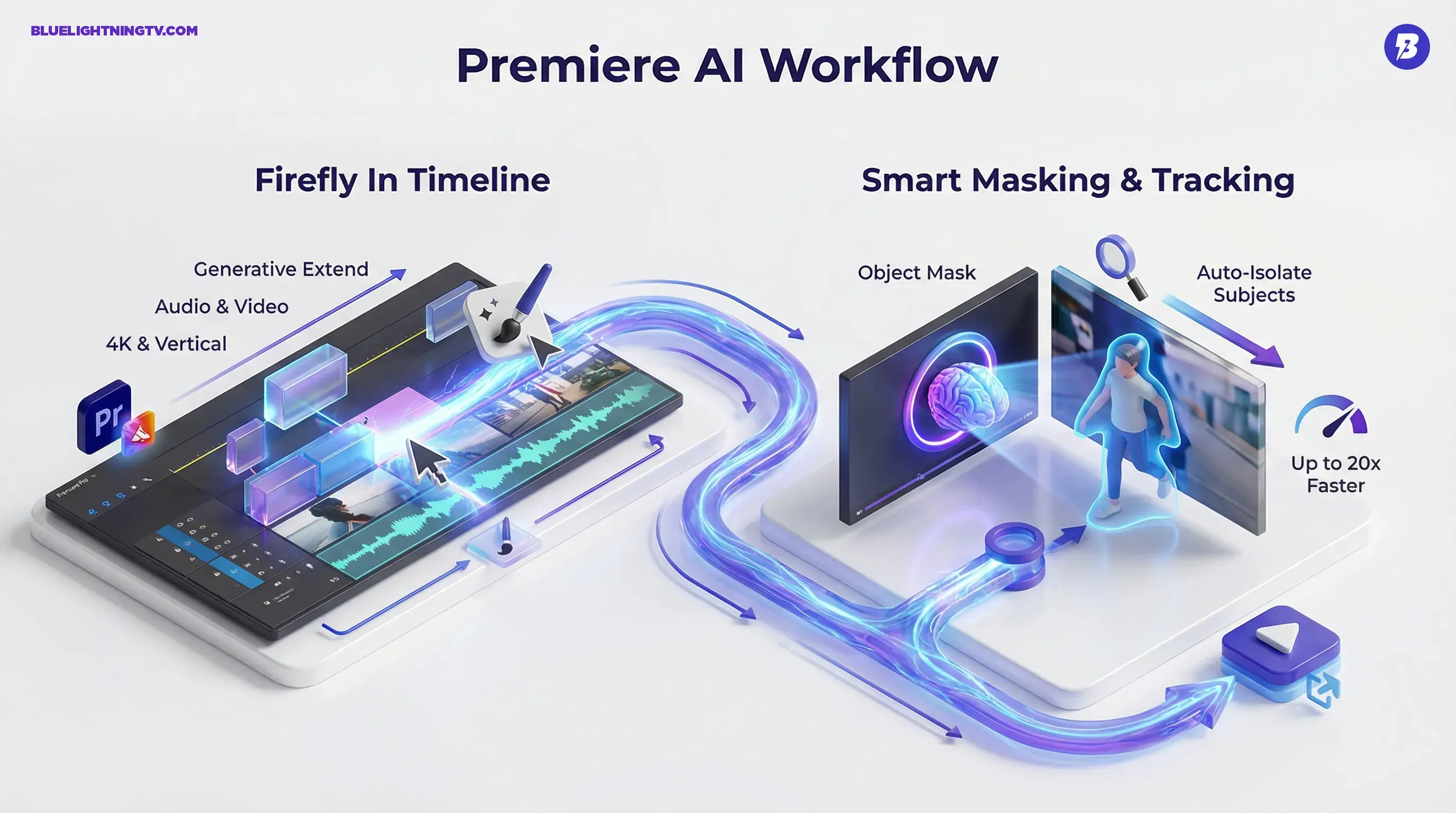
- Firefly-powered video tools land in Premiere Pro (including Generative Extend, plus other AI workflow features Adobe groups under its Firefly umbrella)
- Masking and tracking speed up (Premiere gets smarter about isolating subjects)
- After Effects gets major motion design upgrades (including new 3D and vector workflow improvements that reduce tedious setup)
It’s not a magic wand. It’s Adobe trying to cut down the “tiny chore that becomes a two-hour detour” problem.
The real shift: generative AI isn’t being treated as a separate step anymore. It’s becoming part of the normal edit.
Firefly inside Premiere Pro
The biggest practical win here is how Adobe is treating generative features: less “go somewhere else, export, re-import,” more “stay in the edit.”
One flagship example from Adobe’s announcement is Generative Extend in Premiere Pro, powered by Adobe’s Firefly Video Model. It lets you extend the beginning or end of a clip to cover gaps, smooth transitions, or lengthen a shot for timing. Adobe also says Generative Extend can extend both video and audio, and that it supports 4K and vertical video formats.
The “handoff” problem
Most AI video workflows still look like this:
- Generate somewhere else
- Download the clip
- Rename it (badly)
- Import it
- Realize it’s the wrong aspect ratio
- Repeat until morale improves
Adobe’s move is to collapse that loop by putting Firefly-powered generation closer to where editors work.
Why editors care
Because missing footage is rarely cinematic. It’s usually:
- an establishing shot you didn’t shoot
- a filler transition to make timing work
- a generic cutaway to hide a jump
- a patch for a client-requested change that arrived after the shoot
This is where AI-generated extensions and gap-fill tools are genuinely useful: not as “the whole video,” but as coverage to keep the timeline moving.
Masking gets more usable
Premiere Pro’s most meaningful upgrade in this cycle is the push to make masking feel less like punishment.
Adobe is shipping Object Mask, an AI-assisted tool designed to isolate and track subjects faster than older mask workflows. In Adobe’s January 2026 materials, Object Mask works as a quick select-and-track workflow in the Program Monitor, generating and tracking a mask on the chosen subject.
If you want Adobe’s technical breakdown of the feature behavior, their docs are here.
Object Mask in practice
Object Mask is built for recurring, high-volume tasks like:
- blur faces in street footage or UGC cuts
- isolate a subject for a selective grade or relight
- apply an effect to one moving element (glow, outline, defocus)
- handle revision notes without a full After Effects roundtrip
Adobe also says its redesigned and updated shape mask tracking can be dramatically faster than prior workflows, claiming up to 20x faster mask tracking in some cases.
After Effects gets a boost too
After Effects is still the finishing tool when work needs to be precise, but Adobe is clearly trying to reduce the “AE or nothing” bottleneck by improving core motion design building blocks.
In this release cycle, Adobe highlights major upgrades including:
- Native 3D parametric shapes (meshes) you can build directly inside After Effects
- Improved vector workflows, including SVG import as native shape layers and better preservation of gradients and transparency when converting Illustrator layers
- Substance 3D materials access (Adobe cites over 1,300 free materials)
- Variable font animation via the Text Animator system
These changes are less about “one-click VFX” and more about shaving time off the repetitive setup work that motion teams do constantly.
What this changes in real teams
For motion teams and editors who bounce between Premiere and AE, the win isn’t just speed, it’s fewer handoffs and fewer specialists needed for routine fixes.
That matters in modern production because the average “video team” is often:
- one editor
- one designer who’s also the editor
- a producer who’s also writing the copy
- a Slack channel full of last-minute notes
AI doesn’t remove the need for skill. But it can remove the worst kind of busywork.
Quick comparison
| Workflow need | Old reality | What Adobe is pushing |
|---|---|---|
| Fill gaps fast | Generate elsewhere, download/import | Firefly-powered generation and extensions inside Premiere |
| Subject isolation | Manual masks + tracking cleanup | AI-assisted Object Mask + faster mask tracking |
| Cleanup revisions | AE roundtrips for “small” notes | More routine work stays closer to the edit, with AE getting stronger motion design foundations |
What to watch next
Adobe’s direction is getting clearer: Firefly becomes the generative layer, Creative Cloud becomes the control layer. That strategy is already visible across recent Firefly moves, including the broader push to make Firefly feel like a connected workspace rather than a separate AI destination.
If you want related context on Adobe’s recent momentum, we covered Firefly’s browser-based editing push in Firefly Web Beta Levels Up With Real Editing Tools.
The important question isn’t “can it generate video.” Plenty of tools can do that. The question is:
Can it survive production? Can it survive feedback? Can it survive Tuesday?
This update doesn’t pretend AI replaces editors. It’s something more useful: Adobe trying to make the most annoying parts of editing less annoying, right inside the tools creators already use.