
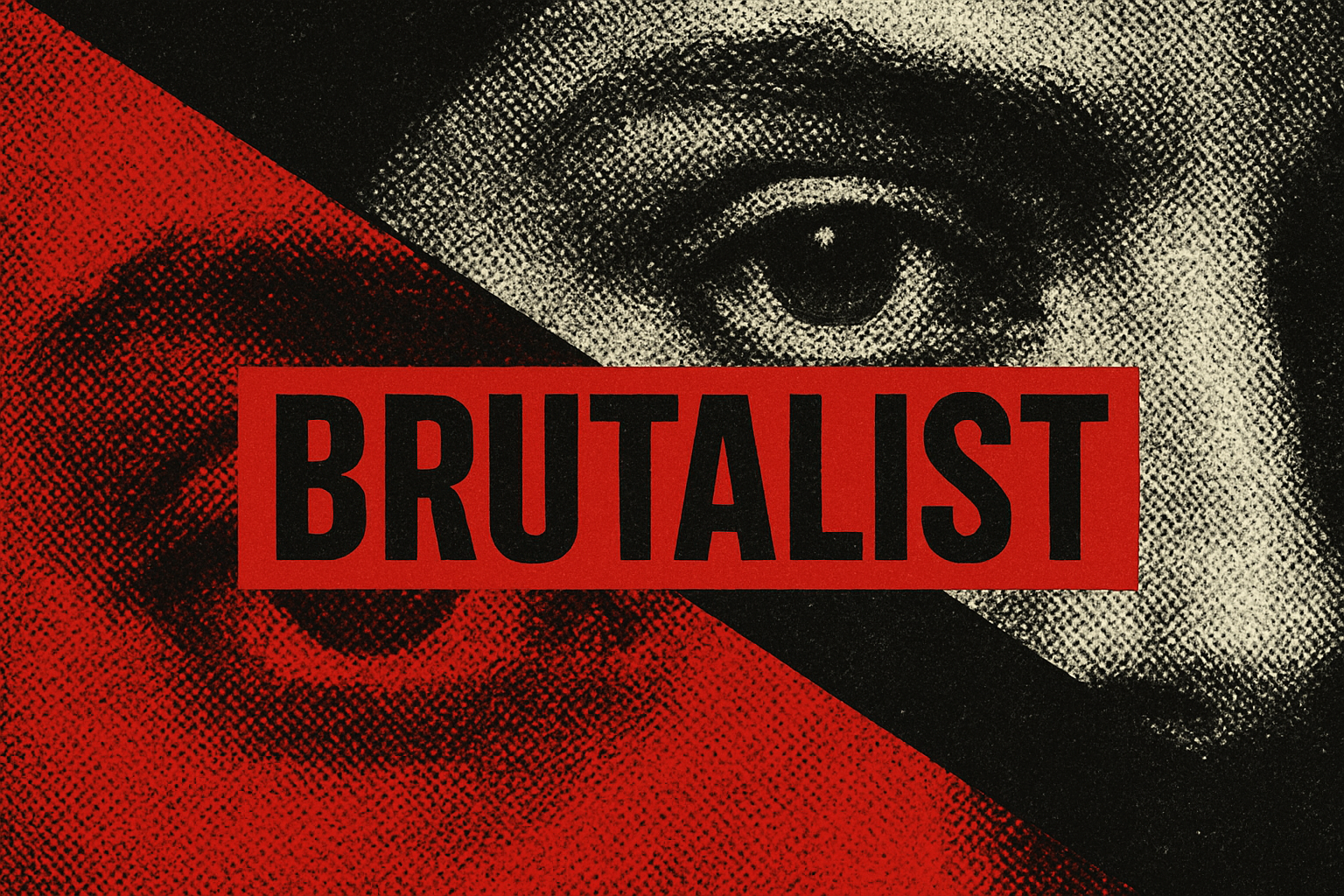
Dive into the Raw Reality of Brutalism Through Graphic Design
Are you tired of the same old sleek, polished designs? Looking for something edgy, raw, and a tad dystopian? Enter the world of Brutalism—a unique art genre that emerged post-World War II in Europe. This style revels in its rough, raw, and unrefined aesthetic, a stark contrast to the more traditional forms of beauty. In this blog post, we’ll recreate a Brutalist-inspired poster design using Photoshop. So, channel your creative energy, and let’s get brutal with some eye-popping designs.
The Allure of Brutalism: Love It or Hate It
Not to be confused with the concrete-heavy architectural movement, Brutalism in design is undeniably eye-catching. The name itself is derived from the French word brut, meaning raw. And that’s precisely what Brutalism is—visually bare, unapologetically rebellious, and utterly shocking at times. This design philosophy isn’t for the faint-hearted, as it breaks norms with exaggerated forms and structures. Spoiler alert: there’s an eyeball involved. Yes, it’s about to get both literal and metaphorical.
Start with the Basics: Convert to Smart Object
In Photoshop, starting with converting your central graphic element to a Smart Object is a savvy move. This allows you to apply changes non-destructively while retaining the ability to replace images easily. Our subject is the aforementioned eyeball—a suitably shocking choice that mirrors the Brutalist aesthetic. Summit to its gaze!
Steps:
- Open your image in Photoshop.
- Click the icon in the upper-right of the layers panel to convert it to a Smart Object.
Black, White, and Something Else
Before diving into the filters, let’s play with the iconic black and white colors. Sure, colors are pretty, but what’s a Brutalist look without that stark, high-contrast vibe? Check your foreground and background colors; if they aren’t black and white, we’ll fix it.
Steps:
- Press D on your keyboard to set the default black and white.
- If needed, swap them using the curved double-arrow icon.
Add Some Texture with Filter Gallery
The essence of a Brutalist design inevitably involves some texture, which is where the filter gallery comes in. We used a sketch filter called reticulation, an idea borrowed straight from the rough surfaces typical in Brutalist works.
Filter Settings:
- Density: 2
- Foreground Level: 22
- Background Level: 11
Let’s Add Some Angles: Diagonal Lines
Lines, angles, sharp contrasts—Brutalism thrives on stark elements. And diagonal black lines make for perfect grit-laden accents. To create them, we’ll use the pencil tool set at 25 pixels to craft these compelling contrasts.
Steps:
- Use the Pencil Tool to draw a thick diagonal line.
- Copy and flip these lines for symmetry and aesthetic displeasure (in the good way).
Inversion and Clipping Games
Experiment with inverting sections of your artwork. It gives your design that weird asymmetry and uncomfortable imbalance which is oh-so-Brutalist.
Steps:
- Select and invert parts of your Smart Object, confined within specific areas.
- Use clipping masks to limit effects to certain sections.
Now for Some Text—Brutalist Style
Text in a Brutalist design channels its own kind of rebellion. We used the Bas Neue Regular font, a fitting choice for its hard-edged appeal. Feel free to play with color—a rich, shocking red fits right in with Brutalism’s shouty manner.
Steps:
- Choose the Horizontal Type Tool and your fave suitably loud font.
- Adjust color, size, and character spacing. We fancy a bright red that screams look at me!
Finishing Touches: Space and Layers
Organizing layers also takes on a Brutalist edge with our design. It’s straightforward but a bit chaotic—a controlled chaos that manages to strike a balance between clarity and complexity.
Steps:
- Layer your text and images skilfully, as though building a maze, nudging, and shifting until it feels raw and real.
- Align text along your diagonal elements to emphasize that geometric vigor.
Brutalism: A Love Letter to the Raw and Unapologetic
Brutalist design isn’t just about the aesthetics—it’s a philosophical declaration. It’s about stepping away from the norm and not being afraid to make your audience feel a little…uncomfortable. Creating Brutalist artwork in Photoshop isn’t just a technical exercise, it’s an experience, a journey that isn’t always pretty but always intriguing.
Now it’s your turn. Fire up Photoshop, embrace the strange allure of Brutalism, and create something raw, real, and utterly fascinating. After all, what’s design if not a little bit daring?





