
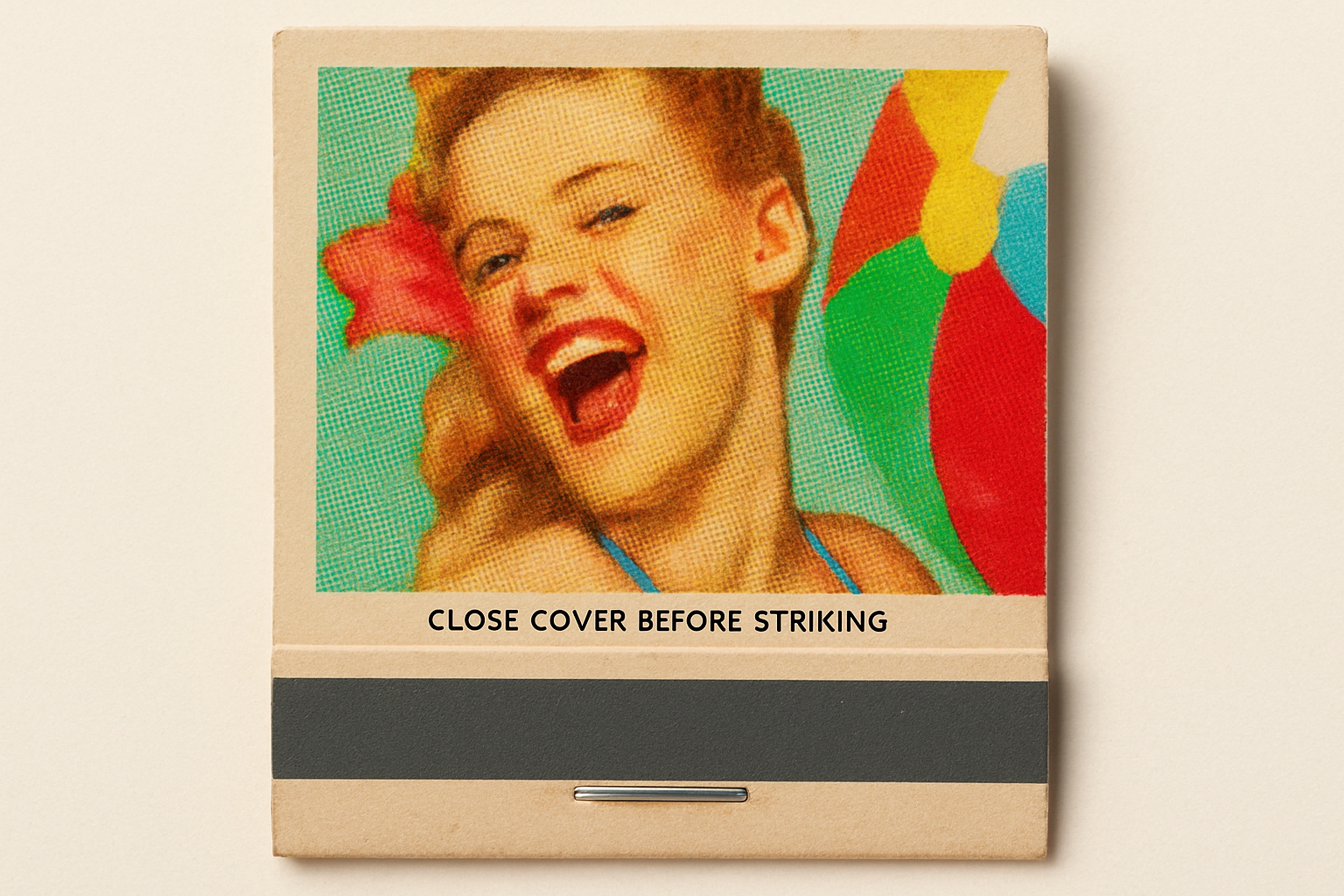
Bring Retro Attitude Back to Life with Vintage Matchbook Covers
Ever gazed at those nostalgic matchbook covers with their retro designs and wondered how you could bring that same classic vibe to your modern art? Well, today, I’m unleashing the secrets of Photoshop to guide you in creating authentic, vintage matchbook cover art. Let’s dive into a world where the aromas of smoke, ink, and nostalgia blend seamlessly to create artwork that’s truly timeless.
Dive Into the Past with a Photoshop Template
First things first, you’ll need to head over to the link in the video description to download a handy Photoshop file template. This isn’t just any ordinary download; it includes rich, retro elements like a linoleum background, images of an authentic matchbook, and even some atmospheric smoke to play around with. Each component within this file is set to transport your present-day art pieces back in time.
Choosing and Cropping Your Image
Before we dive into the aesthetics of the past, crack open your stash of images and pull out one that strikes nostalgic gold. Whether it’s a person, place, or object, matchbook art doesn’t discriminate. I grabbed one from Shutterstock, but feel free to fetch one that resonates with your theme.
Here’s the vital stats for cropping in Photoshop:
– Width: 935px
– Height: 625px
– Resolution: 150ppi
Nurture your inner perfectionist by dragging those corners or adjusting positions within the crop frame until your subject gleams with vintage potential.
Bringing Your Subject into the Limelight
When transforming a person’s photo, it’s key to separate the subject from its sometimes noise-laden background. This is where the magic of solid color backgrounds or Smart Objects comes into play. This step is not only creative, but strategic. By converting your photo to a Smart Object, you preserve the malleability of your edits—keeping creative possibilities wide open without starting from scratch each time.
If the Quick Selection tool is your weapon of choice, wield it like a pro with a comfortable pixel radius. For any Photoshop versions using “Select and Mask” or good ol’ “Refine Edge”, the goal is clear: sharp subject, smooth ensemble. This includes setting your Smart Radius, decontaminating colors, and embracing those new layer masks with open arms.
Laying Down the Retro Vibe
Now, with your subject settled, it’s time to channel the contrast-rich, color-saturated tones of mid-century design. A savvy combo of “Color Halftone” and gentle Gaussian Blur works wonders to pull your image further back to a time where the rainbow was slightly more muted.
Selective Color transforms your reds and yellows, amplifying that retro warmth. Remember the joyful chaos of old ink processes? Your digital tweaks will subtly mimic those charming imperfections, breathing life into the effects.
The Matchbook Meets Its Match
Apply a little vibrancy to really make that modern-day photo pop off of its antique pedestal. Lean into the rifle of history’s hues, adjusting Vibrance to 40 for the perfect punchy yet quintessentially retro vibe.
The pièce de résistance? The pièce de résistance is filling in your matchbook template with seasoned grace. Simply transplanting your subject into that trademark rectangle brings cohesion to your design narrative. Adjust Blend Modes for your image and background layers, experimenting with Linear Burn and Screen to heighten the artistic drama.
Adding an Extra Glow
Achieving the vintage matchbook look isn’t complete without the pervasive warm glow of off-green shelves lined with keepsakes. Tweak your Outer Glow properties to the low-key brilliance of “Multiply” mode at a cool, soft 10px size. This is like dusting your subject with the faintest halo of a secondhand memory.
Final Touches: Transform It Into a Timeless Piece
After positioning, pass your Sovereign Seal of Completion by angling the whole deal with perfect precision via the Transform Tool. With an intuitive eye, guide your composite cover into an angle that captures the essence of long-gone lives and times—up for discussion with every glance.
May your digital art relics invoke a dose of nostalgia and capture the innately human interest in the past’s enduring allure. As you explore these techniques, remember that the virtual brushstrokes you use are paving a bridge between modernity and classic charm.
In a world obsessed with newness, here’s to infusing a bit of timeless culture, one digital matchbook at a time.





