
Unleash Your Inner Cinematic Designer
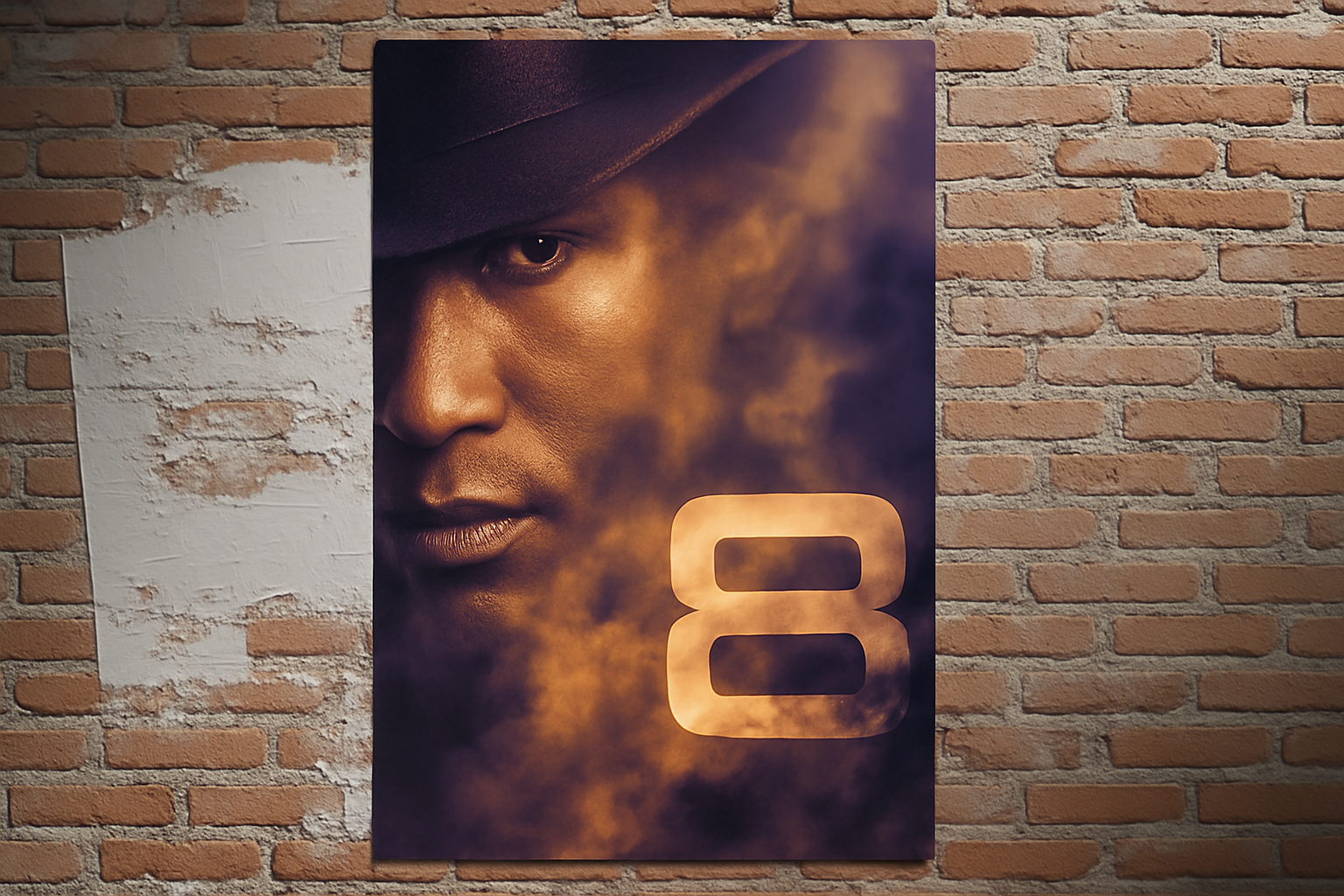
In the world of design, there’s something inexplicably magical about the timeless allure of film noir. This genre, characterized by its stark contrasts, shadow play, and intricate plots, has inspired many a creative soul. But did you know you can channel this magic into your own designs? Today, we’re diving deep into the realm of cinematic design to create a film noir-inspired movie poster using Photoshop, a photo, and some custom smoke brushes from Orange Box.
Get Everything Set Up with These Tools
If you’re ready to make your own film noir masterpiece, it starts with having the right resources prepared. We’ve done the heavy lifting for you, providing a Photoshop template complete with movie credits and a black background in the project’s files. Using this template as your guide will allow you to focus on the artistic elements without sweating the details. And let’s not forget those smoke brushes—we’ll be using smoky textures to add an atmospheric touch to our poster. Be sure to download them ahead of time!
Separating Subjects with Precision
Start by choosing a photo that carries the dramatic ambiance you’re aiming for. Using a tool like the Pen Tool (recommended here for its precision), trace around your subject to separate it from its background. It’s a bit like cutting out the star of the show, so take your time to ensure those edges are sharp and clean. After making the selection, create a layer mask of this newly isolated subject, which will allow for more control as we manipulate the design.
Keeping It Smart and Classy
Next, let’s be smart—literally. Convert your layer into a smart object to ensure non-destructive editing. This lets us make changes and apply filters without permanently altering the original image data. For those of you utilizing Photoshop CS6 or later, take advantage of the Tilt-Shift filter from the Blur Gallery to achieve a subtle, cinematic focus. Earlier versions of Photoshop may require a more manual approach using the Blur Tool.
Placing and Perfecting Your Subject
Bring your isolated subject into the template we’ve provided, nestling it perfectly on the canvas. Adjusting its size is key—resize the subject so it fits snugly within the composition, showing just the right amount of dramatic tension. Ensure the features line up to convey the needed suspenseful aura typical in film noir.
Sharpen for Impact
Once your subject is placed, it’s time to highlight those quintessential noir details. Navigate to Filter > Sharpen > Unsharp Mask to bring out the intensity of your subject’s features. Tweaking the Amount, Radius, and Threshold settings will bring out the necessary sharpness and detail, giving your subject that bold, defined look—a hallmark of any great poster.
Text — The Quiet but Mighty Protagonist
A movie poster is nothing without its title. Select your font and type out your movie’s name and tagline. Fonts like Pasta Palazo Regular add an authentic vintage feel, while Bank Gothic brings in that classic cinematic edge.
Apply layer styles like Bevel and Emboss, along with Drop Shadow, to give depth and dimensionality to your text. It should stand out, yet not overpower the overall aesthetic. These subtle tweaks elevate text from simple lettering to an artistic expression that commands attention.
Crafting Smoky Atmosphere
Here’s where those custom smoke brushes from Brusheezy truly shine. By painting with the smoke brushes on a new layer, hidden facets of your poster’s subject and title will begin to emerge from the veiled depths, revealing your mysterious narrative. Adjust the brush size and angles to create dynamic light and shadow interplay.
For areas you wish to conceal or tone down, simply switch to your layer mask and brush over the areas you’d like to hide. The smoke and mirrors effect is almost literal here, adding layers to the design.
Color Grading for Nostalgia
Finally, add that classic film noir tone with a Color Lookup adjustment layer. By selecting a preset like ‘3DLUT sunset’, you bring a cohesive look to your work, reminiscent of old cinema with enhanced contrast and moodiness.
Final Adjustments and Satisfaction
The result? A striking, compelling movie poster that not only pays homage to the golden age of film noir but also showcases your creative prowess. So tweak, adjust, balance, and celebrate each element as it comes together in the noir narrative you’ve engineered.
Creating a film noir poster isn’t just an exercise in design; it’s an exploration of mood, storytelling, and personality conveyed through visual artistry. Whether you’re formatting your work for personal projects or aiming to recreate the magic for others, the steps above ensure your portrayal will undoubtedly steal the spotlight.
Now you have all the tools and tips to craft cinematic elegance and timeless intrigue right at your fingertips. Happy designing!




