Google just tucked a surprisingly useful creator feature into the Gemini app: an in-app music generator powered by DeepMind’s Lyria 3. The official announcement is here: Use Lyria 3 to create music tracks in the Gemini app. The headline is simple: 30-second tracks from text prompts. The real story is where it lives: inside the same workspace people already use for scripts, captions, ideation, and now video drafts.
This is not “AI will replace musicians” content. It’s more like: Google is reducing the number of tabs between your concept and something you can post. And if you’ve ever lost an hour to stock music scrolling only to settle on “Corporate Uplift 07 (No Vocals),” you already understand the value proposition.
What shipped in Gemini
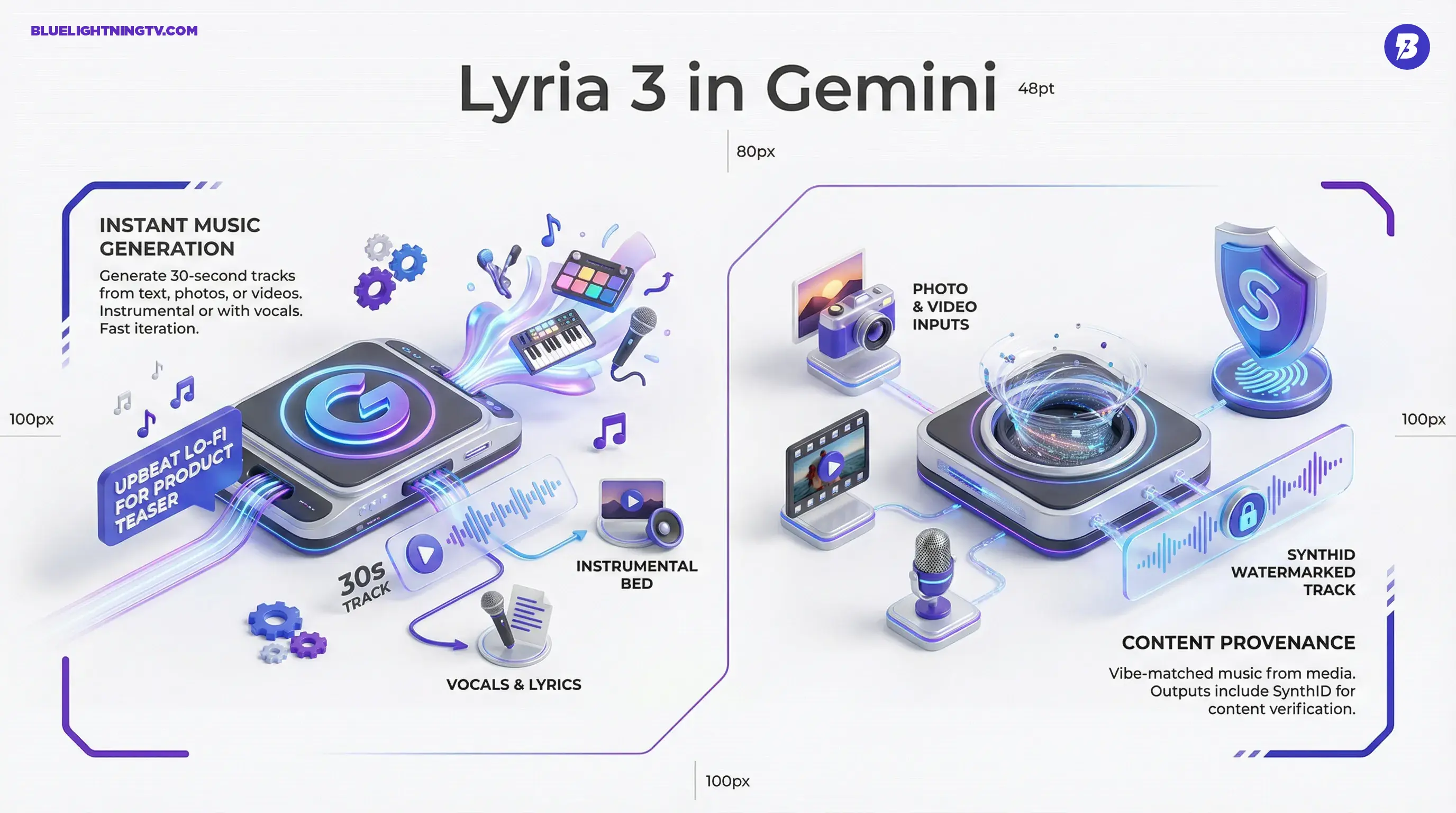
Gemini’s new Music capability generates 30-second audio clips. You can prompt it with plain language (genre, mood, use case), and Gemini returns an original track. Google also says you can generate music inspired by uploaded photos and uploaded videos, with the model aiming to match the vibe of what you upload.
The practical shift: music generation isn’t being sold as a standalone tool anymore. It’s being bundled into a general-purpose creation hub, one place where text, images, video, and now audio can be drafted fast.
Google’s framing includes the ability to create instrumentals as well as tracks that include vocals and lyrics. In other words, you can get background beds for content, or you can push it toward a jingle-ish hook that’s more foreground.
How it works
Text prompts to tracks
The default flow is text-to-music: prompt for mood, genre, tempo, and intended use (“upbeat lo-fi for a product teaser,” “dark synth pulse for a trailer bumper,” etc.). The biggest creator win here is iteration speed. Instead of committing to one song choice, you can generate five vibe options and cut against them immediately.
Photo and video inputs
The more interesting angle is multimodal conditioning. Gemini can take a photo and Google says video uploads are supported too, then generate a track inspired by the media. This matters because music choice is rarely just “is it good?” It’s “does it match the visual energy without fighting it?”
For short-form teams, this is basically a time-saver disguised as a feature: upload the hero frame or rough cut, generate music that’s directionally aligned, and keep moving.
Lyrics and vocals
Gemini can generate tracks with lyrics and vocals. That’s useful for:
- Podcast stings and intro and outro hooks
- Brand sonic experiments for quick “does this vibe fit?” tests
- Social bits where “good enough” vocals are part of the joke
But don’t confuse this with songwriting craft. Auto-lyrics can be catchy in a throwaway way, and that’s often exactly what creators need for quick packaging. The more serious your brand voice and messaging is, the more you’ll want to treat lyric mode as draft material, not final copy.
What creators can make
Google is aiming at the most common audio needs in modern content workflows: short, usable, AI-generated music cues. That’s a narrow target on purpose, and it maps to where most content actually lives right now.
| Output type | Best for | Reality check |
|---|---|---|
| Instrumental beds | Reels, Shorts, ads, explainers | Great for drafts and fast publishing |
| Lyric tracks | Jingles, hooks, comedic bits | Expect “fun,” not “Grammy” |
| Vibe-matched cues | Visual-first edits, brand moodboards | Directionally right beats perfect |
The 30-second cap is a feature, not a bug. Short clips are the currency of social, and they’re also perfect for ad testing: different music beds can materially change perceived pacing and tone, even when the edit is identical.
Availability and limits
Google says the feature is rolling out as a beta for users 18+ in the Gemini app and Gemini on the web, and availability may appear gradually across devices. Google also notes language support at launch includes: English, German, Spanish, French, Hindi, Japanese, Korean, and Portuguese, with more planned.
Google has also said usage limits vary by plan, with higher limits available for Google AI subscription tiers.
Three constraints matter if you’re trying to use this in real production:
- Length ceiling: it’s designed around 30-second tracks, so long-form creators will still need looping, stitching, or a separate workflow.
- Control ceiling: you can steer with prompts, but it’s not a DAW. You’re not getting deep stem-level editing inside Gemini.
- Consistency ceiling: for campaigns that need a repeatable sonic identity across dozens of assets, you’ll need to see how well prompting holds style across generations.
In other words, this is built to be fast, not final mastering. Which is fine. Most creators are not trying to become audio engineers. They’re trying to ship.
SynthID and provenance
Google says Lyria 3 outputs include SynthID watermarking. That matters because AI audio is getting pulled into the same provenance conversation that already exists for AI images and video.
Google’s product overview for the detector is here: SynthID Detector: Identify content made with Google’s AI tools.
Creator translation: watermarking isn’t just a trust and safety story. It’s workflow infrastructure, especially when you’re handing assets to clients, collaborators, or platforms that want clear disclosure signals.
Important nuance: detection only applies to content made with tools that embed SynthID. It’s not a universal “detect all AI audio” magic wand. It’s Google building an ecosystem where creation and verification are tied to the same stack.
Why this matters now
AI music has existed for a while. The new thing is that Google is bundling it into a mainstream assistant with enormous distribution gravity. Once music generation is inside Gemini, it becomes part of the default “make content” flow, right next to the script, thumbnail text, and video draft.
That bundling changes creator behavior in a few pragmatic ways:
- More iterations, less commitment: music becomes something you try on your edit, not something you pick once and regret later.
- Fewer licensing detours: less time hunting for safe tracks just to get a draft out the door.
- Faster proof of concept: agencies and brand teams can pitch with sound attached, which makes rough drafts feel like real spots.
This also fits a pattern we’ve been tracking: Gemini is increasingly a front-end for multiple media engines. For broader context on where Google is taking Gemini as a creator surface, see our related coverage: Gemini’s Creator Upgrade: Veo Video, Project Genie, Web Drafts.
What to watch next
The first version of music inside Gemini is intentionally constrained: short duration, fast generation, simple controls. The next set of updates that would meaningfully increase production value are pretty clear:
- Longer generation or structured looping that doesn’t sound like copy and paste
- More control over structure (intro, chorus, sting), instrumentation, and intensity ramps
- Better editability, even simple stems, or at least separated vocals vs music
- Tighter video-aware scoring if video conditioning becomes more than match the vibe and starts responding to pacing and cuts
For now, the core value is extremely unglamorous and extremely real: fast, custom, AI-generated music cues without leaving the tool you’re already using. That’s not hype. That’s a productivity win dressed up as a fun button.