Adobe is continuing its best model for the job strategy inside Firefly, and this time the partner is OpenAI. Firefly now lets you pick GPT Image 1.5 as the engine for image generation and edits in the same surfaces where you would normally use Adobe’s own models. The most direct product page is here: Adobe Firefly: GPT Image 1.5 partner model.
This is not a vibes-only announcement. It changes how teams work when they are under real constraints: tight timelines, brand rules, and the annoying reality that text in AI images has historically looked like it was typed by a haunted keyboard.
What actually shipped
Firefly’s model picker now includes OpenAI’s GPT Image 1.5 under partner models. That matters because it is not a separate workflow or a new app you have to convince your team to log into. It is the same Firefly UI, but with a new engine option that Adobe positions for stronger instruction following and improved text rendering.
Adobe is also documenting how partner models work across Firefly’s generation surfaces, including how to select them and what to expect from the workflow: Adobe HelpX: Generate images using partner models.
The signal is not Adobe loves OpenAI now. It is Adobe wants Firefly to be the control layer, not the only model.
Why this is different
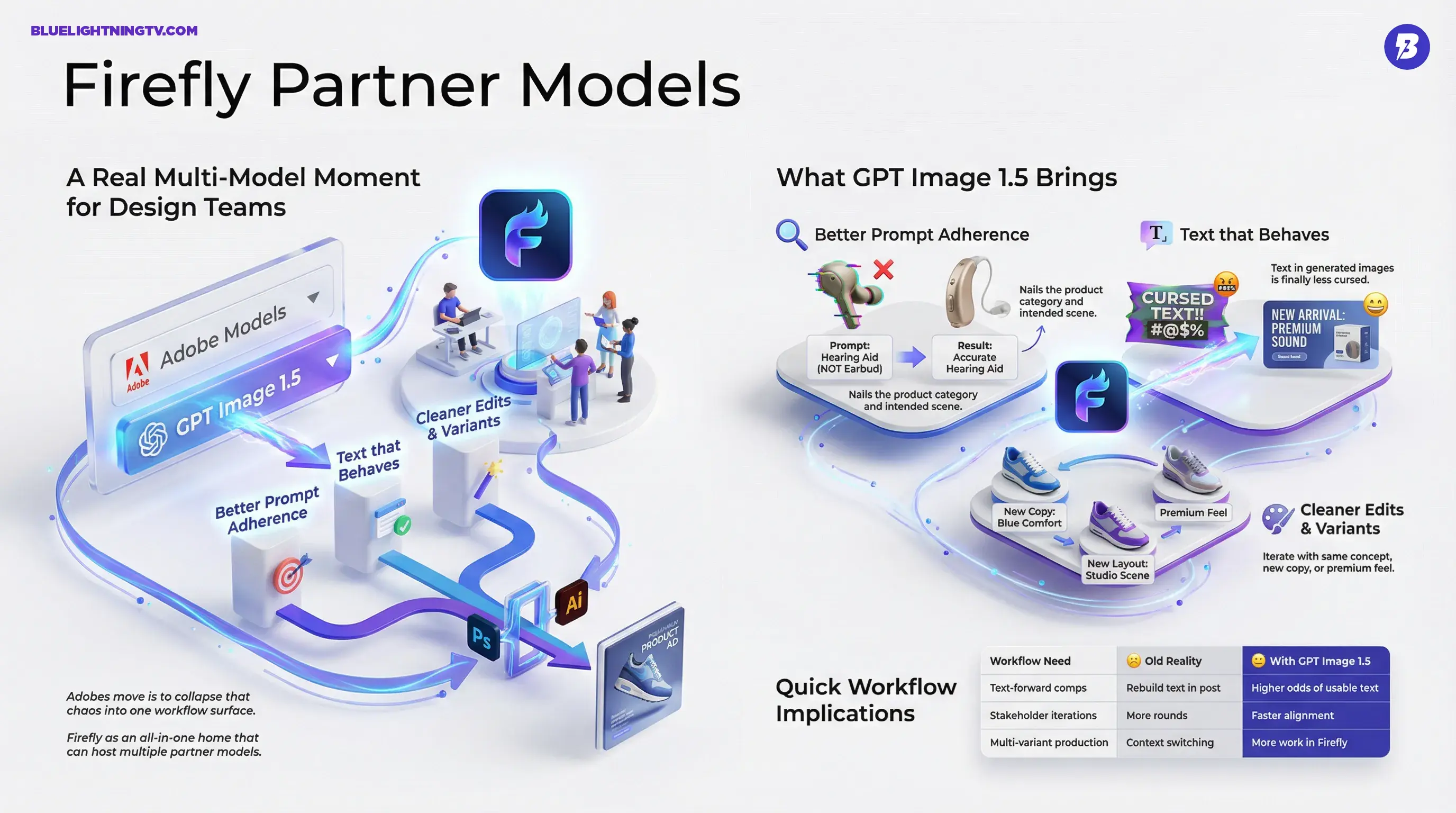
Creative teams have been multi-model for a while, they just did it the messy way: generate in Tool A, fix in Tool B, export, re-import, lose context, repeat. Adobe’s move is to collapse that chaos into one workflow surface.
Here is why the GPT Image 1.5 addition lands as more than another checkbox in a dropdown:
- Model choice becomes intentional: pick a model for typography-heavy comps vs. a model for style exploration.
- Iteration stays inside the Adobe pipeline: less download/upload churn, fewer stray files named final_v7_REALfinal.png.
- Finishing tools are one click away: when the generation is closer to usable, Photoshop and Illustrator become refinement stages instead of rescue missions.
What GPT Image 1.5 brings
OpenAI positions GPT Image 1.5 as a step forward for instruction following, editing, and text handling inside images. That is outlined in OpenAI’s update here: OpenAI: New ChatGPT Images.
In Firefly terms, the practical improvements creators will notice cluster around three pain points.
Better prompt adherence
For brand and marketing teams, prompt adherence is not aesthetic. It is operational. The difference between pretty and usable is often whether the model nailed:
- the product category correctly (no, that is not a wireless earbud, it is a hearing aid)
- the intended scene (studio packshot vs. lifestyle shot)
- the exact props and composition callouts in the brief
When adherence improves, so does throughput. You spend fewer generations trying to wrestle the model into the right lane.
Text that behaves
This is the headline for a lot of production teams: text in generated images is finally less cursed. Not perfect, not deterministic, but meaningfully improved.
That matters immediately for:
- thumbnail headline drafts
- banner ad comps
- packaging mockups
- slides and pitch concepts
- UI-style visuals (even when they are just mock interfaces)
If you have ever had to explain to a stakeholder that the model cannot spell, you know why this is a big deal.
Cleaner edits and variants
Firefly is not just about first-pass generation anymore. It is becoming a place where teams do variations, targeted edits, and asset exploration while keeping things organized within Adobe’s ecosystem.
GPT Image 1.5’s editing strengths show up most when you are iterating: same concept, but new copy; same layout, but different product color; same scene, but make it feel more premium.
What stays the same
Adobe is still trying to make sure Firefly outputs fit professional workflows: provenance, transparency, and compatibility with downstream Creative Cloud work.
A few things do not change just because GPT Image 1.5 is now in the model selector:
- You still need human judgment for typography, hierarchy, spacing, and legal copy.
- You still need brand review (because close enough is how brands drift).
- You still need finishing tools for anything high-stakes.
This update reduces grunt work. It does not delete design.
Quick workflow implications
The clearest impact is on teams doing high-volume creative where speed matters, but approvals still exist (aka: everyone).
Where you will feel it fastest
| Workflow need | Old reality | With GPT Image 1.5 |
|---|---|---|
| Text-forward comps | Generate then rebuild text in post | Higher odds of usable text |
| Stakeholder iterations | More rounds due to almost right outputs | Faster alignment on direction |
| Multi-variant production | Context switching across tools | More work stays in Firefly |
Why Adobe’s multi-model push is accelerating
This is not Adobe dipping a toe in openness. It is Adobe formalizing a pattern: Firefly as an all-in-one home that can host multiple partner models, while Adobe competes on workflow, integration, and production readiness.
Adobe’s own newsroom framing emphasizes Firefly as an all-in-one home for AI content creation with partner models as a core strategy: Adobe Newsroom: Firefly partner models.
If you want a related COEY deep dive on why text quality is becoming the real bottleneck in shipped creative, see: Firefly Adds FLUX.2: Better Text, Real Workflows.
Access and rollout reality
This is live inside Firefly as a selectable partner model, and Adobe’s HelpX documentation treats partner models as first-class options rather than a hidden experiment. Availability can vary by plan, geography, and org controls (especially in enterprise setups), but Adobe is positioning this as a mainstream capability.
One practical wrinkle: Adobe is running a limited-time promotion that offers unlimited generations in the Firefly app until January 15, 2026 for certain higher-tier Firefly plans. Details and eligible plans are spelled out by Adobe here: Adobe Blog: unlimited generations promotion. In other words, they are not just shipping model choice, they are trying to get teams to actually use it enough to build new habits.
What to watch next
The near-term story is not is GPT Image 1.5 better than Adobe’s model. The story is that model selection becomes a creative skill, the way picking a lens or codec is a creative skill. Teams will start learning patterns like:
- which model is best for typography and layout discipline
- which model is best for photoreal product shots
- which model is best for stylized concepting
- when to switch models mid-iteration vs. staying consistent
Firefly is turning into a control panel. And for creators, that is a good thing, as long as we keep it practical: pick the model that ships the asset, not the one that wins the demo.