Big thanks to JoggAI for sponsoring this video. Check them out here: JoggAI.
Unleashing the Power of Avatar X: Creating Emotionally Realistic Avatars
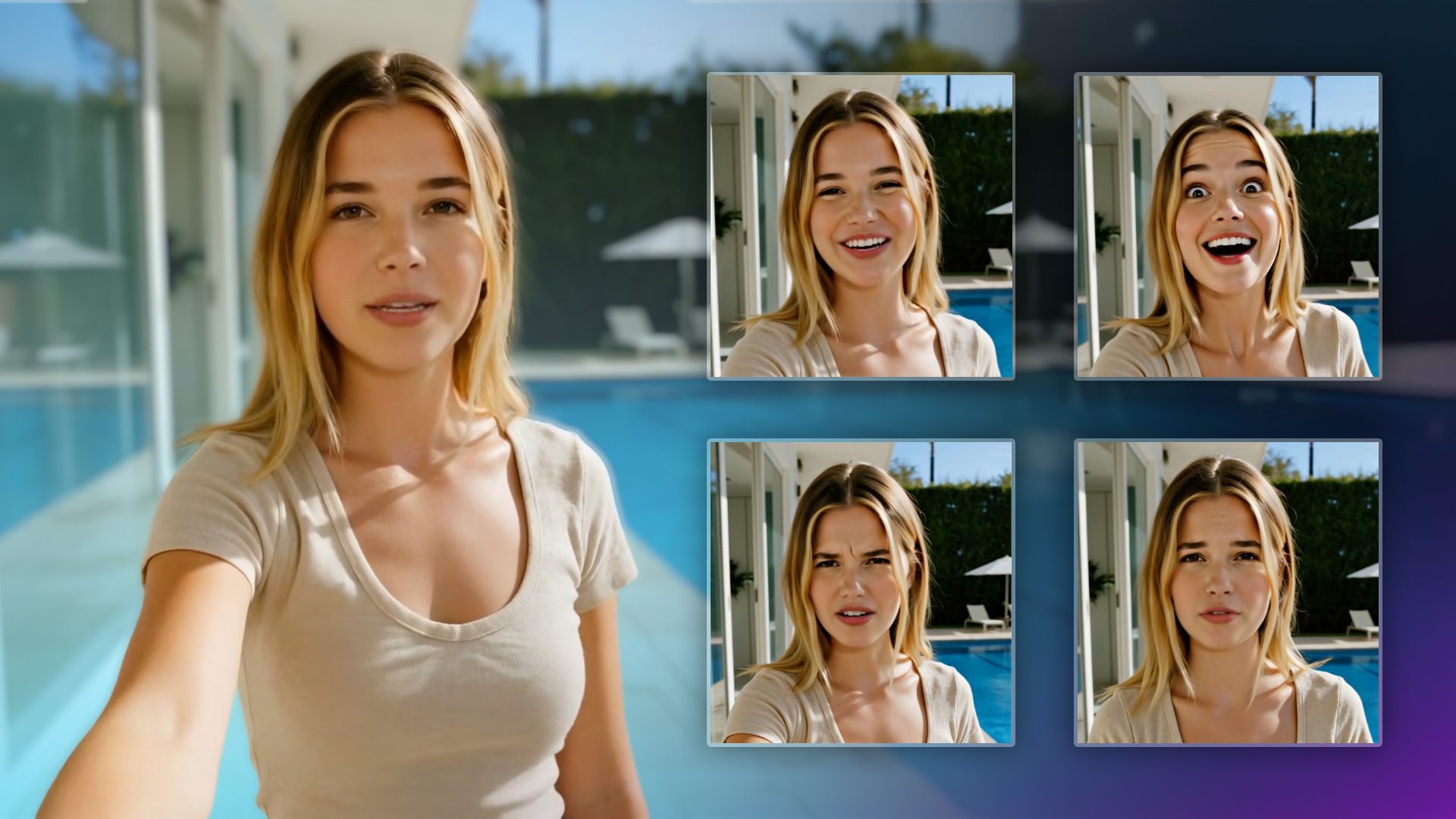
The ever-evolving world of artificial intelligence just took another breathtaking leap. Introducing JoggAI’s Avatar X: a cutting-edge AI tool that’s transforming the way we create lifelike avatars. Imagine taking a simple photo and converting it into a talking avatar video in mere seconds. Not only can these avatars mimic real-life facial expressions, but they can also showcase a broad spectrum of emotions with remarkable precision. Whether you’re crafting faceless content or aiming for that perfect user-generated content (UGC) video that effortlessly displays your product, Avatar X is here to make it happen. Let’s delve into what makes this innovative AI tool a game changer.
What Is Avatar X and Why It Matters Now
JoggAI’s Avatar X is their most advanced talking avatar model to date, designed for expressive, emotionally rich performances from a single image. It brings three standout capabilities to creators and brands:
- Multi-emotion delivery: Choose from preset emotions (happy, excited, angry, nervous, and more) or dial in nuanced reactions with custom emotion controls.
- Premium lip-sync and motion: Speech alignment and facial micro-movements deliver a convincing sense of presence, even for stylized art, cartoons, and side-profile faces.
- UGC-ready composition: Generate scenes that feel like real influencer content, from product holds to believable backgrounds.
For a deeper feature overview and best practices, explore the official Avatar X page and the AvatarX knowledge base.
Avatar X vs. AvatarLite: What’s the Difference?
If you’ve used JoggAI before, you might have seen “AvatarLite” (their classic model set). Here’s how they compare at a glance:
| Feature | AvatarLite (Classic) | Avatar X (Advanced) |
|---|---|---|
| Lip-sync quality | Classic | Premium |
| Emotion support | Optional/limited | Built-in Multi-Emotion |
| Max video length | Up to ~15 minutes | Optimized up to ~5 minutes |
| Motion model | Multiple motion options | Fixed high-expressiveness model |
| Use cases | Longer explainers, lower expressiveness needs | UGC, ads, shorts, high-emotion talking heads |
Getting Started: The Fast Path to a Talking Photo
JoggAI streamlines the process so you can focus on creativity rather than setup. Here’s the quick-start flow showcased in the video:
1) Sign in and choose “Talking Photo”
From the dashboard, launch the latest photo-to-video model. You can upload your own image or try a sample to test-drive settings before using brand assets.
2) Upload a photo with good “avatar potential”
- Use a clear, well-lit head-and-shoulders image.
- Neutral background helps the model focus on the face and expression.
- Keep glasses, hair, and facial hair consistent if you want a recognizable digital twin across videos.
Pro tip: High-quality source photos result in more convincing micro-expressions and lip detail. A smartphone portrait with even lighting is often enough.
3) Add a script or audio
You can paste a script or upload pre-recorded audio. JoggAI also integrates popular voice providers. If you need natural, multi-language voiceovers with fine control, try ElevenLabs. You can also clone your voice inside JoggAI to keep your brand consistent across assets.
Always ensure you have the rights and permissions for any cloned or synthetic voice you use. If your brand uses talent, confirm your usage terms cover AI training and reproduction.
4) Select an emotion, or customize it
This is where Avatar X shines. Choose from preset emotions like happy, excited, angry, nervous, or create a custom blend to fine-tune intensity, head motion, and facial dynamics. You can even test multiple emotions on the same script to see what sells your message best.
5) Generate and review
Click generate and preview your talking avatar. Iterate quickly: tweak emotion strength, swap the voice style, or refresh the image input to push toward the right performance.
Beyond the Basics: Expressive Content Ideas That Work
Avatar X isn’t just for straight-to-camera lines. It’s versatile enough for a range of formats:
- UGC-style ads: Have your avatar hold or reference products, deliver benefit-driven lines, and react naturally to common objections.
- How-tos and explainers: Use a steady, friendly delivery for tutorials or onboarding. Save Avatar X’s bigger expressions for emphasis moments so they land.
- Stylized characters: Turn anime, cartoon, or 3D art into speaking presenters for storytelling, entertainment, or brand mascots.
- Music and singing: Upload music and test singing avatars for hooks, jingles, or meme-ready clips.
- Faceless brand building: Maintain a consistent “virtual host” identity across all your channels in any language.
Pre-made Avatars and Libraries
Short on time? Browse JoggAI’s avatar library for ready-to-use presenters, then customize outfits, emotions, and voices. Save your best looks as reusable presets so your team can generate on-brand variants at scale without creative drift.
“Avatar Video” and Product Scenes
When you need a full scene, use Avatar Video. Prompt UGC-style environments, or pair your avatar with product images to simulate real influencer content. This approach is ideal for:
- Rapid A/B testing of hooks and CTAs
- Versioning for different audiences and languages
- Product launches when you can’t book talent or locations
Pro tip: Keep scripts tight (think 8–20 seconds for social). Use a clear hook, one proof point, and a single CTA. The more concise the message, the more the performance stands out.
Quality, Length, and Workflow Tips
- Video length: Avatar X is optimized for shorter, high-expressiveness clips (up to ~5 minutes). For long-form videos, consider the classic models; for high-impact shorts, Avatar X is the star.
- Voice continuity: If your brand has a signature voice, clone it once and reuse it across campaigns to build recognition.
- Language and localization: Pair Avatar X with multilingual voice models to repurpose winning scripts globally while keeping visuals consistent.
- Iterate quickly: Generate multiple versions in parallel, vary emotion intensity and opening lines to find the best scroll-stopping combo.
Troubleshooting Realism: Common Fixes
- Mouth shape feels off? Try a clearer voice sample with less reverb or choose a voice that matches the avatar’s age and tone.
- Expression looks too “big” for the message? Lower the emotion intensity or switch to a calmer preset for authority-led content.
- Avatar looks “flat”? Feed a higher-resolution, better-lit photo. Avoid heavy face filters that erase natural features.
Don’t Miss: The AvatarX Creator Challenge
JoggAI is celebrating Avatar X with a global creator challenge featuring cash prizes and plan perks. If you love experimenting with expressive avatars, this is a great way to showcase your work and get discovered. Learn more and enter here: AvatarX Creator Challenge.
Why Avatar X Is a Big Deal for Creators and Brands
Avatar X combines controllable emotion, premium lip-sync, and smooth motion to make short-form video production incredibly efficient. For creators, it’s a way to launch consistent on-camera content without filming. For brands, it unlocks scalable UGC-style ads across languages and markets, while keeping a tight rein on messaging and visual identity.
If you’re just getting started, begin with a simple talking photo: pick a friendly emotion preset, use a natural-sounding voiceover, and aim for a 12–20 second script. Then, iterate. Test multiple emotions, swap hooks, and dial in your tone until the performance clicks.
When you’re ready to go deeper, explore advanced options and best practices in the AvatarX knowledge base, or see what’s possible on the official Avatar X page.
Bottom line: In an era where authentic engagement and immersive content are paramount, Avatar X is a practical, powerful way to turn photos into persuasive, human-feeling videos, fast.
Thanks for reading, and happy creating! Stay tuned to Blue Lightning for more tutorials, breakdowns, and hands-on guides to today’s smartest creative tools.