
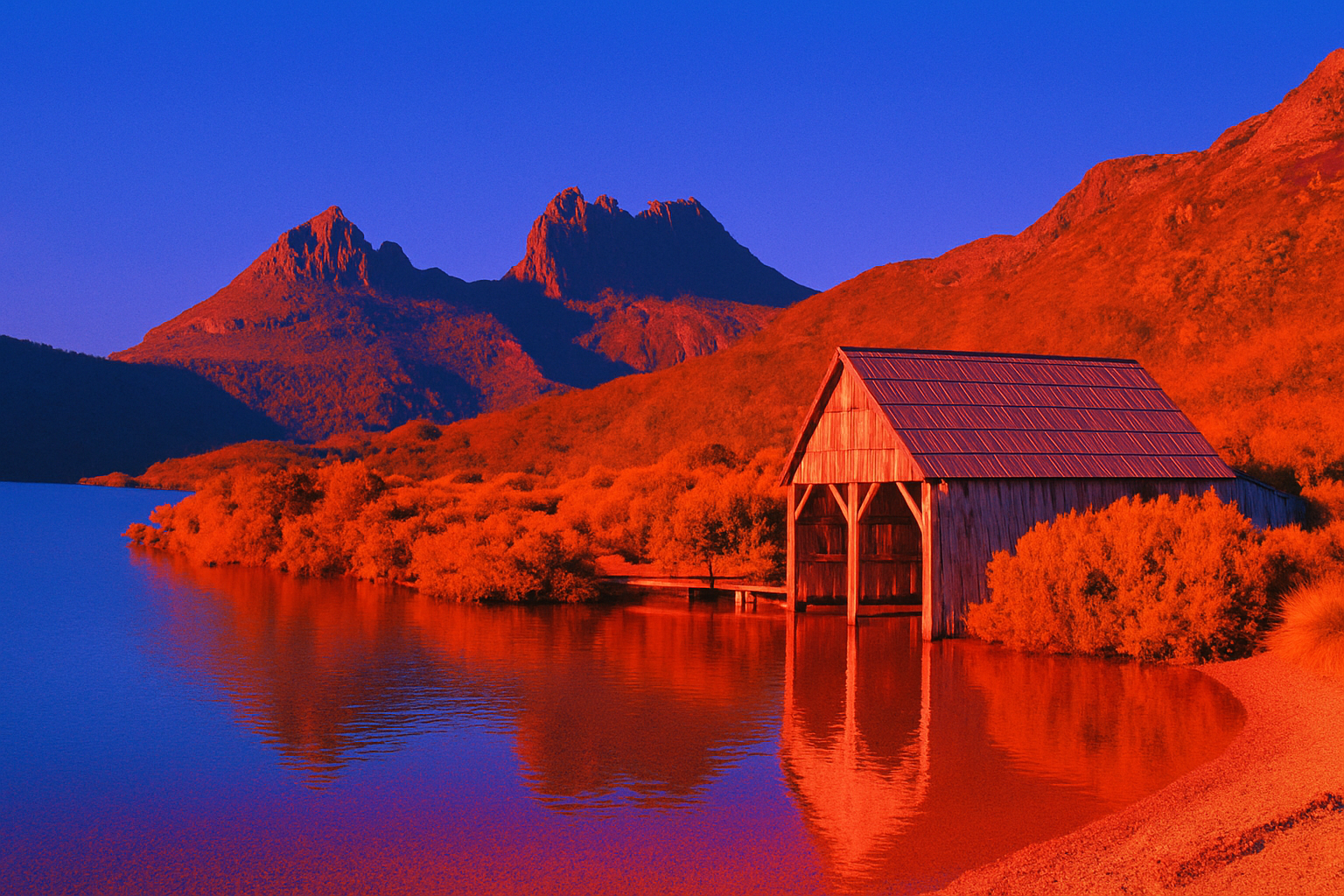
Mastering the Art of Vibrancy and Neoclassicism in Your Photos
Mastering the art of photography sometimes requires looking to the past to breathe life into your creations. If you’re fascinated by rich colors and neoclassic imagery, then Maxfield Parrish might just be your new muse. Known for his transcendent use of color and idyllic landscapes, Parrish’s work redefined American visual arts during the Golden Age of Illustration. Imagine integrating this iconic style into your photography. Well, that dream is now within reach thanks to the magic of Photoshop and a little guidance. Today, we’re going to delve into the process of transforming your ordinary photos into vibrant works of art reminiscent of Maxfield Parrish’s masterpieces. So, grab those digital paintbrushes, and let’s get started.
Step One: Prepping Your Canvas
Before creating a masterpiece, a painter would prepare their canvas. Similarly, the first step in emulating Parrish’s style is setting the right foundation by ensuring your image is the correct resolution. Open your chosen photo—perhaps one downloaded from Dreamstime—and check its resolution. Go to Image > Image Size in Photoshop, and set it to 150 pixels per inch to ensure the results mirror the style closely. You want this foundation to be as perfect as the strokes on a canvas.
Preserve Your Original Vision
Now it’s time to duplicate that base layer. Utilize keyboard wizardry by pressing Ctrl/Command + J. Why duplicate? To preserve your original image, of course! We love the picture; we just aim to uplift it.
The Alchemy of Color Matching
The distinctive color palette of Maxfield Parrish is the heart of this process. Head over to Image > Adjustments and select Match Color. This will open the gates to your own color nirvana.
Within this magical realm, select “Maxfield Parrish Blue Fountain” as your source image—this is a pre-prepared image that encapsulates the distinct Parrish glow. Adjust the Luminance and Color Intensity sliders all the way to the right, merging the real with the surreal.
Plugging into Smart Objects
To maintain control over your final creation, transform your duplicated layer into a Smart Object. This will allow for agile adjustments down the line. Simply head to the layers panel, click the options icon, and choose “Convert to Smart Object”. It’s as simple as a chef flipping an omelet, without the fear of an eggy mess.
The Blur of Artistic Lines
With your image prepared, it’s time to emulate the soft, ethereal quality reminiscent of canvas. Use Surface Blur by going to Filter > Blur > Surface Blur. Set the Radius to 50 pixels and the Threshold to 10. Like an eraser blending chalk lines, this effect smooths and polishes your photograph.
Vibrating with Color
Maxfield Parrish’s landscapes practically boomed with color. To achieve a similar effect, click on the adjustment layer icon and choose Vibrance. Slide it to the right—emphasizing the intensity required for that Parrish pop. As photos differ in inherent vibrancy, consider duplicating this layer and adjusting its opacity to find that sweet spot of color bliss.
Tackling Shadows with Elegance
Dark shadows that swallow details aren’t an artist’s friend. They need taming. Click on your first layer thumbnail to activate it, then wade into Image > Adjustments > Shadows/Highlights. A default Shadows adjustment of 35% awaits, but feel free to tweak it until your shadows sit like they belong in a countryside dawn as imagined by Parrish.
Texture: The Final Flourish
Maxfield Parrish’s art wasn’t just about color—it also had a distinctive texture. Make your work feel alive by going to Filter > Filter Gallery. Open the texture folder and select Grain. Use a regular grain type, set the intensity to 10, and crank the contrast up to 50. The result? A painting that feels tangible and resonant with the touch of history.
The beauty of Parrish isn’t just in his colors or compositions, but in his ability to transport you to a world far richer than our own.
And there you have it—a modern twist on an iconic artistic tradition. In transforming your photographs into Maxfield Parrish-inspired renditions, you’re not only preserving his legacy but also creating your own. A bold, vibrant legacy that captures the imagination just as Parrish’s work captivated generations. Let your photos be your voice, embracing the colors of the past as you paint the future. So, are you ready to artify your world?




