Adobe just pushed Firefly closer to something creators can actually operationalize: Custom Models (beta) are now in public beta, letting teams train Firefly on their own visuals so outputs stay consistent across campaigns, characters, and product looks. The headline is not “new AI art.” It is repeatability, and if you have ever watched a “consistent mascot” slowly morph into its evil twin over 40 deliverables, you know why this matters.
What shipped
Firefly Custom Models lets you build a private model tuned to either:
- A subject (a product, a mascot, a recurring character)
- A style (an illustration approach, a lighting language, a brand-specific look)
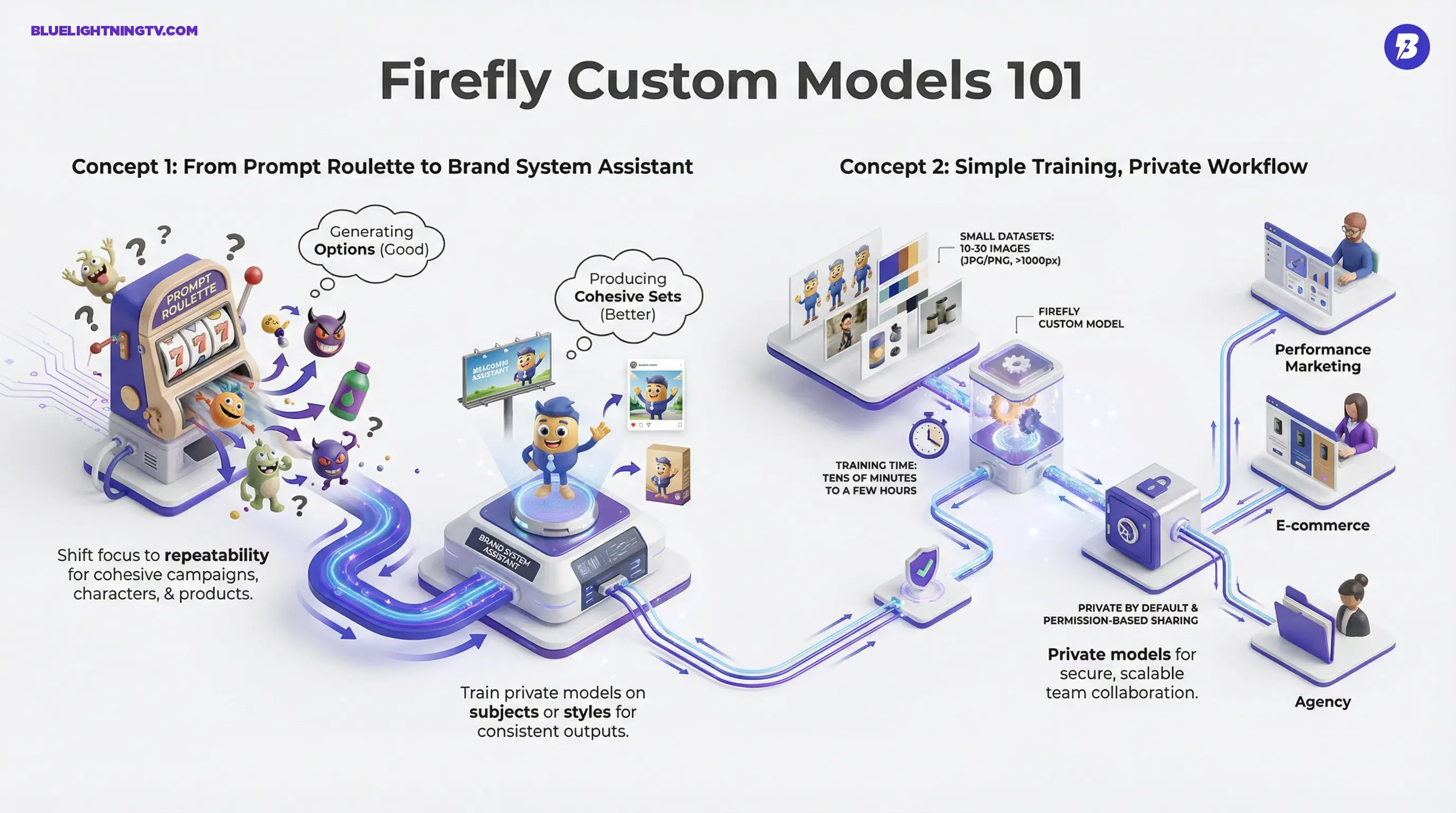
You upload a small set of images you have rights to use, train inside Firefly, and then select that custom model during generation. Adobe’s documentation positions the training range at 10 to 30 images, which is intentionally “small team friendly,” not “bring a whole ML department.”
This is Adobe trying to turn Firefly from “prompt roulette” into “brand system assistant.”
Why this matters now
Generative image tools have been “good” for a while, good at creating options. But most working creators do not get paid for options. They get paid for cohesive sets: a campaign that looks like one campaign, a character that stays the same character, a product shot that does not quietly reinvent the packaging.
That is where general-purpose models still struggle in production. Not because they cannot produce a great single image, but because they cannot reliably produce the same great image five times in a row with controlled variation.
The consistency problem
In real pipelines, style drift shows up fast:
- Characters mutate (face shape, proportions, key details)
- Color and lighting wander (your brand palette becomes a suggestion)
- Teams diverge (everyone prompts differently, everyone gets a different version)
Custom Models is Adobe’s attempt to solve that by moving consistency upstream, into the model selection itself, rather than relying on hero-level prompt engineering and constant manual correction.
How training works
Adobe has kept the workflow simple, but there are still real requirements and constraints. Per Adobe’s documentation, training supports JPG and PNG inputs, and Adobe recommends using images with a minimum width or height of 1,000 pixels so you are not baking blurry references into the model.
Small datasets, by design
The most important product decision here is the dataset size: 10 to 30 images. That means a single product shoot, a small character set, or a compact brand illustration library can be enough to start.
Training time is framed as taking up to a few hours, and in practice will vary based on dataset and system load. The key operational point is that it is fast enough to fit inside actual campaign cycles, not just “someday when we have time.”
What you are really doing
You are not inventing a new foundation model. You are creating a controlled, reusable generator anchored to your references. The practical promise is a higher baseline hit rate: fewer iterations spent begging the model to please stop changing the thing you are paying it to keep the same.
Privacy and sharing
Adobe is leaning hard into brand-safe positioning here. The key workflow detail: Custom Models are private by default. If others need access, sharing is permission-based rather than automatic, which is useful for agencies and distributed teams where separation matters.
Private-by-default is not just a checkbox. It is what makes this usable for client work, not just personal experimentation.
For teams inside larger organizations, Adobe also publishes a security fact sheet describing enterprise controls like roles and sharing restrictions via admin governance: Firefly Custom Models security fact sheet.
Production implications
If Custom Models works the way it is positioned, the biggest gain is not novelty. It is throughput. Less rework per asset means you can scale output without scaling frustration.
| Workflow moment | Before | With Custom Models |
|---|---|---|
| Campaign variants | Re-prompt to match look repeatedly | Higher baseline consistency |
| Recurring characters | Manual fixes after every generation | Better identity stability |
| Team production | Everyone generates a new version | Shared model equals shared visual language |
Where teams feel it first
- Performance marketing: lots of variants, tight brand guardrails, constant iteration
- E-commerce: product consistency across backgrounds, scenes, seasonal themes
- Agencies: multiple clients, multiple visual systems, zero tolerance for cross-contamination
- IP-driven creators: characters, worlds, and this needs to look like our series demands
Limits to expect
This is a big step, but it is not a magic stamp that makes everything perfect forever. A few grounded expectations:
- Your inputs will matter more than your prompts. If your training set is inconsistent, your model will be too.
- Edge cases still exist. Highly abstract styles, extreme lighting, or ultra-specific brand geometry can still require human cleanup.
- QA does not disappear. The goal is fewer failures and less drift, not zero review.
How it fits Adobe’s push
Custom Models also fits a broader pattern from Adobe: Firefly is becoming infrastructure, not a toy. Adobe has been stacking workflow moves that keep creation and iteration inside its ecosystem, model choice, tighter editing surfaces, and services meant for scale.
If you want the COEY context on that shift, see: Firefly Services APIs Make Creative Variants Scalable.
On the enterprise side, Adobe’s newsroom has discussed Firefly Services alongside Custom Models as part of on-brand content production: Adobe: Firefly Services and Custom Models.
Bottom line
Firefly Custom Models (public beta) targets the least glamorous but most expensive problem in generative imagery: keeping things consistent enough to ship. Training with as few as 10 images lowers the barrier for small teams, while private-by-default sharing makes it a realistic option for client work and multi-creator pipelines.
If it delivers a meaningfully higher usable draft rate without turning setup into a science project, this is exactly the kind of generative AI update that changes day-to-day creative ops, not louder, just smoother.